
How to Create a Supercell Id: A Step-by-step Guide
Are you tired of missing your progress in Supercell games like Clash Royale, Brawl Stars, or Hay Day? Do you want to save your coins, gems, and trophies across all your devices? Look no further! In this article, we’ll guide you on how to create a Supercell ID and synchronize your game data seamlessly.
What is a Supercell Id?
A Supercell ID is a free service developed by Supercell that allows you to save your game progress in the cloud. This means you can access and play your games across multiple devices, without worrying about losing your progress. With a Supercell ID, you can synchronize your data between different operating systems, making it easy to pick up where you left off.
How to Create a Supercell ID
Creating a Supercell ID is a straightforward process that can be completed in just a few minutes. Here’s how:
- Open The Game: Open the Supercell game you want to create an ID for, such as Clash Royale or Brawl Stars.
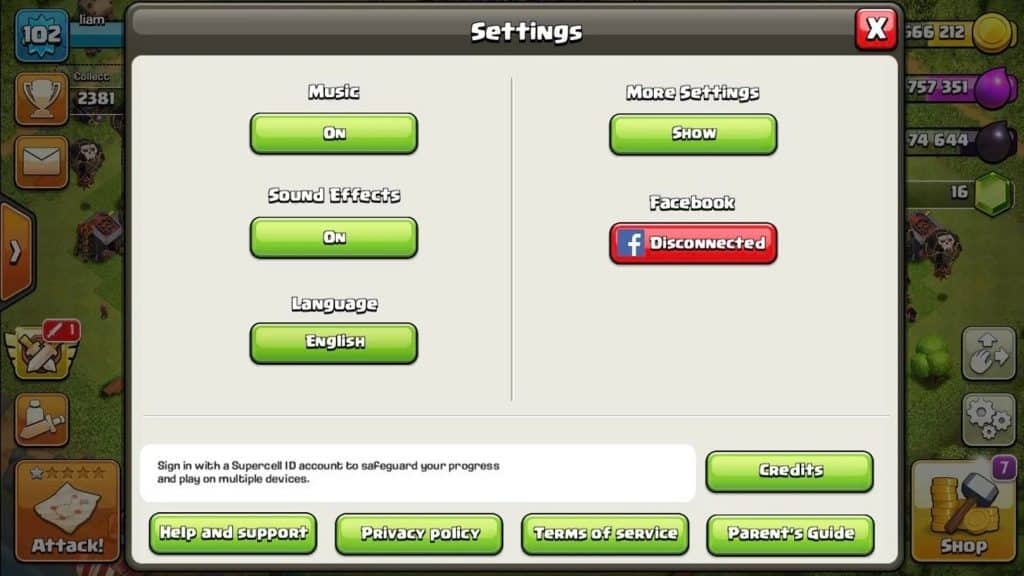
- Access Settings: Tap on the gear icon (⚙️) or access the settings menu.
- Choose The Supercell ID Option: Select the “Supercell ID” option from the menu.
- Follow The Prompts: Follow the in-game prompts to create your Supercell ID. You’ll need to enter an email address and confirm it through a verification email.
- Set up Your Account: Set up your account by choosing a username, avatar, and other preferences.
Creating a Supercell ID For Specific Games
If you want to create a Supercell ID specifically for a game like Hay Day or Clash of Clans, follow these steps:
- For Hay Day: Open the app, tap on the gear icon (⚙️), and select “Settings.” Then, choose the option to create a new Supercell ID.
- For Clash of Clans: Open the app, tap on the gear icon (⚙️), and select “Supercell ID.” Follow the in-game prompts to create your ID.
Benefits of Creating a Supercell ID
Creating a Supercell ID offers several benefits, including:
- Synchronized Game Data: Your progress will be saved across all devices, making it easy to pick up where you left off.
- No More Lost Progress: With a Supercell ID, you’ll never have to worry about losing your progress due to device changes or issues.
- Convenience: Access and play your games from any device, without having to set up multiple accounts.
Tips And Variations
Here are some additional tips and variations for creating a Supercell ID:
- Creating Multiple Ids: If you want to create a second account, follow the same steps as creating the first one.
- Accessing Existing Ids: If you already have a Supercell ID, access it through the game settings menu.
Conclusion
In conclusion, creating a Supercell ID is a simple and essential step for any Supercell gamer. With this guide, you should now be able to create a Supercell ID for your favorite games, synchronize your data, and enjoy seamless gaming across multiple devices.
Frequently Asked Questions (FAQs)
- Q: What is a Supercell Id?
A: A Supercell ID is a free service that allows you to save your game progress in the cloud. - Q: How do I Create a Supercell Id?
A: Open the game, access settings, and follow the prompts to create your ID. - Q: Can I Create Multiple Supercell Ids?
A: Yes, you can create multiple IDs by following the same steps as creating the first one. - Q: How do I Access my Existing Supercell Id?
A: Access it through the game settings menu. - Q: What Benefits Does a Supercell ID Offer?
A: It synchronizes your game data across devices, prevents lost progress, and provides convenience. - Q: Can I Use a Supercell ID on Multiple Devices?
A: Yes, you can access and play your games from any device with a Supercell ID. - Q: Is Creating a Supercell ID Free?
A: Yes, it’s completely free! - Q: How do I Recover my Supercell ID if I Forget my Password or Email Address?
A: Follow the in-game prompts to reset your password and regain access to your account.
Recommended Resources
- Supercell Official Website
- Clash Royale Official Guide
- Brawl Stars Official Guide
I hope this guide has been helpful! If you have any further questions or need assistance with creating a Supercell ID, feel free to ask.


