
Unlocking The Secrets of Zip Files: A Comprehensive Guide
Are you struggling to open ZIP files on your computer or mobile device? Do you find yourself wondering what these mysterious files are all about? Look no further! In this article, we’ll delve into the world of ZIP files and explore the best programs to open them with ease.
What is a Zip File?
A ZIP file is a compressed folder that contains one or more files or subfolders. It’s like a virtual envelope that holds your data, making it easier to store and transfer. ZIP files are widely used in various industries, including technology, business, and education.
The Problem With Zip Files
Unfortunately, not all computers come equipped with the necessary software to open ZIP files. This can lead to frustration and confusion, especially when you need to access important documents or data. But fear not! We’ve got you covered with a list of the best programs to open ZIP files, both free and paid.
Pre-installed Solutions For Windows And Macos
Before we dive into third-party solutions, let’s take a look at the pre-installed options available on Windows and macOS:
Windows Solution: Compressed Folder Handler
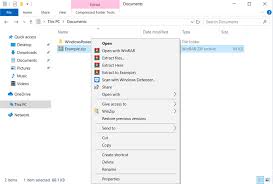
If you’re using Windows 7 or later, you can open ZIP files by simply double-clicking on them. The compressed folder handler will automatically extract the contents of the file.
Macos Solution: Unarchiver
On macOS, you can use the built-in Unarchiver app to open ZIP files. Simply right-click (or control-click) on the ZIP file and select “Open with” > “Unarchiver.”
7-Zip: A Free And Powerful Alternative For Windows
If you’re looking for a more robust solution, 7-Zip is an excellent choice. This free and open-source app supports multiple compression formats, including ZIP, RAR, and 7Z.
To install 7-Zip on your Windows PC:
- Visit the official website and download the installer.
- Follow the prompts to complete the installation process.
- Once installed, you can use 7-Zip to open ZIP files by right-clicking (or control-clicking) on them and selecting “Open with” > “7-Zip.”
Keka: A Free And Open-source Alternative For Macos
If you’re using a Mac, Keka is another excellent option. This free and open-source app supports multiple compression formats, including ZIP.
To install Keka on your Mac:
- Visit the official website and download the .Dmg file.
- Drag the Keka icon to the Applications folder.
- Once installed, you can use Keka to open ZIP files by right-clicking (or control-clicking) on them and selecting “Open with” > “Keka.”
Other Programs to Open Zip Files
If none of the above solutions work for you, there are other programs available that can help:
Winrar: A Powerful Compression Tool
WinRAR is a popular compression tool that supports multiple formats, including ZIP. While it’s not free, it offers a 40-day trial period.
Winzip: A User-friendly Compression Tool
WinZip is another user-friendly compression tool that supports multiple formats, including ZIP. Unfortunately, it’s no longer free, but you can try the 30-day trial version.
Online Solutions For Zip File Extraction
If you’re in a pinch and need to open a ZIP file online, ezyZip is an excellent solution. This web-based service allows you to upload your ZIP file and extract its contents without installing any software.
Conclusion
Opening ZIP files doesn’t have to be a hassle anymore! With these pre-installed solutions on Windows and macOS, or by using third-party apps like 7-Zip and Keka, you can easily access the contents of these compressed folders. Remember, there are also online solutions available if you need to open a ZIP file in a pinch.
Frequently Asked Questions
- What is a Zip File?
A ZIP file is a compressed folder that contains one or more files or subfolders. - How do I Open a Zip File on Windows?
You can use the built-in Compressed Folder Handler or install 7-Zip to open ZIP files. - How do I Open a Zip File on Macos?
You can use the built-in Unarchiver app or install Keka to open ZIP files. - What Other Programs Can I Use to Open Zip Files?
WinRAR, WinZip, and The Unarchiver are some of the other programs available. - Can I Open a Zip File Online?
Yes, ezyZip is an excellent web-based service for opening ZIP files online. - Are There Any Free Solutions For Opening Zip Files?
Yes, 7-Zip (Windows) and Keka (macOS) are both free and powerful alternatives. - What if I’m Using an Older Version of Windows or Macos?
Check the system requirements for each app to ensure compatibility. - Can I Use a Vpn to Open Zip Files Online Securely?
Yes, using a VPN can help protect your data when accessing online services like ezyZip.


