
How to Find Coordinates on Google Maps: A Step-by-step Guide
Are you tired of wondering how to find the coordinates on Google Maps? Look no further! In this article, we will guide you through a step-by-step process on how to locate coordinates on Google Maps using your smartphone, tablet, or computer.
Understanding Coordinates
Before we dive into the process, it’s essential to understand what coordinates are. Coordinates refer to the geographical location of a place, which can be expressed in various formats, such as decimal degrees, degrees, minutes, and seconds (DMS), degrees and small decimal (DMM), or Plus codes.
Finding Coordinates on Google Maps Using Your Smartphone or Tablet
If you’re using an Android device, follow these steps:
- Open The Google Maps App: Access the Google Maps app on your smartphone or tablet.
- Search For a Location: Type the name of the place you want to find coordinates for in the search bar at the top.
- Select The Correct Result: Choose the correct suggestion from the list provided.
- Tap on The Map: Tap on the dot that appears on the map, which represents the location.
- View Coordinates: The coordinates will be displayed in a pop-up window.
If you’re using an iOS device, follow these steps:
- Open The Google Maps App: Access the Google Maps app on your smartphone or tablet.
- Search For a Location: Type the name of the place you want to find coordinates for in the search bar at the top.
- Select The Correct Result: Choose the correct suggestion from the list provided.
- Tap on The Pin: Tap on the blue pin that appears on the map, which represents the location.
- View Coordinates: The coordinates will be displayed in a pop-up window.
Finding Coordinates on Google Maps Using Your Computer
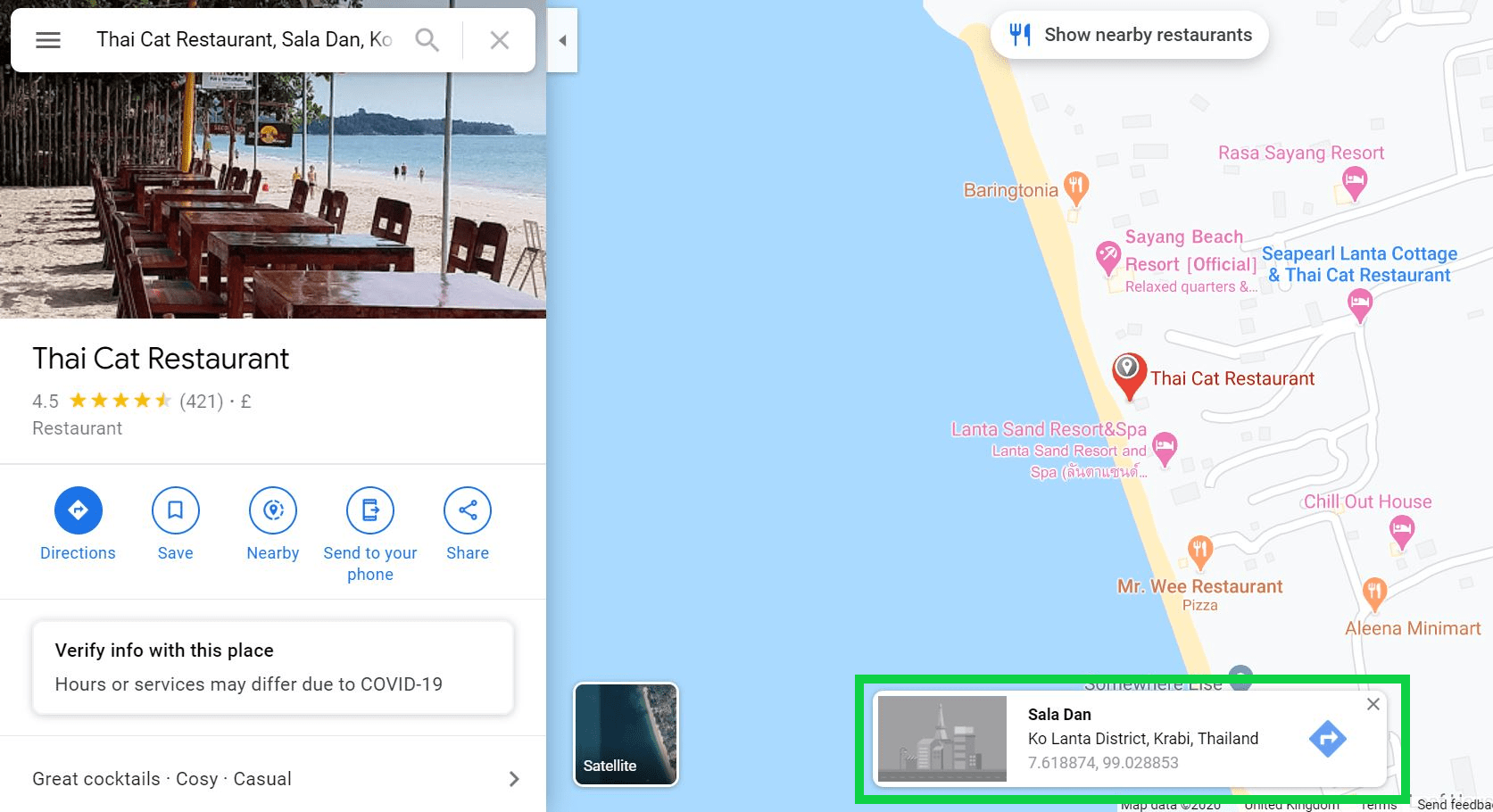
If you’re using a computer, follow these steps:
- Access Google Maps: Open Google Maps on your computer.
- Search For a Location: Type the name of the place you want to find coordinates for in the search bar at the top.
- Select The Correct Result: Choose the correct suggestion from the list provided.
- Right-click on The Map: Right-click on the map, and select “What’s here?” or “Get directions.”
- View Coordinates: The coordinates will be displayed in a pop-up window.
Formatting Coordinates
To ensure that your coordinates are correctly formatted, follow these tips:
- Use decimal degrees in the format 41.40338, 2.17403.
- Avoid using commas instead of dots as separators (e.G., 41,40338, 2,17403).
- Specify the latitude before the longitude.
- Check that the first number of both coordinates is within the correct range (-90 to 90 for latitude and -180 to 180 for longitude).
Plus Codes
Google Maps also supports Plus codes, which are a unique combination of letters and numbers. To use Plus codes, follow these steps:
- Find The Location: Follow the same process as above to find the coordinates.
- Look For The Plus Code: The Plus code will be displayed in a separate section below the coordinates.
Conclusion
Finding coordinates on Google Maps is a straightforward process that can be completed using your smartphone, tablet, or computer. By following these steps and tips, you’ll be able to locate the coordinates of any place and use them for various purposes.
Frequently Asked Questions (FAQs)
- Q: What Are Coordinates?
A: Coordinates refer to the geographical location of a place, which can be expressed in various formats. - Q: How do I Find Coordinates on Google Maps Using my Smartphone or Tablet?
A: Follow the steps outlined above to find coordinates using your Android or iOS device. - Q: Can I Use Plus Codes Instead of Coordinates?
A: Yes, you can use Plus codes, which are a unique combination of letters and numbers. - Q: How do I Format Coordinates Correctly?
A: Follow the tips outlined above to ensure that your coordinates are correctly formatted. - Q: Can I Find Coordinates on Google Maps Using my Computer?
A: Yes, you can use Google Maps on your computer to find coordinates. - Q: What is The Difference Between Decimal Degrees And Dms/dmm?
A: Decimal degrees refers to the format 41.40338, 2.17403, While DMS (degrees, minutes, and seconds) and DMM (degrees and small decimal) are alternative formats for expressing coordinates. - Q: Can I Use Google Maps to Find Coordinates of a Place That is Not Listed?
A: Yes, you can search for the name of the place or its location on the map to find coordinates. - Q: How Accurate Are The Coordinates Provided by Google Maps?
A: The accuracy of coordinates depends on various factors, including the quality of the data and the method used to obtain them.
We hope this article has been helpful in providing you with a comprehensive guide on how to find coordinates on Google Maps using your smartphone, tablet, or computer. If you have any further questions or need more assistance, feel free to ask!


