
How to Unblock Someone on Instagram: A Step-by-step Guide
Are you tired of being blocked by someone on Instagram? Do you want to reconnect with them, but don’t know how? Look no further! In this article, we’ll guide you through the process of unblocking someone on Instagram, using both your smartphone and PC.
Why Can’t I Unblock Someone on Instagram?
Before we dive into the step-by-step guide, it’s essential to understand why sometimes you can’t unblock someone on Instagram. When two users block each other, it can become difficult to find their profile again. This is because neither user can search for the other person using Instagram’s search engine.
Method 1: Unblocking Someone From Your Smartphone or Tablet
To unblock someone from your smartphone or tablet, follow these steps:
Step 1: Access The Instagram App
Initiate the Instagram app on your device. If you haven’t already done so, log in to your account.
Step 2: Search For The Blocked User
Tap on the magnifying glass icon located at the bottom of the screen. In the search bar that appears, type in the name of the user you want to unblock.
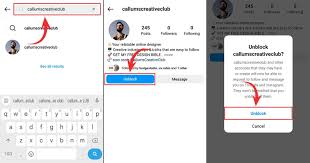
Step 3: Find And Unblock The User
In the list of search results, tap on the name of the user you want to unblock. Then, tap on the “Unblock” button. Confirm your action by tapping on “Unblock” again.
Method 2: Unblocking Someone From Your PC
If you prefer to use your PC to unblock someone, follow these steps:
Step 1: Download And Install Instagram
Download and install the Instagram app for Windows 10 from the Microsoft Store.
Step 2: Log In to Your Account
Launch the Instagram app and log in to your account using your login credentials.
Step 3: Search For The Blocked User
Click on the magnifying glass icon located at the bottom of the screen. In the search bar that appears, type in the name of the user you want to unblock.
Step 4: Find And Unblock The User
In the list of search results, click on the “Unblock” button next to the user’s name. Confirm your action by clicking on “Unblock” again.
Troubleshooting: I Can’t Unblock Someone!
If you’re having trouble unblocking someone using the above methods, don’t worry! You can try an alternative procedure:
Step 1: Go to Your Profile
Go to your profile page and tap or click on the three horizontal lines (☰) in the top right corner.
Step 2: Access Settings
Tap or click on “Settings” and then select “Privacy.”
Step 3: View Blocked Accounts
In the menu that appears, select “Blocked Accounts.” You will see a list of all accounts you have blocked.
Step 4: Unblock The User
Find the user you want to unblock in the list and tap or click on their name. Then, tap or click on the “Unblock” button and confirm your action.
Conclusion
Unblocking someone on Instagram is a straightforward process that can be completed using either your smartphone or PC. By following the steps outlined above, you should be able to reconnect with the person who blocked you. Remember to troubleshoot any issues that may arise by trying an alternative procedure.
Frequently Asked Questions (FAQs)
- Why Was I Blocked on Instagram?
Instagram blocks users for a variety of reasons, including spamming, harassment, or violating community guidelines.
- How do I Unblock Someone on Instagram From my Pc?
To unblock someone on Instagram from your PC, follow the steps outlined in Method 2: Unblocking Someone from Your PC.
- What if I’m Still Having Trouble Unblocking Someone?
If you’re still having trouble unblocking someone, try the alternative procedure outlined in Troubleshooting: I Can’t Unblock Someone!
- Can I Unblock Someone Who Blocked me in Retaliation?
Yes, you can unblock someone even if they blocked you in retaliation.
- How do I Avoid Getting Blocked on Instagram Again?
To avoid getting blocked on Instagram again, be sure to follow the platform’s community guidelines and respect other users’ boundaries.


