
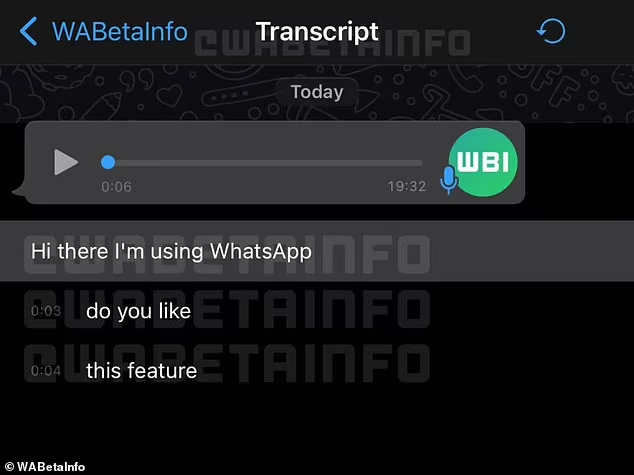
How to Transcribe Audio Messages on Whatsapp
Are you tired of listening to long audio messages on WhatsApp? Do you wish you could read them instead? Well, you’re in luck! There are several solutions available that can help you transcribe audio messages on WhatsApp. In this article, we’ll explore the different options and provide step-by-step guides on how to use them.
What Are Your Options?
There are three main options to consider when it comes to transcribing audio messages on WhatsApp:
- Transcriber For Whatsapp: This is a free app available on the Play Store that can transcribe audio messages in real-time.
- Audio to Text For Whatsapp: This is another app available on the App Store that can transcribe audio messages with high accuracy.
- Microsoft Word’s Transcription Feature: This feature allows you to transcribe audio files, including those from WhatsApp, using Microsoft Word.
Option 1: Transcriber For Whatsapp
The first option we’ll explore is the Transcriber for WhatsApp app. This app is available on both Android and iOS devices and can transcribe audio messages in real-time.
How to Use Transcriber For Whatsapp
To use this app, follow these steps:
- Download and install the Transcriber for WhatsApp app from the Play Store or App Store.
- Open WhatsApp and select the chat containing the audio message you want to transcribe.
- Tap on the audio message to open it in the app.
- Select the “Transcribe” option and wait for the app to complete the transcription.
Option 2: Audio to Text For Whatsapp
The second option we’ll explore is the Audio to Text for WhatsApp app. This app is available only on iOS devices and can transcribe audio messages with high accuracy.
How to Use Audio to Text For Whatsapp
To use this app, follow these steps:
- Download and install the Audio to Text for WhatsApp app from the App Store.
- Open WhatsApp and select the chat containing the audio message you want to transcribe.
- Tap on the audio message to open it in the app.
- Select the “Transcribe” option and wait for the app to complete the transcription.
Option 3: Microsoft Word’s Transcription Feature
The third option we’ll explore is Microsoft Word’s transcription feature. This feature allows you to transcribe audio files, including those from WhatsApp, using Microsoft Word.
How to Use Microsoft Word’s Transcription Feature
To use this feature, follow these steps:
- Download and install Microsoft Word on your computer.
- Open Microsoft Word and select the “Transcribe” option in the ribbon.
- Select the audio file you want to transcribe (e.G., An MP4 or MP3 file from WhatsApp).
- Wait for Microsoft Word to complete the transcription.
Conclusion
Transcribing audio messages on WhatsApp can be a lifesaver if you have difficulty listening to long messages. With these three options available, you can choose the one that best suits your needs. Whether you prefer a free app like Transcriber for WhatsApp or a paid feature like Microsoft Word’s transcription feature, there’s an option for everyone.
Frequently Asked Questions (FAQs)
Here are some frequently asked questions about transcribing audio messages on WhatsApp:
Q: What is The Accuracy of These Apps?
A: The accuracy of these apps can vary depending on the quality of the audio message and the app used. However, they have been reported to be quite accurate.
Q: Can I Use These Apps For Other Purposes Besides Transcribing Whatsapp Messages?
A: Yes, you can use these apps for other purposes such as transcribing podcasts or voice notes.
Q: Do These Apps Require Internet Connectivity to Work?
A: Some of these apps may require internet connectivity to work. However, they can also function offline in some cases.
Q: Are There Any Fees Associated With Using These Apps?
A: Some of these apps are free while others may charge a fee for their services.
Q: Can I Use These Apps on my Computer?
A: Yes, some of these apps can be used on computers.
Q: How Long Does it Take to Transcribe an Audio Message?
A: The time it takes to transcribe an audio message depends on the length and quality of the message. However, most of these apps can complete a transcription in a matter of seconds or minutes.
Additional Tips
Here are some additional tips for using these apps:
- Make sure you have a stable internet connection when using these apps.
- Use high-quality audio files to ensure accurate transcriptions.
- Experiment with different apps and features to find what works best for you.


