
Understanding Who Blocked You on Facebook: A Step-by-step Guide
Are you wondering who might have blocked you on Facebook? Do you feel frustrated and curious about what’s going on behind the scenes? Well, you’re not alone! Many people experience this problem, and it can be quite puzzling. In this article, we’ll take a closer look at why someone might block you on Facebook and provide some practical tips to help you figure out who’s responsible.
What Happens When Someone Blocks You on Facebook
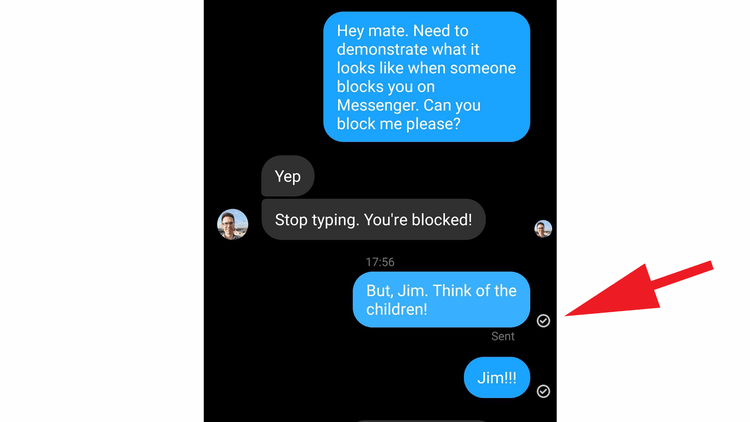
When someone blocks you on Facebook, they’re essentially cutting off all contact between the two of you. This means that:
- They won’t be able to see your posts or updates in their newsfeed.
- You won’t be able to see theirs either.
- If you try to search for them or send a message, it will say they’re not available.
Why Would Someone Block Me on Facebook?
There could be many reasons why someone might block you on Facebook. Here are some possible explanations:
- Disagreements: You had an argument or disagreement, and the other person decided to distance themselves from you.
- Unwanted Messages: They were getting annoyed with your constant messaging or comments.
- Personal Reasons: Something personal happened in their life that made them want to take a break from social media.
So, How Do I Figure Out Who Blocked Me on Facebook?
Here are some steps you can follow:
Controlling The List of Friends
The first thing you should do is check your list of friends on Facebook. If someone has blocked you, they won’t be visible to you anymore. To check this:
- Log in to your Facebook account.
- Click on the “Friends” tab.
- Look for the person’s name that you suspect might have blocked you.
Checking Your Messages
Another thing you can try is checking your messages or chat history with the person. If they’ve blocked you, you won’t be able to see their messages or send new ones. To check this:
- Open Messenger.
- Look for the conversation with the person in question.
Using Facebook’s Built-in Tools
Facebook has some built-in tools that can help you figure out who blocked you. Here are a few things you can try:
- Tagging: If someone has been tagging you in posts or comments, but now they’re not visible to you anymore, it could be a sign that they’ve blocked you.
- Post-activity: Check if the person’s post activity (e.G., Likes, shares) has changed since they last interacted with you.
How Do I Unblock Someone on Facebook?
If you accidentally blocked someone or want to remove a block, here are some steps you can follow:
- Facebook’s Help Center: Go to Facebook’s help center for instructions on how to unblock someone.
- Private Message: Send them a private message explaining that you didn’t mean to block them.
Why Can’t I Find My Friend on Facebook?
If your friend is not visible on your friends list, it could be due to various reasons:
- Their Profile Might Have Been Deleted or Deactivated.
- They Might Have Blocked You.
What Are Some Other Ways to Contact Someone Who Blocked Me on Facebook?
If you need to contact someone who blocked you on Facebook, here are some alternative ways to reach them:
- Other Social Media Platforms: Try contacting them through other social media platforms like Twitter or Instagram.
- Email or Phone Calls: If they’ve blocked you on all social media, try reaching out via email or a phone call.
Conclusion
Figuring out who blocked you on Facebook can be frustrating and puzzling. By following the steps outlined above, you should be able to determine if someone has indeed blocked you. Remember that sometimes, people block us for reasons beyond our control, and it’s essential to respect their boundaries.
Faqs
- Can I Still Send Messages or Comments if Someone Blocks me on Facebook?
- No, when someone blocks you, they won’t receive any notifications from you.
- How Can I Tell if Someone Blocked me on Facebook?
- You won’t be able to see their posts or updates in your newsfeed, and you won’t be able to search for them.
- Can I Unblock Someone on Facebook?
- Yes, you can remove a block by going to Facebook’s help center or contacting the person directly via private message.
- What Should I do if my Friend Blocked me on Facebook?
- Try asking another friend in common to check their friends list, and also reach out to your friend through other social media platforms or email/phone calls.
- Why Would Someone Block me on Facebook?
- There could be various reasons like disagreements, unwanted messages, or personal reasons.
Hope this helps you navigate the world of Facebook blocking!


