
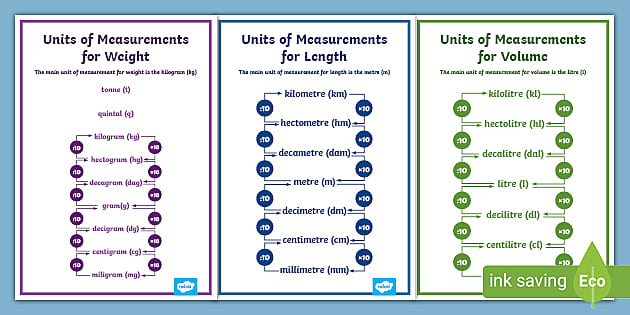
Converting Units of Measure: A Guide
In today’s world, where measurements are a crucial part of our daily lives, converting units of measure has become an essential skill. Whether you’re a student, a professional, or simply someone who likes to keep track of their home improvement projects, knowing how to convert units of measure can save you time and frustration.
But with so many different units of measurement out there (imperial vs. Metric, inches vs. Centimeters, pounds vs. Kilograms…), It’s easy to get overwhelmed. That’s where this guide comes in – we’ll walk you through the best online tools, apps, and software programs to help you convert units of measure like a pro.
Why Convert Units of Measure?
Before we dive into the nitty-gritty of conversion tools, let’s quickly discuss why converting units of measure is important. Here are just a few reasons:
- Accuracy: When working with measurements, accuracy is key. Converting units of measure ensures that your calculations and conversions are precise.
- Communication: In today’s globalized world, being able to communicate effectively across different measurement systems is essential for both personal and professional projects.
- Convenience: With the rise of online tools and apps, converting units of measure has become a breeze. No more tedious manual calculations or relying on unreliable conversion charts!
Best Online Tools
So, where do you start? Here are some top-notch online tools to help you convert units of measure:
- Google Converter: Ah, Google! Who doesn’t love the world’s most popular search engine? Their converter tool is free, easy-to-use, and accurate.
- All The Units: This simple yet effective web service allows you to convert between various units of measurement, including length, weight, temperature, and more.
- Convert World: Another great online resource, Convert World offers a range of conversion tools for different types of measurements.
Mobile Apps
Now that we’ve covered online tools, let’s talk about mobile apps! Here are some fantastic options to convert units of measure on-the-go:
- Unit Converter (Android): A user-friendly app for Android devices that converts various units of measurement.
- Digit Grove (Android): Another great app for Android users, Digit Grove offers a wide range of conversion tools and features a clean interface.
- Unitfy (iOS/iPadOS): Perfect for iPhone and iPad users, Unitfy is an intuitive app that converts various units of measurement with ease.
Software Programs
Finally, let’s not forget about software programs! Here are some excellent options to convert units of measure on your computer:
- Calculator (Windows): The built-in calculator in Windows operating systems has a conversion feature that allows you to change units of measurement.
- Calculator (macOS): Similarly, the macOS calculator also features a conversion tool for different units of measurement.
Conclusion
Converting units of measure is no longer a daunting task, thanks to these fantastic online tools, mobile apps, and software programs. Whether you’re working on a project or simply want to be more accurate in your daily life, knowing how to convert units of measure can make all the difference.
Frequently Asked Questions (FAQs)
Here are some additional questions and answers to help you better understand converting units of measurement:
Q: What is The Difference Between Imperial And Metric Units of Measurement?
A: Imperial units (e.G., Inches, pounds) were commonly used in the United States and other English-speaking countries. Metric units (e.G., Centimeters, kilograms), on the other hand, are widely used globally.
Q: Why Should I Convert Units of Measure When Working With Measurements?
A: Converting units of measurement ensures accuracy, facilitates communication across different systems, and saves time by avoiding tedious manual calculations or relying on unreliable conversion charts.
Q: What Are Some Common Mistakes to Avoid When Converting Units of Measure?
A: Be careful not to mix up units of measurement (e.G., Mixing inches with centimeters) or overlook decimal points. Always double-check your conversions for accuracy.
Q: Are There Any Specific Software Programs or Apps That I Can Use For Unit Conversion?
A: Yes, many online tools, mobile apps, and software programs are available to help you convert units of measurement. Some popular options include Google Converter, All The Units, Convert World, Unit Converter (Android), Digit Grove (Android), and more!
Q: Can I Convert Units of Measure on my Phone or Tablet?
A: Yes, many mobile apps are designed specifically for unit conversion on-the-go.
Q: Do I Need to be an Expert in Computer Science or New Technologies to Use These Tools And Apps?
A: No! These online tools, mobile apps, and software programs are user-friendly and easy to navigate, even for those who aren’t experts in computer science or new technologies.


