
Creating a Playlist on Android: A Step-by-step Guide
Are you tired of listening to music on your Android device without creating a playlist? Do you want to organize your favorite songs in one place? Look no further! In this article, we will guide you through the process of creating a playlist on your Android device using various services like YouTube, Spotify, Amazon Music, Apple Music, and TikTok.
Why Create a Playlist?
Creating a playlist allows you to curate your favorite songs in one place, making it easy to access and listen to them whenever you want. It’s also a great way to discover new music and explore different genres and artists. Whether you’re working out, relaxing, or commuting, having a playlist can enhance your listening experience.
Service-based Playlist Creation
Most of the popular music streaming services offer built-in playlist creation features. Let’s take a look at how to create playlists on some of these services:
Youtube Playlist Creation
To create a YouTube playlist, follow these steps:
- Open the YouTube app on your Android device.
- Search for the first song you want to add to your playlist by tapping on the magnifying glass icon in the top-right corner and typing in the artist or song name.
- Tap on the video of the song to open it.
- While the video is playing, tap and hold on the “Save” button at the bottom of the screen.
- Select “Save in a playlist” from the menu that appears.
- Choose an existing playlist or create a new one by tapping on the “New” option.
Spotify Playlist Creation
To create a Spotify playlist, follow these steps:
- Open the Spotify app on your Android device.
- Tap on the “Search” icon at the bottom of the screen to search for the first song you want to add.
- Select the song and tap on the three dots next to it.
- Choose “Add to a playlist” from the menu that appears.
- Select an existing playlist or create a new one by tapping on the “New” option.
Amazon Music Playlist Creation
To create an Amazon Music playlist, follow these steps:
- Open the Amazon Music app on your Android device.
- Tap on the magnifying glass icon at the bottom of the screen to search for the first song you want to add.
- Select the song and tap on the three dots next to it.
- Choose “Add to a playlist” from the menu that appears.
- Select an existing playlist or create a new one by tapping on the “New” option.
Apple Music Playlist Creation
To create an Apple Music playlist, follow these steps:
- Open the Apple Music app on your Android device (note: Apple Music is not available on Android devices natively).
- Tap on the magnifying glass icon at the top-right corner to search for the first song you want to add.
- Select the song and tap on the three dots next to it.
- Choose “Add to a playlist” from the menu that appears.
- Select an existing playlist or create a new one by tapping on the “New” option.
Tiktok Playlist Creation
To create a TikTok playlist, follow these steps:
- Open the TikTok app on your Android device.
- Tap on the Profile icon at the bottom-right corner to access your profile.
- Select the video you want to add to your playlist by tapping on it.
- Choose “Add to playlist” from the menu that appears.
- Select an existing playlist or create a new one by tapping on the “New” option.
Creating a Playlist Without a Service
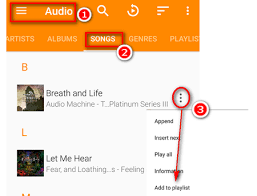
If you don’t have any music streaming services installed on your device, you can use a third-party app like Music Player – MP3 (Reader Musical) to create a playlist without a service. Here’s how:
- Download and install the Music Player – MP3 app from the Google Play Store.
- Open the app and select the Italian language option.
- Tap on the “Done” button at the top-right corner to access the main menu.
- Select the “Songs” tab and choose the songs you want to add to your playlist.
- Tap on the three dots next to each song to select it.
- Choose “Add to” from the menu that appears and select a new playlist or create one by tapping on the “Create” option.
Conclusion
Creating a playlist on Android is easier than ever, thanks to the various music streaming services available. Whether you’re using YouTube, Spotify, Amazon Music, Apple Music, or TikTok, the process is relatively straightforward. If you don’t have any music streaming services installed, you can use a third-party app like Music Player – MP3 to create a playlist without a service.
Faqs
- What Are Some Popular Music Streaming Services?
- Some of the most popular music streaming services include YouTube, Spotify, Amazon Music, Apple Music, and TikTok.
- How do I Create a Playlist on Youtube?
- To create a playlist on YouTube, follow the steps outlined above in the section on YouTube playlist creation.
- Can I Create a Playlist Without Using a Service?
- Yes, you can use a third-party app like Music Player – MP3 to create a playlist without a service.
- How do I Add Songs to my Playlist?
- To add songs to your playlist, follow the steps outlined above in the sections on each music streaming service or using the Music Player – MP3 app.
- Can I Make my Playlist Public?
- Yes, you can make your playlist public by selecting the “Public” option when creating a new playlist.
- How do I Edit my Playlist?
- To edit your playlist, select the playlist and tap on the three dots next to it to access the menu options.
- Can I Delete Songs From my Playlist?
- Yes, you can delete songs from your playlist by selecting the song and tapping on the trash icon next to it.
- How do I Share my Playlist With Others?
- To share your playlist with others, select the playlist and tap on the “Share” option.


