
How to Clean Your Airpods: A Step-by-step Guide
Are you tired of dealing with dirty AirPods? Do you want to keep your wireless earbuds in top condition? Look no further! In this article, we’ll show you how to clean your AirPods like a pro.
Understanding The Importance of Cleaning Your Airpods
Before we dive into the cleaning process, let’s talk about why it’s essential to keep your AirPods clean. Over time, dirt, grime, and sweat can accumulate on the earbuds, affecting their sound quality and overall performance. If you don’t clean them regularly, you may experience:
- Reduced audio fidelity
- Increased risk of damage from moisture
- Unpleasant odors
The Best Products to Clean Your Airpods
To clean your AirPods effectively, you’ll need the right products. Here are some recommended options:
- Microfiber Cloths: These are gentle on the earbuds and can be used with or without water.
- Soft-bristled Brush: This is ideal for cleaning the Lightning connector and other small crevices.
- Alcohol Wipes: Specifically designed for electronics, these wipes can help remove dirt and grime without damaging the materials.
- Clorox Disinfecting Wipes: These are effective against bacteria and viruses, but be sure to follow the manufacturer’s instructions.
Step 1: Prepare Your Airpods
Before cleaning your AirPods, make sure they’re turned off and the case is closed. If you have any stubborn stains or spills, you can lightly dampen a microfiber cloth with water or alcohol and gently wipe them away.
Step 2: Clean The Outer Case
Use a soft-bristled brush to gently sweep away any dust or debris from the outer case. Then, using a microfiber cloth, wipe down the entire surface, paying extra attention to the areas around the Lightning connector.
Step 3: Clean The Earbuds And Charging Case
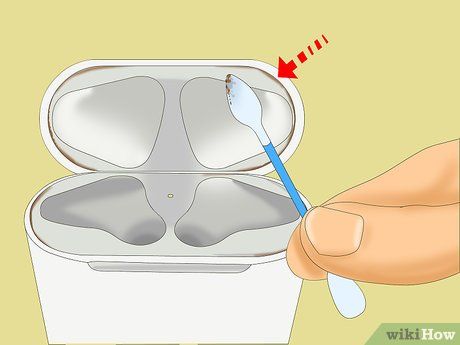
Open the charging case and remove the earbuds. Use a soft-bristled brush to gently sweep away any dust or debris from the earbuds and charging case. Then, using a microfiber cloth, wipe down both the earbuds and charging case.
Step 4: Clean The Lightning Connector
Use a soft-bristled brush to clean the Lightning connector on the earbuds and charging case. If you have any stubborn stains or spills, you can lightly dampen a microfiber cloth with water or alcohol and gently wipe them away.
How to Clean Inner Custody Airpods
If you want to deep-clean your AirPods, including the inner custody, follow these steps:
- Open the charging case.
- Remove the earbuds.
- Use a soft-bristled brush to clean the inner custody and the metallic contacts.
- Wipe down the entire area with a microfiber cloth.
How to Clean Airpod Covers
If your AirPods have covers, follow these steps:
- Check the material of the cover (e.G., Silicone, plastic, or skin).
- Use a soft-bristled brush to gently sweep away any dust or debris from the cover.
- For silicone covers, use a mixture of water and soap to clean them.
- For plastic covers, use a gentle cleaning product specifically designed for electronics.
Tips And Precautions
Remember to:
- Avoid using harsh chemicals or abrasive materials that can damage your AirPods.
- Never submerge your AirPods in water or other liquids.
- Clean your AirPods regularly to prevent dirt and grime buildup.
- Use a soft-bristled brush to clean the Lightning connector and other small crevices.
Conclusion
Cleaning your AirPods is an essential part of maintaining their performance and longevity. By following these steps and using the right products, you can keep your wireless earbuds in top condition. Remember to clean them regularly, avoid harsh chemicals, and never submerge them in water or other liquids.
Recommended Products
- Microfiber cloths: [Amazon link]
- Soft-bristled brush: [Amazon link]
- Alcohol wipes: [Amazon link]
- Clorox disinfecting wipes: [Amazon link]


