
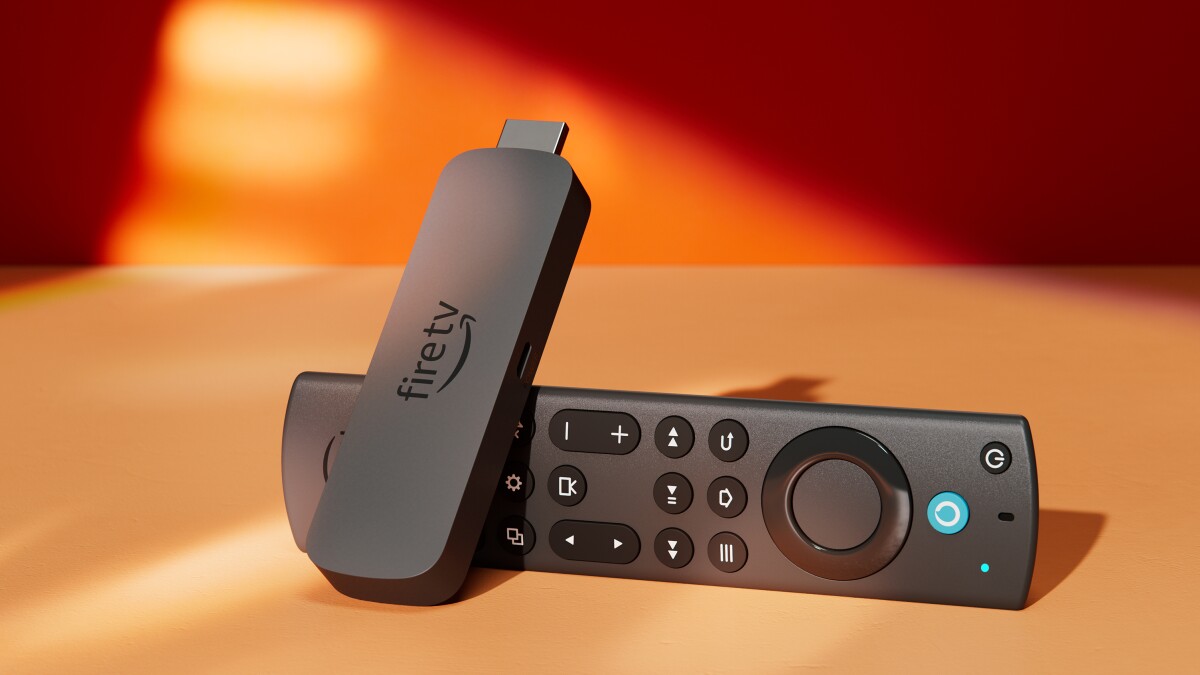
What is Amazon Fire TV Stick?
Amazon Fire TV Stick is a streaming media player that allows users to access a vast range of online contents, including video, music, and applications, directly from their television. It’s a compact device that connects to the HDMI port of a TV and uses Wi-Fi connectivity to stream content.
How Does Amazon Fire TV Stick Work?
The Amazon Fire TV Stick is a dongle-like device that plugs into the HDMI port of a TV. It has a quad-core processor, dual-band Wi-Fi, Bluetooth, and supports 4K resolution with HDR. The device comes with a remote control that features Alexa voice assistant, allowing users to search for content, play games, and more using voice commands.
What Are The Features of Amazon Fire TV Stick?
Some of the key features of Amazon Fire TV Stick include:
- Access to Amazon Prime Video, Netflix, YouTube, and other streaming services
- Support for 4K resolution with HDR
- Dual-band Wi-Fi connectivity
- Bluetooth connectivity
- Quad-core processor
- Alexa voice assistant remote control
How Do I Install And Configure Amazon Fire TV Stick?
To install and configure Amazon Fire TV Stick, follow these steps:
- Connect the device to the HDMI port of a TV.
- Insert batteries into the remote control.
- Follow the on-screen instructions to connect to Wi-Fi and set up the device.
How Do I Use Amazon Prime Video on Amazon Fire TV Stick?
To use Amazon Prime Video on Amazon Fire TV Stick, follow these steps:
- Access the Amazon Prime Video app from the home screen.
- Log in with your Amazon account credentials.
- Browse or search for content to play.
How Do I Install Apps on Amazon Fire TV Stick?
To install apps on Amazon Fire TV Stick, follow these steps:
- Access the Amazon Appstore from the home screen.
- Search for and select an app to download.
- Wait for the installation process to complete.
How Do I Mirror My Smartphone or Tablet on Amazon Fire TV Stick?
To mirror your smartphone or tablet on Amazon Fire TV Stick, follow these steps:
- Ensure that both devices are connected to the same Wi-Fi network.
- Open the Settings app on Amazon Fire TV Stick and enable screen mirroring.
- Open the screen mirroring app on your smartphone or tablet and select Amazon Fire TV Stick as the device.
How Do I Configure Amazon Fire TV Stick?
To configure Amazon Fire TV Stick, follow these steps:
- Access the Settings menu from the home screen.
- Select the option to change Wi-Fi settings or other configuration options.
What Are Some Tips For Using Amazon Fire TV Stick?
Some tips for using Amazon Fire TV Stick include:
- Use the Alexa voice assistant remote control to search for content, play games, and more.
- Take advantage of 4K resolution with HDR for a high-quality viewing experience.
- Access thousands of apps from the Amazon Appstore.
- Mirror your smartphone or tablet on Amazon Fire TV Stick for an immersive viewing experience.
Conclusion
Amazon Fire TV Stick is a versatile streaming media player that offers users access to a vast range of online contents, including video, music, and applications. With its compact design, quad-core processor, and Alexa voice assistant remote control, it’s easy to use and navigate. By following these steps and tips, users can get the most out of their Amazon Fire TV Stick experience.
Frequently Asked Questions
Q: What is The Difference Between Amazon Fire TV Stick And Amazon Fire Tv?
A: Amazon Fire TV Stick is a streaming media player that connects to a TV’s HDMI port, while Amazon Fire TV is a standalone device that can be used as a dedicated streaming box.
Q: Can I Use Amazon Fire TV Stick With Any Tv?
A: Yes, Amazon Fire TV Stick can be used with any HDTV or 4K TV that has an HDMI port.
Q: How do I Update my Amazon Fire TV Stick Software?
A: To update your Amazon Fire TV Stick software, go to the Settings menu and select the option to check for updates.
Q: Can I Use Multiple Devices With Amazon Fire TV Stick?
A: Yes, you can use multiple devices with Amazon Fire TV Stick by following the steps outlined in our guide on how to mirror a smartphone or tablet on Amazon Fire TV Stick.
Q: Is Amazon Fire TV Stick Compatible With Other Streaming Services?
A: Yes, Amazon Fire TV Stick is compatible with other streaming services such as Netflix, YouTube, and Hulu.
Q: Can I Use Alexa Voice Assistant With my Amazon Fire TV Stick?
A: Yes, you can use Alexa voice assistant with your Amazon Fire TV Stick by following the steps outlined in our guide on how to use Alexa with Amazon Fire TV Stick.


