
How to Clean Your Printer Nozzles: A Step-by-step Guide
Are you tired of dealing with poor print quality, clogged nozzles, and frustrating printer issues? Cleaning your printer nozzles is a simple yet effective solution that can help improve the overall performance of your printing device. In this article, we will guide you through the process of cleaning your printer nozzles, providing step-by-step instructions for various types of printers.
Why Clean Your Printer Nozzles?
Before we dive into the nitty-gritty details, let’s discuss why cleaning your printer nozzles is essential. Over time, tiny particles and dust can accumulate inside your printer, causing problems like:
- Poor print quality
- Clogged nozzles
- Frustrating printer issues
Cleaning your printer nozzles helps to remove these impurities, ensuring that your prints come out crisp and clear.
How to Clean Your Printer Nozzles: A Step-by-step Guide
General Instructions
Before we begin, it’s essential to note that the steps below may vary depending on your printer model. Always consult your user manual or manufacturer’s website for specific instructions.
- Turn Off Your Printer: Make sure your printer is turned off and unplugged from the power source.
- Locate The Printer Nozzles: Find the printer nozzles, which are usually located at the back of the printer or on top of the printer head.
- Clean The Nozzles: Use a soft brush or cloth to gently remove any debris or dust from the nozzles.
Cleaning Printer Nozzles: Step-by-step Instructions For Specific Printers
Epson Printer Nozzles
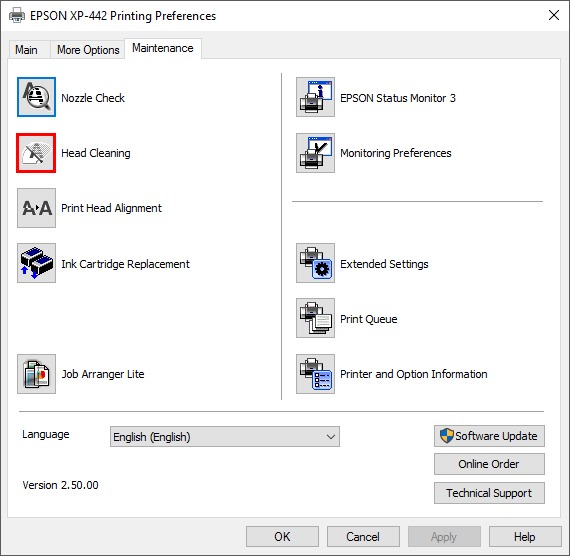
To clean your Epson printer nozzles, follow these steps:
- Open the printer settings and go to the “Maintenance” section.
- Select the option to clean the print head.
- The printer will automatically perform a cleaning cycle.
Alternatively, you can use a soft brush or cloth to manually clean the nozzles.
HP Printer Nozzles
To clean your HP printer nozzles, follow these steps:
- Download and install the HP Smart app on your smartphone or tablet.
- Open the app and select the printer model.
- Go to the “Settings” section and select “Ink System Quality.”
- Choose the option to clean the print head.
Epson Printer Nozzles (Mobile)
To clean your Epson printer nozzles using a mobile device, follow these steps:
- Download and install the iPrint app on your smartphone or tablet.
- Open the app and select the printer model.
- Go to the “Utility” section and select “Clean Print Head.”
HP Printer Nozzles (Mobile)
To clean your HP printer nozzles using a mobile device, follow these steps:
- Download and install the HP Smart app on your smartphone or tablet.
- Open the app and select the printer model.
- Go to the “Settings” section and select “Ink System Quality.”
- Choose the option to clean the print head.
Tips And Precautions
- Always refer to your user manual or manufacturer’s website for specific instructions on cleaning your printer nozzles.
- Use a soft brush or cloth to avoid damaging the nozzles.
- Avoid using harsh chemicals or abrasive materials that can damage the printer.
- Clean your printer regularly to prevent clogged nozzles and poor print quality.
Conclusion
Cleaning your printer nozzles is a simple yet effective way to improve the overall performance of your printing device. By following the step-by-step instructions outlined in this article, you can ensure that your prints come out crisp and clear. Remember to always refer to your user manual or manufacturer’s website for specific instructions on cleaning your printer nozzles.
Frequently Asked Questions
- Q: How Often Should I Clean my Printer Nozzles?
A: Clean your printer nozzles every 3-6 months, or as recommended by the manufacturer. - Q: What Happens if I Don’t Clean my Printer Nozzles?
A: Failing to clean your printer nozzles can lead to poor print quality, clogged nozzles, and frustrating printer issues. - Q: Can I Use a Different Cleaning Method?
A: While other cleaning methods may work, it’s essential to follow the manufacturer’s recommended procedure for cleaning your printer nozzles. - Q: Will Cleaning my Printer Nozzles Void my Warranty?
A: Check your user manual or contact the manufacturer to determine if cleaning your printer nozzles will affect your warranty. - Q: Can I Clean my Printer Nozzles Myself, or do I Need Professional Help?
A: In most cases, you can clean your printer nozzles yourself by following the step-by-step instructions provided in this article. - Q: How Long Does it Take to Clean my Printer Nozzles?
A: Cleaning your printer nozzles typically takes a few minutes, depending on the method and complexity of the procedure. - Q: What Are Some Common Mistakes to Avoid When Cleaning my Printer Nozzles?
A: Avoid using harsh chemicals or abrasive materials that can damage the printer. Also, be gentle when handling the nozzles to prevent breakage. - Q: Can I Use a Different Type of Cloth or Brush to Clean my Printer Nozzles?
A: While other cleaning methods may work, it’s essential to use a soft brush or cloth specifically designed for cleaning printer nozzles.


