
How to Get Amazon Prime Free Without a Credit Card
Are you interested in enjoying the benefits of Amazon Prime, but don’t have a credit card? You’re not alone! Many people want to take advantage of free shipping, music streaming, and other perks offered by Amazon, but may not have a valid payment method. Fortunately, there are alternative solutions that can help you get Amazon Prime for free without a credit card.
What is Amazon Prime?
Amazon Prime is a subscription service offered by Amazon that provides members with a range of benefits, including:
- Free shipping on millions of eligible items
- Music streaming through Amazon Music
- Video streaming through Prime Video
- Access to ad-free listening and additional features through Prime Music
- Early access to deals and discounts
- Photo storage through Amazon Drive
Methods to Get Amazon Prime Free Without a Credit Card
There are several methods to get Amazon Prime free without a credit card:
1. Take Advantage of The Free Trial Period
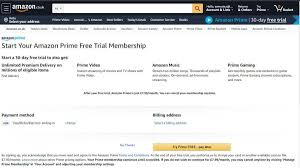
If you’re new to Amazon, you can sign up for a free trial period of 30 days, which gives you access to all the benefits of Amazon Prime. This is a great way to try out the service and see if it’s right for you.
2. Use a Promotional Code
Amazon occasionally offers promotional codes that give users a free month or year of Amazon Prime. Keep an eye on your email inbox and social media feeds for these opportunities.
3. Sign Up With a University Student Account
If you’re a university student, you can sign up for a special Amazon Prime student account, which gives you access to free shipping and other benefits for free.
4. Use a Gift Card or Promotional Code on Amazon
You can use a gift card or promotional code that’s been purchased by someone else to sign up for an Amazon Prime subscription. This is a great way to try out the service without using your own credit card.
5. Sign Up With a Phone Company
Some phone companies offer Amazon Prime as part of their plans, which can give you access to free shipping and other benefits for free.
How to Sign Up For Amazon Prime Free Without a Credit Card
Signing up for Amazon Prime free without a credit card is relatively easy. Here’s how:
For Computer Users
- Go to the Amazon website on your computer.
- Click on “Sign In” and enter your login credentials.
- Click on the Prime voice in the menu bar.
- Click on the button that says “Enroll now, 30 days free.”
- Follow the instructions to complete your sign-up process.
For Smartphone And Tablet Users
- Open the Amazon app on your device.
- Tap on the icon of the Amazon app.
- Sign in with your login credentials.
- Tap on the Prime voice in the menu bar.
- Follow the instructions to complete your sign-up process.
How to Cancel Your Amazon Prime Subscription
If you’ve signed up for Amazon Prime and want to cancel, follow these steps:
For Computer Users
- Go to the Amazon website.
- Sign in with your login credentials.
- Click on “Account & Lists” and then click on “Prime Registration.”
- Click on the button that says “Update, erase, and another.”
- Confirm your cancellation.
For Smartphone And Tablet Users
- Open the Amazon app on your device.
- Tap on the icon of the Amazon app.
- Sign in with your login credentials.
- Tap on the Prime voice in the menu bar.
- Follow the instructions to complete your cancellation process.
Conclusion
Getting Amazon Prime free without a credit card is possible through various alternative solutions, including taking advantage of a free trial period, using promotional codes, and signing up with a university student account or phone company. By following these steps, you can enjoy all the benefits of Amazon Prime without breaking the bank.
Frequently Asked Questions
Q: How long does the free trial period last?
A: The free trial period lasts for 30 days, after which you’ll need to cancel your subscription if you don’t want to continue with Amazon Prime.
Q: Can I use a promotional code on my phone or tablet?
A: Yes, you can use a promotional code on your phone or tablet by accessing the Amazon app and following the instructions.
Q: How do I sign up for an Amazon Prime student account?
A: To sign up for an Amazon Prime student account, go to the Amazon website, click on “Student” and follow the instructions to complete your registration process.
Q: Can I cancel my Amazon Prime subscription online?
A: Yes, you can cancel your Amazon Prime subscription online by accessing the Amazon website and following the instructions outlined above.
Q: How do I get a refund for an unused Amazon Prime gift card?
A: If you have an unused Amazon Prime gift card, contact Amazon customer service to request a refund.


