
Unlocking The Full Potential of Your Amazfit Device: A Guide to Official And Third-party Apps
Are you ready to take your fitness journey to the next level with your Amazfit device? In this article, we will explore the official app for Amazfit, as well as other apps that can help you get the most out of your wearable.
The Official App: A Must-have For Amazfit Users
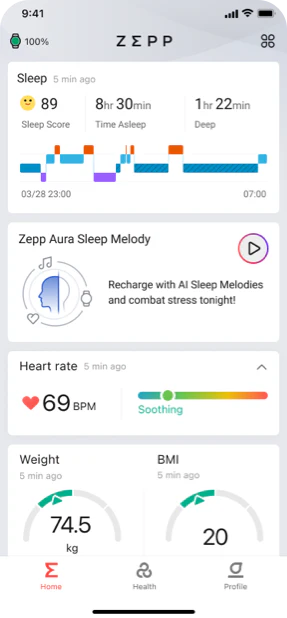
When you first pair your Amazfit smartband or smartwatch with your smartphone, you’ll need to download and install the official Zepp app. This app is a must-have for Amazfit users, as it allows you to connect your device to your phone and access a range of features, including:
- Monitoring your physical activity
- Receiving notifications from your phone
- Tracking your sleep and other health metrics
How to Install The Official App
Installing the official Zepp app is easy. Simply follow these steps:
- Open the Play Store (for Android devices) or App Store (for iOS devices)
- Search for “Zepp” in the search bar
- Tap on the icon of the app to open it
- Click on the Install/Gain button to download and install the app
- If you’re using an iOS device, check your identity by face ID, Touch ID, or password
Other Apps For Amazfit: A Guide to Third-party Options
While the official Zepp app is a must-have, there are also other apps that can help you get the most out of your Amazfit device. These apps are developed by third-party developers and can provide additional features and functionality.
Some popular third-party apps for Amazfit include:
- Notify for Amazfit & Zepp: This app provides new features for Android devices, including a cleaned interface and extra functionality.
- Other watch faces: Many users have created custom watch faces that can be downloaded from the Play Store or App Store.
Tips For Using Third-party Apps
When using third-party apps, it’s essential to exercise caution. These apps may not always work as intended, and some may even compromise your device’s security.
Here are some tips for using third-party apps safely:
- Read reviews and check ratings before installing an app
- Be cautious of apps that ask for sensitive information or permissions
- Don’t install apps from unknown sources
Understanding The Role of Zepp
Zepp is a platform developed by Amazfit to connect its devices with smartphones. The official Zepp app is a must-have for Amazfit users, as it provides access to a range of features and functionality.
Here are some key things to know about Zepp:
- Zepp is the official app for Amazfit
- It’s available for both Android and iOS devices
- The app allows you to connect your Amazfit device to your phone and access various features
How to Add a New Device
If you have multiple Amazfit devices, you can add them to your Zepp account by following these steps:
- Open the Zepp app on your smartphone
- Tap on the + button in the top right corner of the screen
- Select the category of your device (e.G., Smartband or smartwatch)
- Wait for the app to scan and detect your device
Managing Your Devices
Once you’ve added a new device, you can manage it from within the Zepp app. Here’s how:
- Open the Zepp app on your smartphone
- Tap on the Profile icon in the bottom right corner of the screen
- Select the device you want to manage
Getting Started With Your Amazfit Device
Congratulations! You’ve now installed the official Zepp app and added a new device (if applicable). Here’s what you need to know to get started:
- Make sure your device is fully charged before using it
- Download and install the official Zepp app on your smartphone
- Pair your device with your phone by following the steps outlined above
Conclusion
In this article, we’ve explored the official Zepp app for Amazfit users, as well as other third-party apps that can help you get the most out of your wearable. Remember to exercise caution when using third-party apps and always prioritize your device’s security.
By following the tips and guidelines outlined in this article, you’ll be able to unlock the full potential of your Amazfit device and take your fitness journey to new heights!
Frequently Asked Questions
Q: What is Zepp?
A: Zepp is a platform developed by Amazfit to connect its devices with smartphones.
Q: How do I install the official Zepp app?
A: Simply follow the steps outlined above, including searching for “Zepp” in the Play Store or App Store and installing the app.
Q: Can I use third-party apps with my Amazfit device?
A: Yes, but be cautious of apps that ask for sensitive information or permissions. Always read reviews and check ratings before installing an app.
Additional Resources
For more information on using your Amazfit device, including tips and tricks, be sure to check out the following resources:
- The official Zepp website
- Online forums and communities dedicated to Amazfit users
By staying informed and up-to-date, you’ll be able to get the most out of your Amazfit device and achieve your fitness goals!


