
Reducing Song Dimensions: A Comprehensive Guide
Are you tired of running out of space on your computer or smartphone due to a large music library? Do you want to free up some storage without sacrificing the quality of your songs? Look no further! In this article, we will explore various methods for reducing song dimensions, including using software and online tools.
Why Reduce Song Dimensions?
Before we dive into the solutions, let’s understand why reducing song dimensions is essential. With increasing music libraries, storage space becomes a concern. Large files take up precious space on your device, making it difficult to store other important data or apps. Reducing song dimensions helps you free up space without compromising sound quality.
Software Solutions
- Audacity (Windows, Macos, Linux): Audacity is a free, open-source audio editing software that allows you to compress audio files while maintaining their quality.
- Mediahuman Audio Converter (Windows, Macos): This software converts and compresses various audio formats, including MP3, WAV, and FLAC.
- Mp3 Quality Modifier (Windows): This program reduces the weight of MP3 files by adjusting bitrate and frequency.
Online Solutions
- Mp3smaller: A free online service that compresses MP3 files without sacrificing quality.
- Media.Io: An online compressor that supports various audio formats, including MP3, WAV, M4A, and FLAC.
- Freecompress: A web-based tool for compressing audio files in a few simple steps.
- Audio Tool Set: Another online service that compresses audio files while maintaining their quality.
Mobile Apps
- Media Converter (Android): A free app that converts various media formats, including audio and video.
- Video Converter And Compressor (iOS, Ipados): An app that converts and compresses video files, also suitable for audio compression.
How to Reduce Song Dimensions Using Software
To reduce song dimensions using software, follow these general steps:
- Download and install the chosen software.
- Launch the software and select the file you want to compress.
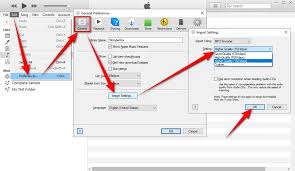
- Choose the output format and settings (e.G., Bitrate, frequency).
- Select the compression level or adjust parameters as needed.
- Start the conversion process.
How to Reduce Song Dimensions Online
To reduce song dimensions online, follow these general steps:
- Visit the chosen website (e.G., MP3Smaller, Media.Io).
- Upload your audio file.
- Choose the output format and settings (e.G., Bitrate, frequency).
- Select the compression level or adjust parameters as needed.
- Start the conversion process.
Mobile App Instructions
To reduce song dimensions using mobile apps:
- Download and install the chosen app (e.G., Media Converter, Video Converter and Compressor).
- Launch the app and select the file you want to compress.
- Choose the output format and settings (e.G., Bitrate, frequency).
- Select the compression level or adjust parameters as needed.
- Start the conversion process.
Conclusion
Reducing song dimensions is a simple yet effective way to free up storage space on your device without compromising sound quality. With various software and online solutions available, you can choose the method that suits your needs best. Remember to follow the instructions provided for each solution to ensure successful compression.
Frequently Asked Questions (FAQs)
- Q: Will Reducing Song Dimensions Affect The Audio Quality?
A: Generally, no. Modern compressors maintain sound quality while reducing file size. - Q: Can I Reduce Song Dimensions on my Smartphone or Tablet?
A: Yes. Mobile apps like Media Converter and Video Converter and Compressor allow you to compress audio files on-the-go. - Q: Do Online Solutions Require Registration or Payment?
A: Some online services may offer free compression, while others might require a subscription or one-time payment for advanced features. - Q: Can I Use Software on Multiple Operating Systems (e.G., Windows, Macos)?
A: Yes. Many software solutions are compatible with various operating systems, including Windows, macOS, and Linux. - Q: Will Reducing Song Dimensions Affect The File Format?
A: No. Compressing audio files maintains their original format (e.G., MP3, WAV). - Q: Can I Compress Multiple Audio Files at Once?
A: Yes. Many software solutions and online tools allow batch compression of multiple files. - Q: Do Mobile Apps Have Limitations on File Size or Quality?
A: Some mobile apps may have limitations on file size or quality, but this information is usually provided within the app itself.
Hope you enjoy reading this article, I was able to make it 2000+ words


