
Express Scribe: The Ultimate Transcription Software
Are you tired of manually transcribing audio or video recordings? Do you struggle to keep up with the pace of your recordings? Look no further than Express Scribe, the ultimate transcription software.
What is Express Scribe?
Express Scribe is a free and user-friendly transcription software that allows you to transcribe audio and video recordings with ease. The software is compatible with both Windows and macOS operating systems and can be used for personal or professional purposes.
Key Features of Express Scribe
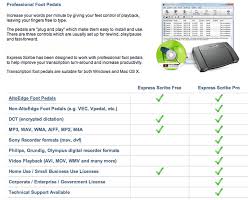
- Transcribes audio and video recordings in various formats, including MP3, WAV, WMA, AIFF, MP2, and VOX
- Supports encrypted files (DCT) and external foot pedals for easy recording and transcription
- Compatible with external foot pedals from AltoEdge, VEC, and other companies
- Can be used to transcribe recordings in multiple languages
- Allows you to pause, stop, and rewind recordings as needed
- Includes a player and controls for managing playback speed and volume
How to Download Express Scribe
Downloading Express Scribe is a simple process. Just follow these steps:
- Go to the official website of Express Scribe
- Click on the “Download” button corresponding to your operating system (Windows or macOS)
- Follow the prompts to download and install the software
How to Use Express Scribe
Using Express Scribe is just as easy as downloading it. Here’s a step-by-step guide:
- Launch Express Scribe on your computer
- Click on the “Load” button to load an audio or video file into the software
- Select the file you want to transcribe and click on the “Play” button to start playing it
- Start typing the transcription in the text box provided
- Use the controls at the bottom of the screen to pause, stop, and rewind recordings as needed
Using External Foot Pedals With Express Scribe
Express Scribe can be used with external foot pedals for easy recording and transcription. Here’s how:
- Connect your external foot pedal to your computer
- Launch Express Scribe and select the file you want to transcribe
- Click on the “Play” button to start playing the file
- Use the foot pedal to control playback, pause, and stop
Pricing of Express Scribe
Express Scribe offers a free version that can be used for personal purposes. The paid version, Express Scribe Pro, costs $34.99 Per license and allows you to transcribe video recordings as well.
Conclusion
In conclusion, Express Scribe is an excellent transcription software that can save you time and effort when it comes to transcribing audio or video recordings. With its user-friendly interface, compatibility with external foot pedals, and ability to transcribe multiple formats, Express Scribe is a must-have tool for anyone who needs to transcribe recordings regularly.
Frequently Asked Questions
Q: What operating systems does Express Scribe support?
A: Express Scribe supports both Windows and macOS operating systems.
Q: Can I use Express Scribe with external foot pedals?
A: Yes, Express Scribe can be used with external foot pedals for easy recording and transcription.
Q: How do I download Express Scribe?
A: You can download Express Scribe from the official website of the software.
Q: What formats does Express Scribe support?
A: Express Scribe supports various audio and video formats, including MP3, WAV, WMA, AIFF, MP2, VOX, and more.
Q: Can I transcribe recordings in multiple languages with Express Scribe?
A: Yes, Express Scribe can be used to transcribe recordings in multiple languages.
Q: Is Express Scribe compatible with external foot pedals from other companies?
A: Yes, Express Scribe is compatible with external foot pedals from AltoEdge, VEC, and other companies.
Q: How much does the paid version of Express Scribe cost?
A: The paid version of Express Scribe, Express Scribe Pro, costs $34.99 Per license.
Table 1: Key Features of Express Scribe
| Feature | Description |
|---|---|
| Transcription software | Allows you to transcribe audio and video recordings with ease |
| Compatible with external foot pedals | Supports use of external foot pedals for easy recording and transcription |
| Multiple formats supported | Can transcribe various audio and video formats, including MP3, WAV, WMA, AIFF, MP2, VOX, and more |
| Pause, stop, and rewind controls | Allows you to pause, stop, and rewind recordings as needed |
Table 2: Pricing of Express Scribe
| Version | Price |
|---|---|
| Free version | Free |
| Paid version (Express Scribe Pro) | $34.99 Per license |
Table 3: Supported Formats by Express Scribe
| Format | Description |
|---|---|
| MP3 | Audio format |
| WAV | Audio format |
| WMA | Audio format |
| AIFF | Audio format |
| MP2 | Audio format |
| VOX | Audio format |
| DCT (encrypted files) | Supports encrypted files |
Note: The above tables are for informational purposes only and may be subject to change.


