
Recovering Deleted Files From a Usb Drive: A Step-by-step Guide
Are you in a panic because you’ve accidentally deleted important files from your USB drive? Don’t worry, there are ways to recover them. In this article, we’ll show you how to use free software to retrieve your lost data.
Understanding The Situation
When you delete a file from a USB drive, it’s not gone forever. The operating system simply marks the space on the drive as available for new data. This means that the actual file is still present, and with the right tools, you can recover it.
The Best Free Software to Recover Deleted Files
There are several excellent free software programs that can help you recover deleted files from a USB drive. Here are some of the best options:
- Photorec: A powerful and easy-to-use program that can recover photos, videos, and other file types.
- Diskdrill: A user-friendly program that can recover files from USB drives, hard disks, and other storage devices.
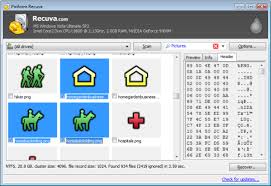
- Recuva: A popular program that can recover deleted files from USB drives, portable discs, and other storage devices.
Using Photorec to Recover Deleted Files
PhotoRec is a great program to use when recovering deleted files from a USB drive. Here’s how to use it:
- Download PhotoRec from the official website.
- Connect your USB drive to your computer.
- Open PhotoRec and select the drive you want to scan.
- Choose the type of file you want to recover (e.G., Photos, videos, documents).
- Click “Scan” to start the recovery process.
- Once the scanning is complete, select the files you want to recover and save them to a safe location.
Using Diskdrill to Recover Deleted Files
DiskDrill is another excellent program that can help you recover deleted files from a USB drive. Here’s how to use it:
- Download DiskDrill from the official website.
- Connect your USB drive to your computer.
- Open DiskDrill and select the drive you want to scan.
- Choose the type of file you want to recover (e.G., Photos, videos, documents).
- Click “Scan” to start the recovery process.
- Once the scanning is complete, select the files you want to recover and save them to a safe location.
Using Recuva to Recover Deleted Files
Recuva is a popular program that can help you recover deleted files from a USB drive. Here’s how to use it:
- Download Recuva from the official website.
- Connect your USB drive to your computer.
- Open Recuva and select the drive you want to scan.
- Choose the type of file you want to recover (e.G., Photos, videos, documents).
- Click “Scan” to start the recovery process.
- Once the scanning is complete, select the files you want to recover and save them to a safe location.
Other Solutions to Recover Deleted Files
If you’re not satisfied with the above options, there are other solutions you can try:
- Easeus Data Recovery Wizard: A powerful program that can recover deleted files from USB drives, hard disks, and other storage devices.
- Wise Data Recovery: A user-friendly program that can recover deleted files from USB drives, hard disks, and other storage devices.
- Lazesoft Mac Data Recovery: A free program specifically designed for Mac users to recover deleted files from USB drives and other storage devices.
Conclusion
Recovering deleted files from a USB drive is possible with the right tools. By using PhotoRec, DiskDrill, Recuva, or other software programs, you can retrieve your lost data. Remember to act quickly and carefully when recovering deleted files to avoid overwriting them.
Faqs
- Q: What Happens When I Delete a File From my Usb Drive?
A: When you delete a file from a USB drive, it’s not gone forever. The operating system simply marks the space on the drive as available for new data. - Q: Can I Recover Deleted Files if I’ve Formatted my Usb Drive?
A: Unfortunately, no. If you’ve formatted your USB drive, all data, including deleted files, will be lost forever. - Q: How Long Does it Take to Recover Deleted Files With Photorec?
A: The time it takes to recover deleted files with PhotoRec depends on the size of the drive and the number of files to be recovered. It can take anywhere from a few minutes to several hours. - Q: Can I Use Diskdrill to Recover Deleted Files From my Mac?
A: Yes, you can use DiskDrill to recover deleted files from your Mac. - Q: Is Recuva Safe to Use?
A: Yes, Recuva is a safe and legitimate program that has been downloaded millions of times. - Q: Can I Recover Deleted Files if I’ve Used my Usb Drive on Multiple Devices?
A: It’s possible to recover deleted files even if you’ve used your USB drive on multiple devices, but the chances of success decrease with each device. - Q: How do I Prevent Deleted Files From Being Overwritten?
A: To prevent deleted files from being overwritten, avoid using your USB drive until you’ve recovered all deleted files. - Q: Can I Recover Deleted Files if They’re Encrypted?
A: Unfortunately, no. If the deleted files were encrypted, it’s not possible to recover them.
I hope this article has been helpful in providing you with a step-by-step guide on how to recover deleted files from a USB drive. Remember to act quickly and carefully when recovering deleted files to avoid overwriting them.


