
In today’s world, where privacy and security are paramount, end-to-end encryption (E2EE) has become a crucial feature for messaging apps. If you’re curious about how to unlock end-to-end encryption or want to ensure that your conversations are securely encrypted, this guide will provide you with a comprehensive understanding of what E2EE is and how to activate it across different platforms.
What is End-to-End Encryption?
End-to-end encryption is a method of securing data so that only the communicating users can read it. In this system, the messages are encrypted on the sender’s device and decrypted only on the recipient’s device. No intermediaries, including the service providers, can read the messages.
End-to-end encryption ensures that:
- Your messages are private and cannot be accessed by third parties, including the app developers.
- Security is maintained, even if someone tries to intercept the messages.
- Only the sender and recipient can decrypt and read the communication.
Now that you understand what end-to-end encryption is, let’s explore how to enable it on popular messaging platforms.
How to Unlock End-to-End Encryption on WhatsApp
WhatsApp is one of the most widely used messaging platforms globally, and it offers end-to-end encryption by default for all messages and calls.
WhatsApp Messages Encryption
All one-on-one chats on WhatsApp are encrypted by default, which means you don’t need to manually activate this feature. However, you can verify if a chat is encrypted.
Steps to Verify Encryption on WhatsApp:
- Open the conversation you want to check.
- Tap on the contact’s name at the top of the chat.
- Scroll down and tap on Encryption.
- You will see a QR code or a 40-digit security code. Compare this code with the one on your contact’s phone to verify the encryption.
Alternatively, you can scan each other’s QR codes to confirm encryption.
WhatsApp Backup Encryption
While messages are encrypted by default, chat backups are not automatically encrypted. You need to manually activate encryption for your WhatsApp backups.
Steps to Enable Backup Encryption:
- Open WhatsApp and go to Settings.
- Select Chats > Chat Backup.
- Tap End-to-End Encrypted Backup and select Turn On.
- Create a password for your backup or use a 64-digit encryption key.
Important: If you forget this password, you will not be able to restore your encrypted backup.
How to Unlock End-to-End Encryption on Facebook Messenger
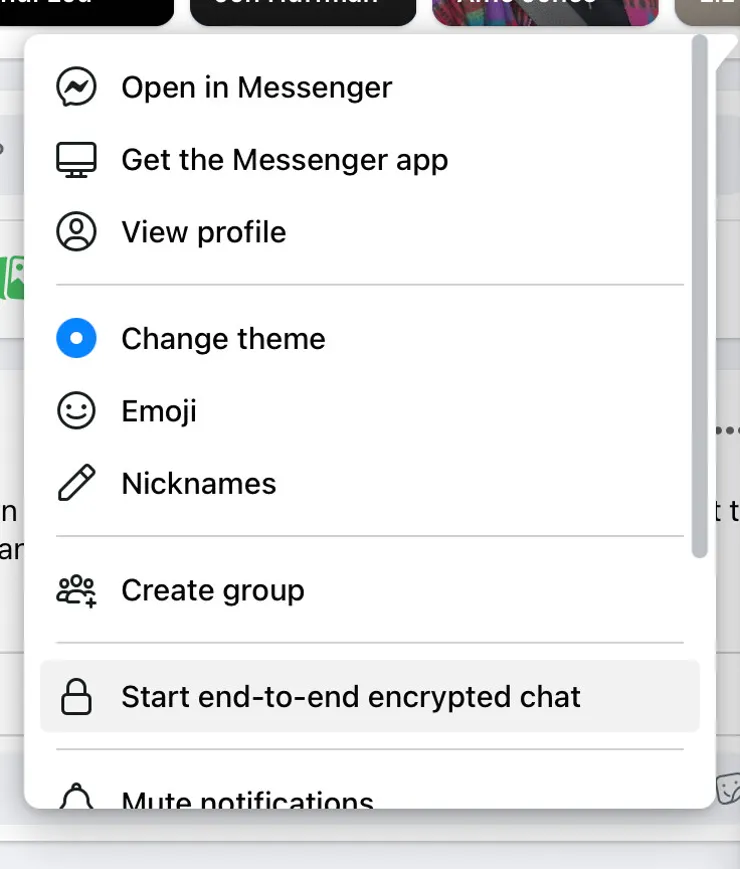
Facebook Messenger, owned by Meta, rolled out end-to-end encryption as a default feature in late 2023. While this update is being gradually applied to all conversations, you can also manually start encrypted chats.
Steps to Activate End-to-End Encryption on Messenger:
- Open Messenger.
- Choose the conversation you want to encrypt.
- Tap the contact’s name at the top.
- Select Go to Secret Conversation.
A new, encrypted chat will open with the same contact, but this conversation will be fully encrypted end-to-end.
How to Unlock End-to-End Encryption on Telegram
Unlike WhatsApp and Messenger, Telegram does not use end-to-end encryption for all messages by default. Instead, it offers an option to start Secret Chats with specific contacts for encrypted conversations.
Steps to Start a Secret Chat on Telegram:
- Open Telegram and select the contact you want to chat with.
- Tap the three dots in the upper right corner.
- Choose Start Secret Chat.
- Confirm by tapping Start.
Secret Chats on Telegram are encrypted end-to-end and are not stored on the Telegram servers. Additionally, you can enable a self-destruct timer for messages in secret chats.
How to Unlock End-to-End Encryption on Google Messages
Google Messages, the default SMS and messaging app on many Android devices, supports end-to-end encryption for RCS (Rich Communication Services) chats.
Steps to Enable Encryption on Google Messages:
- Open Google Messages and tap the three dots in the top right corner.
- Select Settings and then tap on Chat Features.
- Toggle Enable chat features to ON.
Once chat features are enabled, RCS chats with encryption will display a lock icon next to the message, indicating that the conversation is protected by end-to-end encryption.
How to Unlock End-to-End Encryption on iMessage
Apple’s iMessage service is known for its robust security features, and all iMessages sent between Apple devices are encrypted end-to-end.
Verifying Encryption on iMessage:
There’s no need to manually activate encryption on iMessage, as it is enabled by default. However, you can tell if a message is encrypted by checking the color of the message bubbles:
- Blue message bubbles indicate that the message is an encrypted iMessage.
- Green message bubbles mean that the message was sent via SMS and is not encrypted.
To ensure your messages are encrypted, make sure you and your contact are both using iMessage on Apple devices.
Understanding Encryption Keys
End-to-end encryption relies on encryption keys to ensure that only the sender and recipient can decrypt the messages. There are two types of keys:
- Public Key: Shared with the recipient to encrypt the message.
- Private Key: Kept secret by the recipient to decrypt the message.
When both keys match, the message is successfully decrypted, ensuring secure communication.
The Importance of End-to-End Encryption
The importance of end-to-end encryption cannot be overstated, especially in today’s digital age where privacy concerns are at an all-time high. Here’s why it’s essential:
- Protects Personal Data: End-to-end encryption ensures that your personal conversations, whether via text or voice, remain private.
- Prevents Unauthorized Access: Even if a message is intercepted, it remains unreadable without the decryption key.
- Enhances Trust in Communication: When both parties know their messages are secure, communication becomes more reliable and trustworthy.
Common Misconceptions About End-to-End Encryption
There are several misconceptions about end-to-end encryption that are worth addressing:
- “Service providers can read encrypted messages.” This is false. With end-to-end encryption, even service providers like WhatsApp or Google cannot read the messages.
- “Encryption slows down communication.” Not true. Modern encryption methods are designed to operate in real-time without affecting the speed of communication.
- “All messaging apps offer end-to-end encryption by default.” Unfortunately, not all apps provide encryption by default, and it often needs to be manually enabled, as in the case of Telegram and Google Messages.
Conclusion
End-to-end encryption is a vital feature that ensures privacy and security in your online communications. While many platforms now offer this security standard by default, it’s essential to know how to verify or enable it. Whether you’re using WhatsApp, Messenger, Telegram, or Google Messages, activating encryption is a straightforward process that gives you peace of mind, knowing that your conversations are protected from unauthorized access.
FAQs
1. Is end-to-end encryption available for all conversations on WhatsApp?
Yes, all one-on-one conversations on WhatsApp are encrypted by default. However, you need to manually enable encryption for chat backups.
2. Can I enable end-to-end encryption on Facebook Messenger?
Facebook Messenger now enables end-to-end encryption by default for most conversations. You can also manually start a Secret Conversation for encryption.
3. Are Telegram messages encrypted by default?
No, Telegram does not encrypt all chats by default. You must start a Secret Chat to enable end-to-end encryption.
4. How can I verify if a Google Message conversation is encrypted?
If a conversation is encrypted, you will see a lock icon next to the message within the chat window.
5. Can Apple read my iMessages?
No, Apple cannot read your iMessages, as they are encrypted end-to-end by default.
6. What happens if I forget my WhatsApp backup encryption password?
If you forget the password for your encrypted WhatsApp backup, you will not be able to restore the backup.
7. Does encryption slow down message delivery?
No, encryption does not slow down the delivery of messages. It happens in real-time and is designed to be seamless.
8. Can third parties access my messages if they are encrypted?
No, with end-to-end encryption, only the sender and the intended recipient can access the messages. Third parties, including the service providers, cannot read the encrypted messages.


