
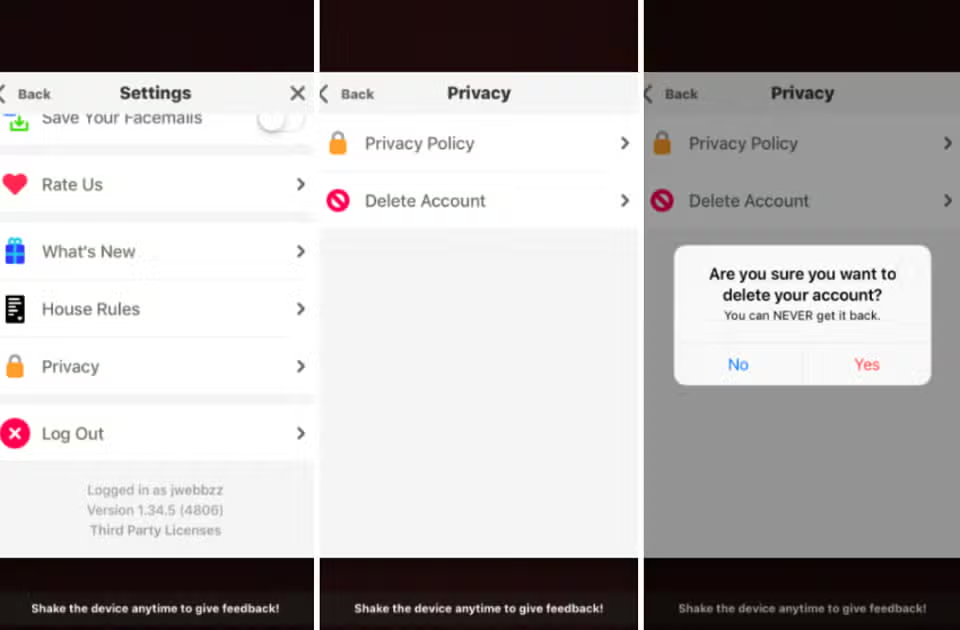
Houseparty was once a popular social media app that allowed group video calls in a fun and interactive way. However, like many platforms, you may find that Houseparty no longer suits your needs, and you’d like to delete your account. In this article, we’ll cover everything you need to know about removing your Houseparty account, with clear steps for both Android and iOS devices.
Table of Contents:
- Introduction
- What is Houseparty?
- Why Would You Want to Delete Your Houseparty Account?
- Important Information Before Deleting Your Account
- Data Loss After Account Deletion
- Alternative Solutions
- How to Delete Your Houseparty Account on Android
- Step-by-Step Instructions
- Common Issues & Troubleshooting
- How to Delete Your Houseparty Account on iOS/iPadOS
- Step-by-Step Instructions
- Common Issues & Troubleshooting
- Can You Recover a Deleted Houseparty Account?
- What Happens to Your Data After Deleting Your Account?
- Alternative Apps to Houseparty
- Conclusion
- FAQs
Introduction
Houseparty was launched with the idea of creating a platform where people could socialize via video calls. Over time, it gained a lot of users. However, as with any service, you may eventually decide it’s not for you. Whether you want a break from social media or prefer another video chat platform, this guide will help you through the steps of deleting your Houseparty account.
What is Houseparty?
Houseparty is a social networking app focused on video calls, allowing users to chat with multiple friends at the same time. It gained popularity as a fun, casual way to stay connected with friends and family, especially during periods of social distancing.
Why Would You Want to Delete Your Houseparty Account?
There could be many reasons you might want to delete your Houseparty account. Some common reasons include privacy concerns, a lack of use, or simply preferring other communication tools like Zoom, Skype, or Google Meet. Whatever your reason, deleting your Houseparty account is a simple process.
Important Information Before Deleting Your Account
Before you proceed with deleting your account, there are a few important considerations to keep in mind.
Data Loss After Account Deletion
Once your Houseparty account is deleted, you will permanently lose all data associated with it. This includes your chat history, contacts, and any in-app purchases you may have made. You won’t be able to recover any of this data once the account is deleted.
Alternative Solutions
If you are hesitant about permanently deleting your account, you may consider deactivating it temporarily or simply logging out. This allows you to take a break without losing your data, in case you change your mind later.
How to Delete Your Houseparty Account on Android
Deleting your Houseparty account on Android is a straightforward process. Follow these steps:
Step-by-Step Instructions
- Open the Houseparty app on your Android device.
- Sign in to your account if you’re not already logged in.
- Tap on the smiley face icon located in the top-left corner of the screen.
- In the menu that appears, tap on the settings icon (gear symbol) in the top-left corner.
- Scroll down to the Privacy section and tap on it.
- Select Delete Account.
- You’ll be asked to confirm your action by entering your password.
- Tap Delete to finalize the deletion.
Common Issues & Troubleshooting
Some users report difficulties with finding the “Delete Account” option. Ensure your app is up-to-date. If you’re still having trouble, try reinstalling the app or contacting Houseparty support for help.
How to Delete Your Houseparty Account on iOS/iPadOS
Deleting your Houseparty account on an iOS or iPadOS device is equally simple, though the steps are slightly different.
Step-by-Step Instructions
- Open the Houseparty app on your iPhone or iPad.
- Log in to your account if necessary.
- Tap on the smiley face icon in the top-left corner.
- Go to the settings icon (gear symbol) in the top-left corner.
- Select Privacy from the list of options.
- Choose Delete Account.
- You’ll be prompted to enter your account password.
- Tap Delete to complete the process.
Common Issues & Troubleshooting
If you are unable to locate the delete option, make sure you are using the most current version of the app. If issues persist, consider contacting Houseparty’s customer support team for assistance.
Can You Recover a Deleted Houseparty Account?
No, once your account is deleted, it cannot be recovered. You will need to create a new account if you decide to return to the platform. Make sure you are certain before completing the deletion process, as it is irreversible.
What Happens to Your Data After Deleting Your Account?
When you delete your Houseparty account, all of your personal information, chats, and any other associated data will be permanently erased. Houseparty’s policy states that they cannot restore your data after deletion.
Alternative Apps to Houseparty
If Houseparty no longer meets your needs, you may want to explore alternative apps. Here are a few to consider:
- Zoom: A highly popular video conferencing tool that offers group video calls and webinars.
- Google Meet: Offers free video meetings for users with a Google account.
- Skype: Microsoft’s video calling service with chat functionality.
- Discord: A community-driven app that offers both voice and video chat.
Conclusion
Deleting your Houseparty account is a simple yet permanent decision. If you’ve decided that Houseparty is no longer the right platform for you, following the steps outlined above will allow you to remove your account swiftly and securely. Just remember that once deleted, your data cannot be recovered, so make sure this is the right choice for you.
FAQs
1. Can I temporarily deactivate my Houseparty account instead of deleting it?
No, Houseparty does not offer an option to deactivate accounts temporarily. Your only option is to delete it permanently.
2. What happens to my Houseparty data after I delete my account?
All of your data, including your contact list, chat history, and any saved settings, will be permanently deleted and cannot be restored.
3. Can I still use Houseparty without an account?
No, Houseparty requires users to create an account in order to use its services.
4. What if I change my mind after deleting my account?
If you delete your account and later decide to return, you’ll need to create a new account. Your previous account data will not be recoverable.
5. Can I delete my Houseparty account from a computer?
No, account deletion can only be performed through the mobile app on Android or iOS devices.
6. Will my friends be notified when I delete my account?
No, Houseparty does not send notifications to your contacts when you delete your account.
7. Can I recover my account if I forgot my password?
If you’ve forgotten your password, you can reset it before deleting your account. However, once your account is deleted, it cannot be recovered.
8. How long does it take for my account to be deleted?
The deletion process is instant once you confirm your decision and input your password.


