
Resolving Amazon Package Delivery Issues: A Step-by-step Guide
Are you one of the many individuals who have experienced issues with their Amazon package delivery? You’re not alone! In this article, we’ll guide you through the process of resolving common Amazon package delivery problems.
What to Do When Your Amazon Package Doesn’t Arrive
When your Amazon package doesn’t arrive, it’s natural to feel frustrated and anxious. However, there are steps you can take to resolve the issue quickly and efficiently.
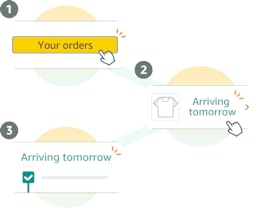
- Check The Tracking Status: The first step is to check the tracking status of your package on Amazon’s website or mobile app. You can do this by logging into your account, navigating to the “Orders” section, and selecting the order containing the missing package.
- Verify The Delivery Address: Double-check that you entered the correct delivery address when placing your order. Make sure all details are accurate, including the apartment or suite number (if applicable).
- Contact Amazon Customer Service: If the tracking status indicates that the package was delivered, but you didn’t receive it, contact Amazon customer service for assistance.
How to Contact Amazon Customer Service
If the above steps don’t resolve your issue, here’s how to contact Amazon customer service:
- Go to Amazon’s Website: Visit Amazon’s website and navigate to the “Help” section.
- Choose Your Preferred Contact Method: Select your preferred method of contact: Phone, chat, email, or text message.
- Provide Order Information: Have your order number ready to provide to the customer service representative.
Contacting Amazon Customer Service Via Phone
If you prefer to speak with a live agent over the phone:
- Call Amazon’s Customer Service Number: Dial the toll-free phone number for Amazon customer service: 1-888-280-4333 (US).
- Follow The Automated Menu: Listen to the automated menu and choose your preferred language.
- Explain Your Issue: Clearly explain your issue to the representative.
Contacting Amazon Customer Service Via Chat or Email
If you prefer to communicate with a customer service representative via chat or email:
- Go to Amazon’s Website: Visit Amazon’s website and navigate to the “Help” section.
- Choose Chat or Email: Select the “Chat with Us” or “Email us” option.
- Provide Order Information: Have your order number ready to provide.
Resolving Package Delivery Issues With Amazon
In some cases, packages may be lost in transit due to unforeseen circumstances. If this happens:
- Contact Amazon Customer Service: Reach out to Amazon customer service and report the issue.
- Follow Their Instructions: Follow the instructions provided by the customer service representative.
Preventing Package Delivery Issues With Amazon
To avoid common package delivery issues with Amazon:
- Verify Your Address: Double-check that your address is accurate and complete.
- Track Your Packages: Keep an eye on your packages’ tracking status to ensure they’re delivered correctly.
- Update Your Account Information: Ensure all account information, including email addresses and phone numbers, are up-to-date.
Conclusion
Resolving Amazon package delivery issues doesn’t have to be a frustrating experience. By following these simple steps, you can quickly resolve common problems and get back to enjoying your online shopping experience.
Faqs
- Q: How do I Track my Amazon Package?
A: You can track your package by logging into your account on Amazon’s website or mobile app. - Q: What Should I do if my Package is Lost in Transit?
A: Contact Amazon customer service and report the issue. They’ll guide you through the process of resolving it. - Q: Can I Change my Delivery Address After Placing an Order?
A: Yes, you can change your delivery address before the item ships. However, if the package has already shipped, you’ll need to contact Amazon customer service for assistance. - Q: How do I Contact Amazon Customer Service Via Phone?
A: You can call Amazon’s toll-free number (1-888-280-4333) and follow the automated menu. - Q: Can I Use Amazon’s Live Chat Feature to Resolve my Issue?
A: Yes, you can initiate a live chat with an Amazon representative by going to their website and selecting the “Chat with Us” option.
Additional Resources
For more information on resolving Amazon package delivery issues or other topics related to online shopping, visit Amazon’s Help section or consult with our expert blog for additional guidance.


