
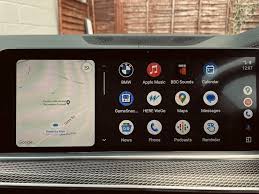
The Ultimate Guide to Android Autoradio Apps
Are you looking to elevate your driving experience with the latest Android autoradio apps? Look no further! In this comprehensive guide, we’ll explore the best autoradio apps for Android devices, covering navigation, music streaming, and more.
What Are Android Autoradio Apps?
Android autoradio apps are applications that allow you to connect your smartphone to your car’s infotainment system using Bluetooth or cable AUX. This enables you to access a wide range of features, including GPS navigation, music streaming, voice commands, and more.
Top Navigation Apps For Android Autoradios
When it comes to navigation, there are several excellent options available for Android autoradios. Here are some of the top choices:
- Google Maps
- A comprehensive mapping app that provides turn-by-turn directions, traffic updates, and more.
- Available on both smartphone and autoradio platforms.
- Waze
- A community-driven navigation app that offers real-time traffic information, road closures, and incident reports.
- Compatible with Android autoradios through a separate download and installation process.
Best Music Streaming Apps For Android Autoradios
Music streaming is an essential feature for many drivers. Here are some of the top music streaming apps compatible with Android autoradios:
- Spotify
- A popular music streaming service with access to millions of songs, playlists, and podcasts.
- Can be used on both smartphone and autoradio platforms through separate downloads and installations.
Other Notable Autoradio Apps
In addition to navigation and music streaming apps, there are several other notable autoradio apps worth exploring:
- Youtube Music
- A dedicated music streaming app that offers access to millions of songs, playlists, and podcasts.
- Can be used on both smartphone and autoradio platforms through separate downloads and installations.
Using Autoradio Apps With Android Autoradios
To use autoradio apps with your Android autoradio, you’ll need to:
- Download And Install The App on your smartphone from the Google Play Store.
- Connect Your Smartphone to Your Car’s Infotainment System using Bluetooth or cable AUX.
Tips For Using Autoradio Apps
Here are some tips for getting the most out of autoradio apps:
- Use Voice Commands to minimize distractions while driving.
- Explore App Settings to customize features and preferences.
- Stay Up-to-date With Software Updates to ensure optimal performance.
Conclusion
In conclusion, Android autoradio apps offer a wealth of features and functionality for drivers. By exploring the top navigation, music streaming, and other notable autoradio apps, you can enhance your driving experience and stay connected on the go.
Frequently Asked Questions (FAQs)
- Q: What Are The Benefits of Using Autoradio Apps?
A: Autoradio apps provide access to a wide range of features, including GPS navigation, music streaming, voice commands, and more. - Q: Which Autoradio Apps Are Compatible With Android Devices?
A: Many autoradio apps, such as Google Maps, Waze, Spotify, and YouTube Music, are compatible with Android devices. - Q: How do I Download And Install Autoradio Apps on my Smartphone?
A: You can download and install autoradio apps from the Google Play Store on your smartphone. - Q: Can I Use Voice Commands With Autoradio Apps?
A: Yes, many autoradio apps offer voice command functionality to minimize distractions while driving. - Q: Are Autoradio Apps Secure?
A: Autoradio apps are generally secure and have been vetted by Google Play Store guidelines. - Q: Can I Use Autoradio Apps With Other Types of Cars?
A: Some autoradio apps may be compatible with other types of cars, but this depends on the specific app and car model. - Q: How do I Troubleshoot Issues With Autoradio Apps?
A: You can refer to the app’s user manual or contact customer support for assistance with troubleshooting issues.
Call-to-action
Ready to take your driving experience to the next level with Android autoradio apps? Try out some of the top apps mentioned in this guide and discover a whole new world of features and functionality!


