
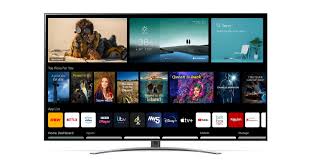
The Ultimate Guide to Apps on Your LG Smart TV
Are you excited about your new LG smart TV but don’t know where to start with the apps? Well, you’ve come to the right place! In this comprehensive guide, we’ll walk you through the best available applications on the LG Content Store and show you how to access them.
Getting Started: Connecting Your LG Smart TV to The Internet
Before we dive into the world of apps, it’s essential to connect your LG smart TV to the internet. You can do this using a cable or Wi-Fi connection. If you’re not sure how to do this, don’t worry; we’ve got a step-by-step guide here.
Accessing The LG Content Store
Once you’ve connected your LG smart TV to the internet, it’s time to access the LG Content Store. Here’s how:
- Press the Home button on your remote control.
- Select the icon of the store (the shopping bag).
- Press the OK button on your remote control.
Navigating The LG Content Store
The LG Content Store is divided into four main categories: Initial screen, apps and games, personal page, and search. Let’s take a closer look at each one:
- Initial Screen: This is where you’ll find a selection of recommended applications and content.
- Apps And Games: This section allows you to browse the entire catalogue of LG Content Store, including categories and recommendations.
- Personal Page: From here, you can view, update, and uninstall your downloaded apps.
- Search: Use this feature to search for specific apps using the virtual keyboard.
Finding Great Apps on Your LG Smart TV
Now that we’ve covered the basics, let’s talk about some of the best available applications on the LG Content Store. Here are a few suggestions:
Iptv Apps
If you’re looking for IPTV (Internet Protocol Television) apps, here are a few options:
- Iliria Iptv: This app allows you to access Vietnamese TV channels.
- A Iptv: This app provides Albanian TV channels, already configured and ready to watch.
- Iptv Smarters: This free app offers a wide range of IPTV channels, including those from various countries.
Other Great Apps on Your LG Smart TV
In addition to IPTV apps, there are many other great applications available on the LG Content Store. Here are a few more:
TV Channels And Entertainment
If you’re looking for apps related to TV channels and entertainment, here are some options:
- Raiplay: This app offers official content from Rai, including movies, series, and more.
- Mediaset Infinity: This app provides direct streaming of Mediaset channels, along with on-demand content.
- LG Channels: This free service allows you to access a wide range of digital channels live and on-demand.
Music, Social Media, And News
If music, social media, or news are more your thing, here are some great apps for you:
- Spotify: This popular music streaming app is available on the LG Content Store.
- Facebook Watch: Keep up with the latest social media trends and watch videos with this app.
- Accuweather: Stay informed about weather conditions with this app.
Sports, Movies, And More
Finally, if you’re interested in sports, movies, or other types of content, here are some apps for you:
- Netflix: One of the most popular streaming services available on the LG Content Store.
- Disney+: Another popular streaming service offering a wide range of content.
- Dazn: A sports-focused app providing live and on-demand content.
Conclusion
And there you have it – our ultimate guide to apps on your LG smart TV! With these tips, you’ll be able to find and install great applications from the LG Content Store. Happy streaming!


