
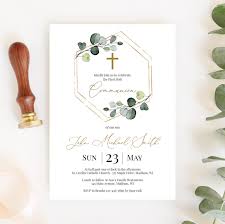
Creating Invitations For Communion: A Guide to Useful Apps
As a parent, organizing an event like a child’s communion can be a daunting task. One of the most critical aspects of this celebration is sending out invitations to family and friends. In this article, we’ll explore some useful apps that can help you create beautiful and personalized invitations for your child’s communion.
Why Are Invitations Essential?
Before we dive into the world of apps, let’s quickly discuss why invitations are essential when dealing with events like communions. Without invitations, guests may not be aware of the celebration, and it can lead to a lack of attendance or even misunderstandings. Invitations serve as an official notification that helps set expectations and excitement for the event.
Top Apps For Creating Communion Invitations
- Canva: Canva is a popular graphic design app that’s user-friendly and free. You can choose from various templates, customize your invitation to suit your style, and even add images or videos.
- Desygner: Desygner is another versatile app that allows you to create professional-looking invitations for communions, birthdays, and other events. It offers a wide range of templates, fonts, and graphics to personalize your design.
- Vistacreate: VistaCreate is a free design platform that provides thousands of templates, including communion invitation designs. You can choose from various categories, customize your template, and even add animations or videos.
Step-by-step Guide: Using Canva For Communion Invitations
To create a communion invitation using Canva:
- Download the app on your Android or iOS device.
- Choose a pre-designed template by searching for “communion invitations” in the bar at the top of the screen.
- Tap on a design that catches your eye, and access the modification screen.
- Use the instruments bar to add elements like images, text, or shapes to personalize your invitation.
Step-by-step Guide: Using Desygner For Communion Invitations
To create a communion invitation using Desygner:
- Download the app on your Android or iOS device.
- Choose the section “Invitations” and select a design that suits your needs.
- Tap on the pattern to access the modification screen.
- Use the instruments bar to add elements like images, text, or shapes to personalize your invitation.
Step-by-step Guide: Using Vistacreate For Communion Invitations
To create a communion invitation using VistaCreate:
- Download the app on your Android or iOS device.
- Choose a pre-designed template by searching for “communion invitations” in the search bar.
- Tap on a design that catches your eye, and access the modification screen.
- Use the instruments bar to add elements like images, text, or shapes to personalize your invitation.
Tips And Tricks
- Always choose an app that suits your style and preferences.
- Customize your invitation to match your child’s personality or theme of the event.
- Make sure to include all necessary details, such as date, time, location, and RSVP information.
- Consider adding a personal message or quote to make your invitation even more special.
Conclusion
Creating invitations for communion doesn’t have to be a stressful task. With these useful apps, you can create beautiful and personalized invitations that reflect your child’s unique personality. Whether you choose Canva, Desygner, or VistaCreate, remember to have fun and get creative with the design process!
Frequently Asked Questions (FAQs)
- Q: What Are Some Essential Details I Should Include in my Communion Invitation?
A: Date, time, location, RSVP information, and any additional details specific to the event. - Q: Can I Create a Digital Invitation Using These Apps?
A: Yes! Many of these apps allow you to create digital invitations that can be shared via email or social media. - Q: How do I Customize my Invitation Design on These Apps?
A: Each app has its own instruments bar with various tools and features to help you personalize your design, such as adding images, text, shapes, or animations. - Q: Can I Use These Apps For Other Types of Invitations, Like Birthdays or Weddings?
A: Yes! These apps are versatile and can be used for a wide range of events and occasions. - Q: What is The Cost Associated With Using These Apps?
A: Most of these apps offer free versions or trials, but some may require subscription fees or one-time payments for premium features. - Q: Can I Print Out my Invitation Design From These Apps?
A: Yes! Many of these apps allow you to download and print your invitation design directly on your device.
Additional Resources
For more information on creating communion invitations, check out our article on digital invitations.


