
The Ultimate Guide to Avira Free Antivirus: Protecting Your Devices From Online Threats
Are you worried about the safety of your devices in today’s digital landscape? Do you want to protect yourself from online threats without breaking the bank? Look no further than Avira Free Antivirus!
In this article, we’ll take a closer look at Avira Free Antivirus, its features, and how it can safeguard your PC, Mac, Android device, and iOS/iPadOS device from malware, viruses, and other online threats.
What is Avira Free Antivirus?
Avira Free Antivirus is a free software solution that provides comprehensive protection for your devices against various online threats. Developed by the renowned cybersecurity company Avira, this antivirus program offers robust security features to safeguard your digital assets.
Features of Avira Free Antivirus
Here are some of the key features of Avira Free Antivirus:
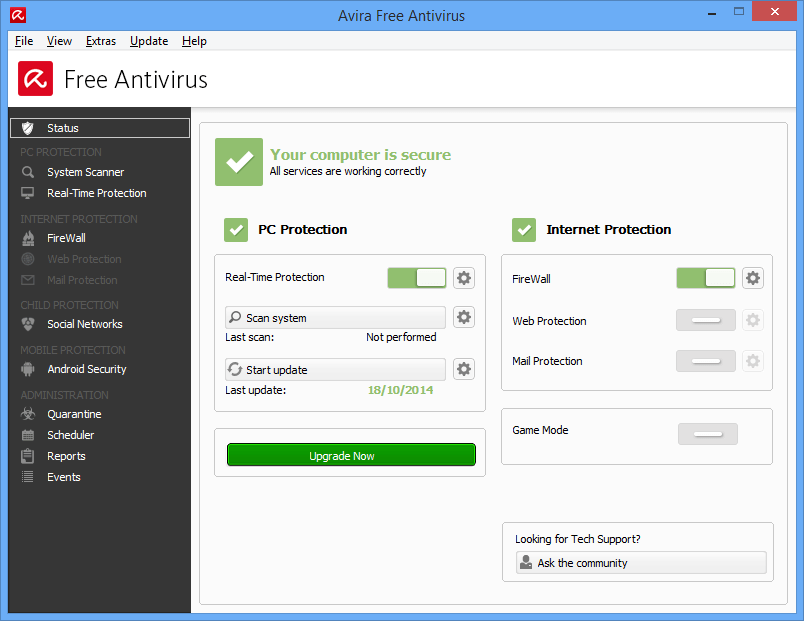
- Real-time Protection: This feature ensures that your device is protected in real-time against malware, viruses, and other online threats.
- Antivirus Engine: The antivirus engine of Avira scans your device for any potential threats and removes them to ensure complete protection.
- System Scanning: Avira’s system scanning feature performs a thorough scan of your device to identify and remove any existing malware or viruses.
- Smart Scan: This feature provides a quick and efficient scan of your device, highlighting any potential issues that need attention.
- Security Features: Avira offers various security features, including password protection, firewall configuration, and data backup.
System Requirements For Avira Free Antivirus
To install Avira Free Antivirus on your devices, you’ll need to meet the following system requirements:
- Windows PC: Windows 7 SP1 or later versions of Microsoft operating systems
- Ram: At least 2 GB of RAM required
- Storage Space: Minimum 2 GB of free space on your hard drive
- Processor: Intel Pentium 4 or AMD Athlon 64 processor or higher
- Internet Connection: A stable internet connection is necessary for updates and functionality
Installing Avira Free Antivirus on Your PC
To install Avira Free Antivirus on your Windows PC, follow these steps:
- Visit the official Avira website to download the antivirus software.
- Once downloaded, double-click on the executable file to initiate the installation process.
- Follow the on-screen instructions to complete the installation.
Installing Avira Free Antivirus on Your Mac
To install Avira Free Antivirus on your Mac, follow these steps:
- Visit the official Avira website to download the antivirus software.
- Once downloaded, double-click on the dmg file to initiate the installation process.
- Follow the on-screen instructions to complete the installation.
Installing Avira Free Antivirus on Your Android Device
To install Avira Free Antivirus on your Android device, follow these steps:
- Visit the Google Play Store and search for Avira Free Security.
- Once found, click on the app icon to download and install it.
- Follow the on-screen instructions to complete the installation.
Installing Avira Mobile Security For Ios/ipados Device
To install Avira Mobile Security for your iOS/iPadOS device, follow these steps:
- Visit the App Store and search for Avira Mobile Security.
- Once found, click on the app icon to download and install it.
- Follow the on-screen instructions to complete the installation.
Avira Free Antivirus Pricing
The pricing of Avira Free Antivirus varies depending on your device type:
- Windows PC: Completely free
- Mac: Completely free
- Android Device: Completely free with optional upgrade to Pro version
- Ios/ipados Device: Completely free with optional upgrade to Pro version
Conclusion
Avira Free Antivirus is an excellent choice for protecting your devices from online threats. With its robust security features, real-time protection, and user-friendly interface, it’s a must-have software solution for anyone who wants to safeguard their digital assets.
Whether you’re using a Windows PC, Mac, Android device, or iOS/iPadOS device, Avira Free Antivirus has got you covered.
Faqs
Here are some frequently asked questions about Avira Free Antivirus:
Q: What is Avira Free Antivirus?
A: Avira Free Antivirus is a free software solution that provides comprehensive protection for your devices against various online threats.
Q: Which devices can I install Avira Free Antivirus on?
A: You can install Avira Free Antivirus on Windows PC, Mac, Android device, and iOS/iPadOS device.
Q: Is Avira Free Antivirus completely free?
A: Yes, Avira Free Antivirus is completely free to download and use on all supported devices.
Q: Can I upgrade to the Pro version of Avira Free Antivirus?
A: Yes, you can upgrade to the Pro version of Avira Free Antivirus for enhanced security features and additional benefits.


