
The Ultimate Guide to Avira Free: Protecting Your Device From Threats
Are you tired of worrying about viruses, malware, and other online threats compromising your device’s security? Look no further than Avira Free, a powerful antivirus software that offers robust protection against even the most sophisticated cyber dangers.
In this comprehensive guide, we’ll delve into the world of Avira Free, exploring its features, benefits, and user interface. Whether you’re a tech-savvy individual or a newcomer to the realm of cybersecurity, this article will provide you with the knowledge needed to safeguard your device against online threats.
What is Avira Free?
Avira Free is a free antivirus software that provides robust protection against viruses, malware, and other cyber threats. Developed by Avira, a renowned cybersecurity company, this software has been designed to be user-friendly, efficient, and effective in detecting and removing threats from your device.
Features of Avira Free
- Real-time Protection: Avira Free offers real-time protection against viruses, malware, and other online threats. This means that the software constantly monitors your device for potential threats, ensuring that you’re always protected.
- Advanced Threat Detection: The software employs advanced threat detection algorithms to identify and neutralize even the most sophisticated cyber dangers.
- User-friendly Interface: Avira Free boasts a user-friendly interface that’s easy to navigate, making it accessible to users of all skill levels.
- Free Vpn Service: In addition to antivirus protection, Avira Free also includes a free VPN service, allowing you to encrypt your internet traffic and stay anonymous online.
How to Install Avira Free
Installing Avira Free is a straightforward process that requires minimal technical expertise. Here’s a step-by-step guide:
- Visit The Official Website: Head over to the official Avira website and click on the “Download” button.
- Select Your Device: Choose your device type (Windows, Mac, Android, or iOS) from the dropdown menu.
- Click on “Download Free”: Click on the “Download Free” button to initiate the download process.
- Run The Installer: Once the download is complete, run the installer and follow the prompts to install Avira Free.
Using Avira Free
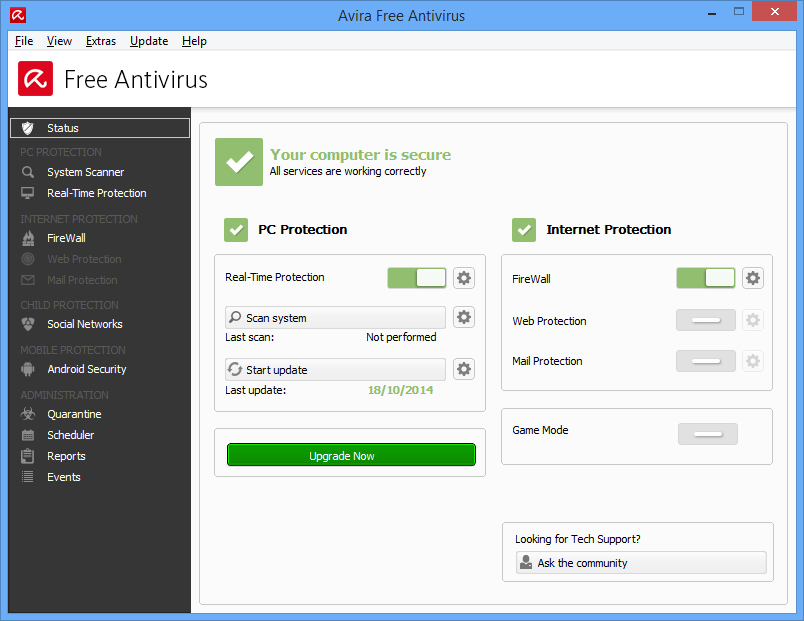
Using Avira Free is a breeze, even for those without extensive technical knowledge. Here’s an overview of the software’s user interface:
- Dashboard: The dashboard provides an instant view of your device’s security status, displaying any detected threats or protection issues.
- Safety Menu: Access various safety features, such as scanning, options of protection, and quarantine management from the Safety menu.
- Privacy Section: Explore additional privacy features, including VPN, password manager, and other advanced settings within the Privacy section.
- Performance Optimization: Access performance optimization tools, such as disk cleanup, battery saver, and driver updater.
Avira Free For Mac
Avira Free is also available for Mac devices, offering robust protection against viruses and malware. The installation process is identical to that of Windows devices:
- Visit The Official Website: Head over to the Avira website and click on the “Download” button.
- Select Your Device: Choose your device type (Mac) from the dropdown menu.
- Click on “Download Free”: Click on the “Download Free” button to initiate the download process.
- Run The Installer: Once the download is complete, run the installer and follow the prompts to install Avira Free.
Avira Free For Android
Avira Free is also available for Android devices, providing robust protection against viruses and malware:
- Visit The Google Play Store: Head over to the Google Play Store and search for Avira Free.
- Install The App: Click on the “Install” button to initiate the installation process.
- Launch The App: Once installed, launch the app and follow the prompts to configure your protection settings.
Avira Free For Ios And Ipados
Avira Free is also available for iOS and iPadOS devices, offering robust protection against online threats:
- Visit The Apple App Store: Head over to the Apple App Store and search for Avira Free.
- Install The App: Click on the “Get” button to initiate the installation process.
- Launch The App: Once installed, launch the app and follow the prompts to configure your protection settings.
Conclusion
Avira Free is a robust antivirus software that provides comprehensive protection against online threats. With its user-friendly interface, advanced threat detection algorithms, and free VPN service, this software is an excellent choice for individuals seeking to safeguard their devices from cyber dangers.
Whether you’re using Avira Free on Windows, Mac, Android, or iOS, rest assured that your device will be protected from even the most sophisticated online threats. Don’t wait – download Avira Free today and enjoy peace of mind knowing that your device is secure!
Frequently Asked Questions
Q: What is the cost of Avira Free?
A: Avira Free is a free antivirus software.
Q: Does Avira Free offer real-time protection?
A: Yes, Avira Free offers real-time protection against viruses and malware.
Q: Can I install Avira Free on multiple devices?
A: Yes, you can install Avira Free on multiple devices, including Windows, Mac, Android, and iOS.
Q: Is Avira Free compatible with my device?
A: Avira Free is compatible with a wide range of devices, including Windows, Mac, Android, and iOS.
Q: What is the difference between Avira Free and paid antivirus software?
A: While Avira Free offers robust protection against online threats, paid antivirus software may offer additional features and support.


