
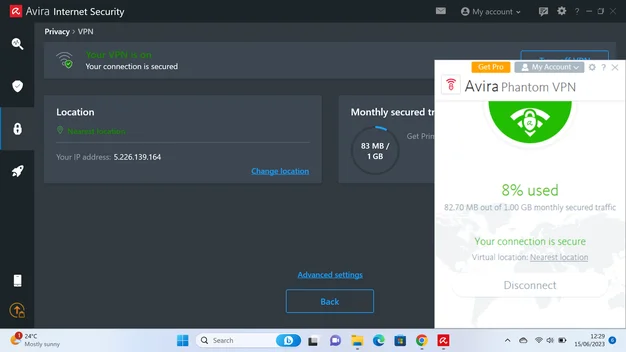
What is Avira Phantom Vpn And How Does it Function?
Are you concerned about your online security while traveling abroad or using public Wi-Fi networks? Do you want to access streaming services that are restricted in your region? Then, a Virtual Private Network (VPN) might be the solution for you. In this article, we will explore Avira Phantom VPN, one of the best VPN solutions available today.
What is a Vpn And How Does it Work?
A VPN creates a secure tunnel between your device and the internet, encrypting all data transmitted through it. This way, even if you’re using public Wi-Fi or an unsecured network, your online activities remain private and secure. A VPN also hides your IP address and location, allowing you to access geo-restricted content and services.
What Are The Benefits of Using Avira Phantom Vpn?
Avira Phantom VPN offers several benefits, including:
- Security: Avira’s advanced encryption technology protects your data from cyber threats.
- Anonymity: With Avira Phantom VPN, your online activities remain private and anonymous.
- Access to Geo-restricted Content: Access streaming services and websites that are restricted in your region.
- Free Version Available: Try out the free version of Avira Phantom VPN to see if it suits your needs.
How Does Avira Phantom Vpn Work?
Avira Phantom VPN works by creating a secure connection between your device and the internet. Here’s how:
- Download And Install Avira Phantom Vpn: Get the app from the official website or app store.
- Launch The App: Open the app and log in with your account credentials.
- Choose a Server Location: Select a server location that suits your needs (e.G., Nearest to you or in a specific region).
- Establish a Connection: Click on the “Connect” button to establish a secure connection.
Avira Phantom Vpn Features And Pricing
Avira Phantom VPN offers several features, including:
- Aes-256 Encryption: Advanced encryption technology for maximum security.
- No Log Policy: Avira doesn’t keep any logs of your online activities.
- Multiple Server Locations: Choose from over 25 server locations worldwide.
- Compatibility With Multiple Devices: Use Avira Phantom VPN on multiple devices, including smartphones and tablets.
Prices
Avira Phantom VPN offers two pricing plans:
- Free Version: Get up to 500MB of free data per month.
- Pro Plan: Upgrade to the Pro plan for unlimited data and exclusive tech support.
System Requirements
To use Avira Phantom VPN, you’ll need:
- Windows 7 or Later
- Macos 10.11 El Capitan or Later
- Android 4.1 Or Later (except Android Tv)
- Ios 8 or Later
Extensions And Add-ons
Avira Phantom VPN offers extensions for Google Chrome, Mozilla Firefox, and Microsoft Edge.
Setup And Installation
To set up Avira Phantom VPN on your device:
- Download The App: Get the app from the official website or app store.
- Launch The App: Open the app and log in with your account credentials.
- Choose a Server Location: Select a server location that suits your needs.
- Establish a Connection: Click on the “Connect” button to establish a secure connection.
Tips For Using Avira Phantom Vpn
Here are some tips for using Avira Phantom VPN:
- Use a Strong Password: Choose a strong password to protect your account.
- Keep Your Software Up-to-date: Ensure you have the latest software updates installed.
- Monitor Your Data Usage: Be mindful of your data usage, especially if you’re on a limited plan.
By following these tips and guidelines, you can effectively use Avira Phantom VPN to protect your online security and access geo-restricted content.
Frequently Asked Questions
Here are some frequently asked questions about Avira Phantom VPN:
- What is Avira Phantom Vpn?
- A Virtual Private Network (VPN) that provides secure and anonymous browsing.
- How Does Avira Phantom Vpn Work?
- It creates a secure connection between your device and the internet, encrypting all data transmitted through it.
- Is Avira Phantom Vpn Free?
- Yes, there’s a free version available with up to 500MB of free data per month.
By understanding how Avira Phantom VPN works and its benefits, you can make an informed decision about whether to use this service.


