
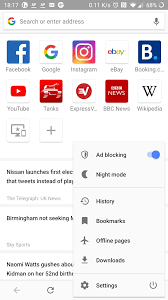
The Best Browser For Android: A Comprehensive Guide
As we navigate through the vast digital landscape, having a reliable browser on our Android devices is essential. With numerous options available, choosing the best browser can be overwhelming. In this article, we will delve into the world of Android browsers, exploring their features, and helping you make an informed decision.
The Quest For The Best Browser
With so many browsers vying for attention, it’s natural to wonder which one reigns supreme. While there is no single “best” browser, each has its unique strengths and weaknesses. Let us explore some of the most popular options:
- Google Chrome: The undisputed favorite among Android users, Google Chrome offers seamless integration with other Google services, lightning-fast loading times, and a user-friendly interface.
- Firefox: Mozilla’s Firefox is a close second, boasting robust security features, a vast library of extensions, and a sleek design that rivals Chrome.
- Microsoft Edge: Microsoft’s Edge browser brings a fresh perspective to the Android landscape, with impressive speeds, a modern interface, and tight integration with Windows 10 devices.
Tvweb Browser For TV
For those using Android TV or Smart TVs, the TVWeb Browser is an excellent option. Although not as polished as Chrome, it still delivers on its promise of providing a smooth browsing experience. For those looking to explore other alternatives, the Puffin TV Browser offers a unique blend of features and functionality.
The Benefits of Choosing The Right Browser
In today’s fast-paced digital world, having the right browser can make all the difference:
- Speed: A lightning-fast browser ensures seamless navigation and quicker access to information.
- Security: Robust security features protect your personal data and prevent malicious activities.
- Customization: Extensions and add-ons allow you to tailor your browsing experience to suit your needs.
Conclusion
Choosing the best browser for Android requires careful consideration of your specific needs. By weighing the pros and cons of each option, you can find the perfect fit for your browsing habits. Whether it’s Google Chrome, Firefox, Microsoft Edge, or one of the other alternatives, there’s a browser out there that will meet your requirements.
Frequently Asked Questions (FAQs)
- What is The Best Browser For Android?
The answer depends on your specific needs and preferences. Google Chrome, Firefox, and Microsoft Edge are all excellent options. - How do I Choose The Right Browser For my Device?
Consider factors such as speed, security, customization options, and integration with other services. - Can I Use a Different Browser on my Android TV or Smart Tv?
Yes, you can explore alternatives like the TVWeb Browser or Puffin TV Browser. - What Are Some Essential Features to Look For in a Browser?
Look for robust security features, lightning-fast loading times, and customization options. - Can I Sync my Browsing Data Across Devices?
Yes, most browsers offer syncing capabilities, allowing you to access your bookmarks, history, and other data across multiple devices.
Conclusion
Finding the best browser for Android is a matter of personal preference. By considering your specific needs and exploring the features offered by each option, you can make an informed decision that suits your browsing habits.


