
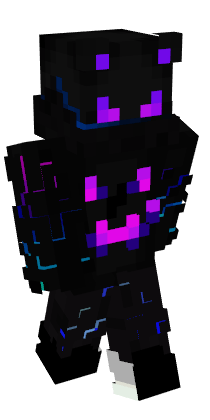
The Ultimate Guide to Better Skin in Minecraft
Are you tired of having a plain-looking avatar in Minecraft? Do you want to stand out from the crowd and show off your unique style? Look no further! In this article, we’ll explore the best skin options for Minecraft and provide tips on how to use them.
What Are Skins in Minecraft?
Before we dive into the good stuff, let’s quickly explain what skins are. Skins are custom appearance options that can be used to change the look of your character in Minecraft. They’re a great way to personalize your avatar and make it stand out from others.
Why Use Skins in Minecraft?
Using skins in Minecraft can enhance your gaming experience in several ways:
- Express Yourself: With thousands of skin options available, you can choose a design that reflects your personality or style.
- Stand Out: In a crowded game like Minecraft, skins can help you stand out from the crowd and make your avatar more recognizable.
- Improve Gameplay: Some skins may even provide gameplay advantages, such as increased visibility or improved navigation.
The Best Skins in Minecraft
Now that we’ve covered the basics, let’s get to the good stuff! Here are some of the best skin options for Minecraft:
Wither Strider Skin
The Wither is a iconic mob in Minecraft, and its strider counterpart is just as awesome. This skin option features a strider with a Wither-inspired design, complete with a menacing gaze and sharp teeth.
Pros:
- Unique and eye-catching design
- Perfect for players who love the Wither mob
Cloacked Enderman Skin
The Cloacked Enderman is a mysterious and intimidating mob in Minecraft. This skin option features an Enderman with a hooded cloak, adding to its already eerie appearance.
Pros:
- Spooky and atmospheric design
- Great for players who love the Enderman mob
Spiderman Skin
Who doesn’t love Spiderman? This skin option features a Minecraft avatar dressed as your friendly neighborhood Spiderman, complete with red and blue web-slinging gear.
Pros:
- Classic and recognizable design
- Perfect for fans of the Marvel universe
Solaire of Astora Skin
Solaire is a beloved character from the Dark Souls series. This skin option features a Minecraft avatar dressed as Solaire, complete with his iconic sword and shield.
Pros:
- Unique and stylish design
- Great for fans of the Dark Souls series
Other Interesting Skins
There are many other interesting skins available in Minecraft, including:
- TV Guy: A skin that features a character with a TV head.
- Herobrine: A skin that features a mysterious figure known as Herobrine.
- Tupac Shakur: A skin that pays tribute to the legendary rapper.
- Neil Armstrong: A skin that features the first man to walk on the Moon.
- Mario: A skin that brings the iconic video game character into Minecraft.
How to Use Skins in Minecraft
Using skins in Minecraft is a breeze. Here’s how:
- Open your Minecraft Launcher and click on the “Skins” tab.
- Click on the “+” button to upload a new skin or select an existing one from your library.
- Customize your skin by adjusting its texture, size, and other settings.
- Save your changes and enjoy your new look!
Conclusion
In conclusion, skins are a great way to personalize your Minecraft experience and stand out from the crowd. With thousands of options available, you’re sure to find one that suits your style. Whether you choose the Wither Strider, Cloacked Enderman, Spiderman, Solaire of Astora, or another skin, remember to have fun and experiment with different designs until you find the perfect look for you.
Frequently Asked Questions
Q: What are skins in Minecraft?
A: Skins are custom appearance options that can be used to change the look of your character in Minecraft.
Q: Why use skins in Minecraft?
A: Using skins in Minecraft can enhance your gaming experience by allowing you to express yourself, stand out from the crowd, and improve gameplay.
Q: How do I use skins in Minecraft?
A: To use skins in Minecraft, open your Launcher, click on the “Skins” tab, upload or select a skin, customize its settings, and save your changes.


