
The Ultimate Guide to Telegram Bots: A Comprehensive Overview
Are you looking to take your Telegram experience to the next level? Look no further! In this article, we’ll delve into the world of Telegram bots, exploring their features, benefits, and how to use them.
What Are Telegram Bots?
Telegram bots are artificial intelligence-powered tools that can interact with users on the Telegram messaging platform. They’re not another user, but rather a script programmed to perform specific actions and interact with other users in a chat or cluster.
How Do I Add a Bot to Telegram?
Adding a bot to Telegram is a straightforward process that can be done from both smartphones and tablets, as well as computers. Here’s how:
- From your smartphone or tablet, open the Telegram app and navigate to the “Contacts” section.
- Search for the bot you want to add by typing its name in the search bar.
- Once you’ve found the bot, tap on it to initiate a conversation and add it to your contacts.
From Your Computer
To add a bot from your computer, follow these steps:
- Open the Telegram web client or use the desktop app for Windows or macOS.
- Navigate to the “Contacts” section.
- Search for the bot you want to add by typing its name in the search bar.
- Once you’ve found the bot, click on it to initiate a conversation and add it to your contacts.
The Best Telegram Bots
Now that we’ve covered the basics of adding bots to Telegram, let’s explore some of the best bots available:
- Trackbot: A bot that allows you to track messages from multiple users in one place.
- Microsoft Copilot: A bot that uses AI to provide answers and assistance with your queries.
- Tomato Bot: A bot that helps you manage your time by scheduling regular intervals for work and breaks.
- Telegram Channel Bot: A bot that allows you to search for channels based on your interests.
How Do I Use Telegram Bots?
Using a Telegram bot is relatively simple. Here’s how:
- Add the bot to your contacts using the steps outlined above.
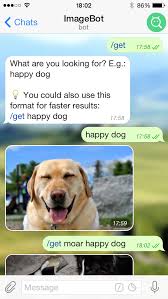
- Initiate a conversation with the bot by sending it a message.
- The bot will respond based on its programming and capabilities.
Tips For Using Telegram Bots
Here are some tips for getting the most out of Telegram bots:
- Use Specific Commands: Each bot has its own set of commands that you can use to interact with it. Experiment with different commands to see what works best.
- Customize Your Experience: Many bots allow you to customize their behavior and settings. Take advantage of these features to make the most out of your experience.
Conclusion
Telegram bots are a powerful tool for enhancing your Telegram experience. By understanding how to add bots, use them effectively, and take advantage of their features, you can unlock new possibilities for communication and productivity. Whether you’re looking to manage your time, stay informed, or simply have some fun, there’s a bot out there for you. So why not give it a try?


