
The Ultimate Guide to Finding The Best Schedules For Posting on Tiktok
Are you tired of posting on TikTok at random hours, only to have your videos seen by a handful of people? Do you want to increase your engagement and reach more viewers on this popular social media platform? Look no further! In this article, we’ll show you how to use the built-in analytics tool in the TikTok app to find the best schedules for posting on TikTok.
Why Schedules Matter on Tiktok
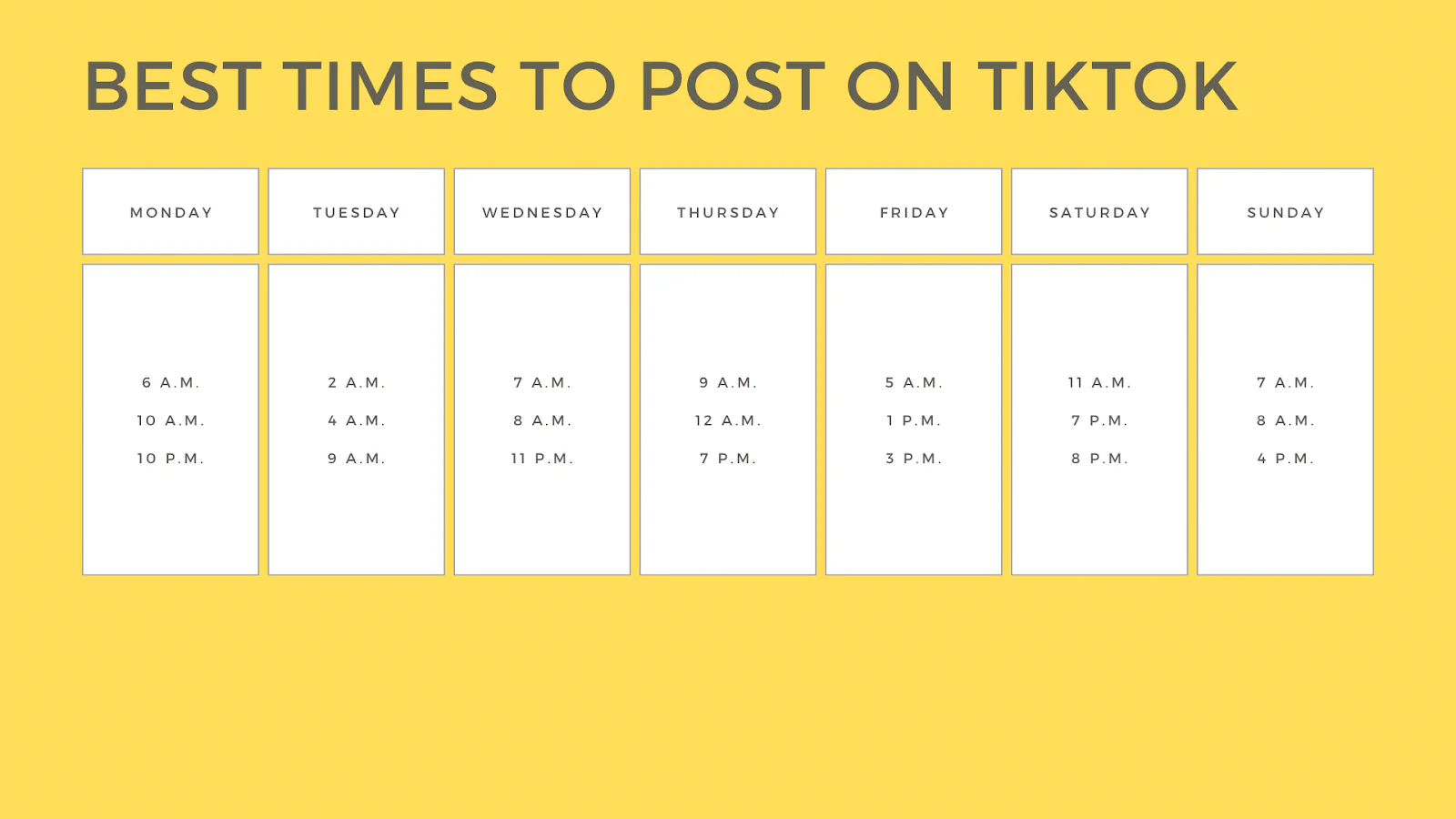
Before we dive into the nitty-gritty of using TikTok’s analytics tool, let’s talk about why schedules matter on this platform. While there’s no one-size-fits-all answer to the question of when to post on TikTok, research suggests that posting at certain times can increase your reach and engagement.
Understanding Your Audience
To determine the best schedules for posting on TikTok, you need to understand your audience. Who are they? What are their interests? When are they most active on the platform?
How to Use Tiktok’s Analytics Tool
Fortunately, TikTok provides a built-in analytics tool that can help you answer these questions and find the best schedules for posting. Here’s how to use it:
Accessing The Analytics Tool
- Open the TikTok app on your smartphone or tablet.
- Tap on the profile icon in the top-right corner of the screen.
- Select “TikTok Studio” from the menu.
H2: Viewing Your Analytics Data
Once you’re in the TikTok Studio, you’ll see a dashboard that displays various analytics data about your account and followers. To view your analytics data, tap on the “See everything” button, then select the “Analytics” tab.
Understanding Your Follower Activity
In this section of the analytics tool, you’ll see a graph showing the hours and days when your followers are most active on the platform. This is where you can find the best schedules for posting on TikTok.
Why Use The Analytics Tool?
Using the analytics tool in the TikTok app can help you:
- Increase your reach and engagement by posting at times when your followers are most active
- Understand your audience’s preferences and adjust your content accordingly
- Stay ahead of the competition by identifying trends and patterns in user behavior
Tips For Using The Analytics Tool Effectively
Here are some additional tips to keep in mind when using the analytics tool:
- Post regularly, but not too frequently. Aim for 3-5 posts per week.
- Experiment with different schedules and content types to see what works best for your audience.
- Use the data from the analytics tool to inform your content decisions, rather than relying on guesswork or assumptions.
Can You Use The Analytics Tool on a Computer?
Yes! If you prefer to use a computer instead of a smartphone or tablet, you can access the analytics tool through the TikTok website. Here’s how:
- Log in to your TikTok account on a computer.
- Click on the profile icon in the top-right corner of the screen.
- Select “Account” from the menu.
- Click on the “Analytics” tab.
Tips For Using The Analytics Tool on a Computer
When using the analytics tool on a computer, keep these tips in mind:
- Use the data from the analytics tool to inform your content decisions, just as you would with the mobile app.
- Experiment with different schedules and content types to see what works best for your audience.
- Post regularly, but not too frequently. Aim for 3-5 posts per week.
Conclusion
Finding the best schedules for posting on TikTok can help increase your reach and engagement on this popular social media platform. By using the built-in analytics tool in the TikTok app or website, you can gain valuable insights into your audience’s preferences and adjust your content accordingly. Remember to experiment with different schedules and content types, and use the data from the analytics tool to inform your content decisions. Happy posting!


