
Reviewing The Crm of Bitrix24: A Comprehensive Guide
Are you searching for a solution that simplifies the management of your company and accelerates communications with clients and collaborators? Have you ever thought about using a Customer Relationship Management (CRM) system? If not, it’s time to consider one. CRMs are software solutions that bundle various applications aimed at analyzing, managing, and optimizing business operations.
There are numerous CRM options available, including free and paid versions, classic software installations on computers, and cloud-based services. One of the most popular and effective CRMs is Bitrix24. Used by over 10 million companies worldwide, Bitrix24 is a cloud-based (also available as an app for computer, smartphone, and tablet) CRM that encompasses all the tools necessary to manage and optimize business operations.
What Makes Bitrix24 Special?
Bitrix24 includes not only typical CRM tools but also a project manager, an integrated communication platform with social media and chat features, a website builder to create your own sites easily, a contact center for managing client communications, and integration with numerous external platforms for automatic import of bids and information. All these features are accessible through a user-friendly interface translated into Italian and costing zero.
Pricing Plans
Bitrix24 offers various pricing plans to suit different business needs:
- Free Plan: Supports up to 12 users, includes 5GB of cloud storage, management tools for bills and bids, detailed reports, social network integration, Messenger support, over 30 collaboration tools, project management instruments, and more.
- Basic Plan ($49/month with annual turnover or $61/month): Supports 5 users, includes 24GB of cloud storage, and basic CRM, tasks, and blueprints, websites, online store, and contact center features.
- Standard Plan ($99/month with annual turnover or $124/month): Supports 50 users, includes all Basic plan features plus advanced instruments, a system for managing online documents, and more.
- Professional Plan ($199/month with annual turnover or $249/month): Supports 100 users, includes all Standard plan features, sales intelligence and automation tools, additional administration instruments, and more.
- Enterprise Plan (custom pricing): For large companies needing advanced instruments and innovative solutions.
All plans are available in a free trial version for 15 days, as well as quarterly, semiannual, and biennial subscription options. Visit Bitrix24’s website to learn more about their features and pricing.
The Benefits of Using Bitrix24
Bitrix24 offers numerous benefits, including:
- Simplified management and optimization of business operations
- Accelerated communication with clients and collaborators through integrated social media and chat features
- Customizable project manager for efficient task assignment and management
- Website builder for creating professional-looking websites without coding knowledge
- Contact center for effective client communication
- Integration with external platforms for automatic import of bids and information
- Scalable pricing plans to suit different business needs
Getting Started With Bitrix24
To use Bitrix24, follow these simple steps:
- Register freely on the Bitrix24 website.
- Connect your email address or phone number and choose if you want to receive updates about products and special offers.
- If desired, access using your Facebook, Google, Office, Microsoft Live, or Twitter account by clicking on the corresponding icons.
- Go to your inbox, open the message from Bitrix24, and click on the confirm email button.
- Set up a password for your account.
Using The Crm of Bitrix24
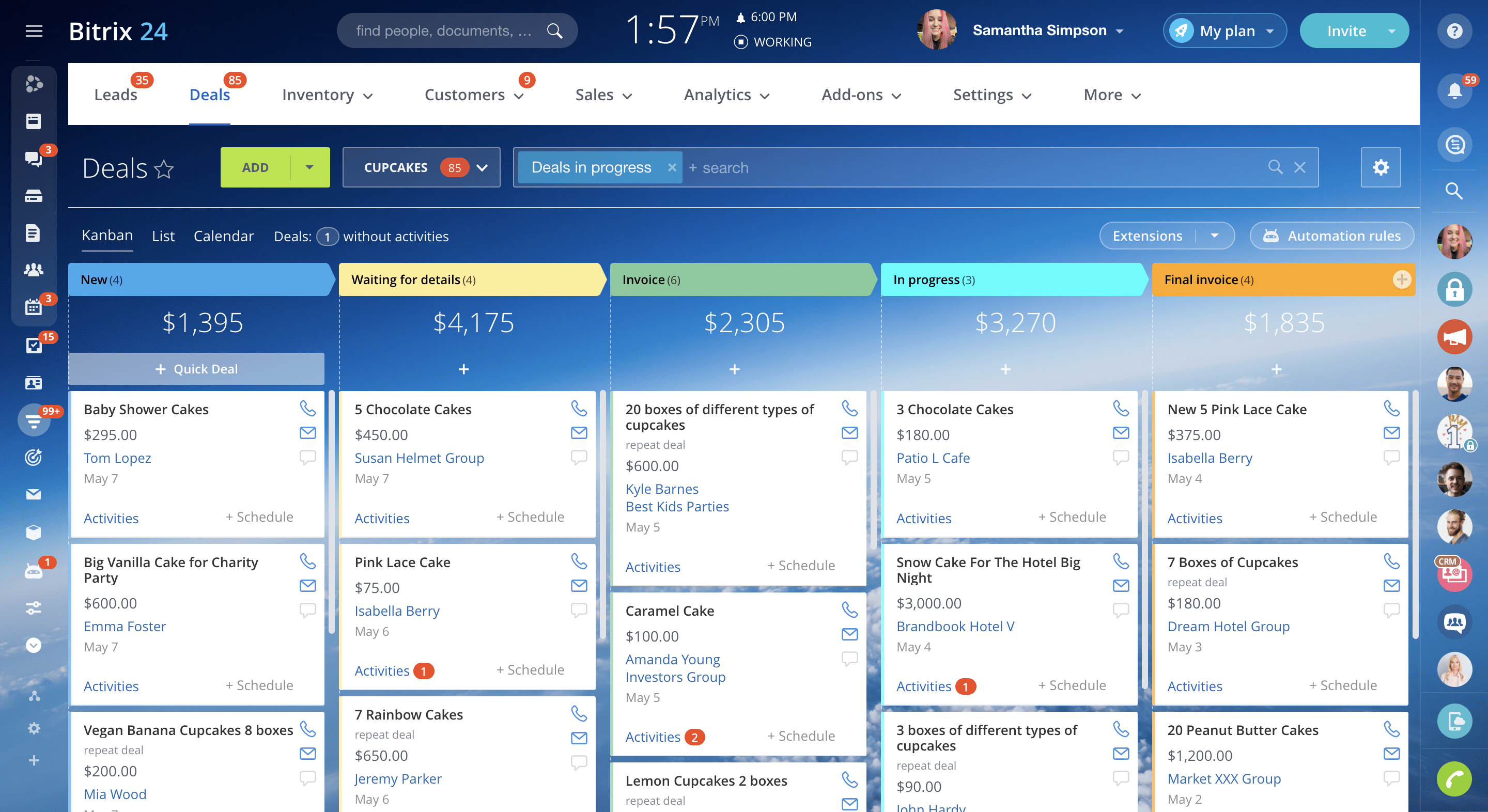
Once registered, access the CRM through the leading menu, selecting “CRM” from the list of options. The main screen displays all bids in progress. Filter bids using the bar at the top and view dependencies and chronology by expanding the bid’s details.
Create new activities by clicking on the “Add a new activity” button or adding them directly to a bid. Three visualization styles are available: Kanban, ideal for displacing bids through various phases of a sales funnel; List, suitable for estimating sales and bids; and Calendar, providing a panoramic chronological view of all bids.
Marketing Crm
The Marketing CRM section allows you to create email campaigns, configure automatic import of Google Adwords and Facebook announcements, and increase sales by repeating bids. The Analysis CRM section offers graphic, statistical, and report features on the sales funnel, slow sales, course sales, performer performances, clients, and more.
Sales Intelligence
This instrument is particularly useful for companies generating most leads and bids through online sources. It displays which source of traffic converts to sales within the CRM, what budget is spent on marketing campaigns, and what is effective.
Inviting Users And Communicating With Team Members
To invite other users to your Bitrix24 account (up to 12 in the free plan), select “Invite users” from the left menu. Choose how to forward invitations: Via a link, SMS, or email by selecting one of the corresponding sheets from the right box.
If you prefer to manually record a new user instead of inviting them via link or SMS, choose the “Record” option and fill out the required information.
Accessing Bitrix24 on Smartphone And Tablet
Download and install the official app for Android and iOS/iPadOS. Access your account using the email address and password created during registration.
Once logged in, navigate to the CRM section to create sales pipelines, modify pipeline phases, carry out calls with clients, record conversations, manage tasks, communicate via chat, view company information, access settings, and more.
Bitrix24 Drive
Use this feature to store and share files. In the free plan, you have 5GB of cloud storage available. To access Bitrix24 Drive, select the “Drive” option from the left menu.
Social Network
To access the social network, navigate to the “Flow activity” section from the left menu. This allows you to share messages and multimedia content with team members, view upcoming events, tasks, and more.
Creating a Website
If you need to create a website for your company, use Bitrix24’s web builder. There is no need to know any programming language. To access this feature, navigate to the “Sites” section from the left menu.
Bitrix24 Settings
To regulate preferences regarding format given/hour, festive days, and all CRM functions, select the “Settings” option from the left menu.
Using Bitrix24 on Desktop
In addition to using the app, you can install the client desktop for Windows, macOS, and Linux. This allows quick access to chat, drive online, and other features. To download the software, visit Bitrix24’s website, scroll down, and click on the relevant icon based on your operating system.
After installation, launch the program and log in using your email address and password. The desktop version provides a more comprehensive panel of management than the app.
Conclusion
Bitrix24 offers a range of features that can help streamline business operations, improve communication with clients and collaborators, and enhance sales performance. With its user-friendly interface and customizable plans, it’s an ideal solution for companies of all sizes.


