
How to Cancel Your Now TV Subscription: A Step-by-step Guide
Are you tired of your NOW TV subscription? Do you want to cancel it, but don’t know how? Look no further! In this article, we will guide you through the process of canceling your NOW TV subscription on various devices, including computers, smartphones, and tablets. We’ll also show you how to reactivate your subscription if needed.
Why Cancel Your Now TV Subscription?
Before we dive into the steps, let’s talk about why you might want to cancel your NOW TV subscription. Perhaps you’ve found a better streaming service that suits your needs, or maybe you’re no longer interested in watching Sky content on demand. Whatever the reason, we’ll help you through the process.
Canceling Your Now TV Subscription on Computer
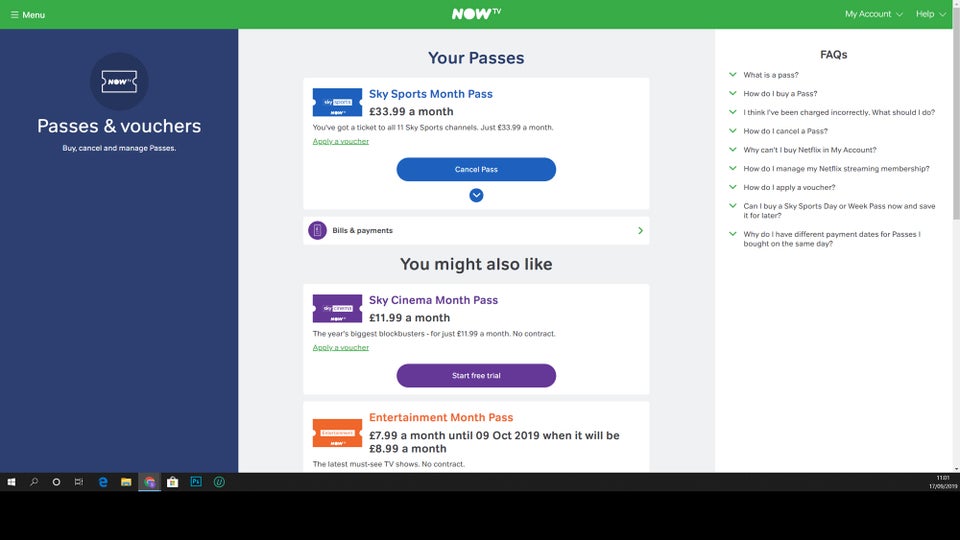
To cancel your NOW TV subscription on computer, follow these steps:
- Log in to Your Now TV Account: Go to the NOW TV website and log in with your credentials.
- Click on “My Account”: Once logged in, click on the “My Account” button at the top right corner of the screen.
- Select “Manage Passes”: In the new page that opens, select “Manage Passes”.
- Find The Pass You Want to Cancel: Locate the pass you want to cancel and click on it.
- Click on “Deactivate Pass”: Click on the “Deactivate Pass” button next to the pass you selected.
- Confirm Deactivation: Confirm that you want to deactivate the pass by clicking on the “Yes, continue” button.
Canceling Your Now TV Subscription on Smartphone or Tablet
If you’re using a smartphone or tablet, follow these steps:
- Open The Now TV App: Open the NOW TV app on your device.
- Log in to Your Account: Log in to your NOW TV account using your credentials.
- Tap on “My Account”: Tap on the “My Account” button at the bottom of the screen.
- Select “Manage Passes”: Select “Manage Passes” from the menu.
- Find The Pass You Want to Cancel: Locate the pass you want to cancel and tap on it.
- Tap on “Deactivate Pass”: Tap on the “Deactivate Pass” button next to the pass you selected.
- Confirm Deactivation: Confirm that you want to deactivate the pass by tapping on the “Yes, continue” button.
Canceling Your Now TV Subscription on Smart TV
If you’re using a smart TV, follow these steps:
- Open The Now TV App: Open the NOW TV app on your smart TV.
- Log in to Your Account: Log in to your NOW TV account using your credentials.
- Select “My Account”: Select “My Account” from the menu.
- Find The Pass You Want to Cancel: Locate the pass you want to cancel and select it.
- Click on “Deactivate Pass”: Click on the “Deactivate Pass” button next to the pass you selected.
- Confirm Deactivation: Confirm that you want to deactivate the pass by clicking on the “Yes, continue” button.
Canceling Your Now TV Subscription With Vodafone
If you’ve actuated a Vodafone TV bid that includes access to NOW, follow these steps:
- Log in to Your Vodafone Account: Log in to your Vodafone account using your credentials.
- Select “Vodafone Tv”: Select “Vodafone TV” from the menu.
- Find The Pass You Want to Cancel: Locate the pass you want to cancel and select it.
- Click on “Deactivate Pass”: Click on the “Deactivate Pass” button next to the pass you selected.
- Confirm Deactivation: Confirm that you want to deactivate the pass by clicking on the “Yes, continue” button.
Troubleshooting: What if I Have Problems Canceling My Subscription?
If you encounter any problems canceling your NOW TV subscription, don’t worry! You can contact NOW’s customer support team for assistance. Follow these steps:
- Go to The Now TV Website: Go to the NOW TV website and click on “Support”.
- Search For Answers: Search for answers to your questions in the FAQs section.
- Chat With a Representative: If you still need help, chat with a NOW TV representative.
- Call Customer Support: If you prefer to speak with someone directly, call NOW’s customer support team.
Conclusion
Canceling your NOW TV subscription is a straightforward process that can be completed on various devices. We hope this guide has helped you through the steps and resolve any doubts you may have had. Remember to always check your account status after canceling your subscription to ensure it’s been deactivated successfully.
Frequently Asked Questions (FAQs)
- Q: Can I reactivate my NOW TV subscription if I change my mind?
A: Yes, you can reactivate your NOW TV subscription at any time. - Q: How do I contact NOW’s customer support team for assistance?
A: You can contact NOW’s customer support team by chatting with a representative on their website or calling them directly.


