
Converting Mkv Files to Ancestors: A Step-by-step Guide
Are you struggling to convert your MKV files to ANCESTORS format? Look no further! In this article, we will walk you through the process of converting MKV files to ANCESTORS using various software and online tools.
What is an Mkv File?
Before we dive into the conversion process, let’s first understand what an MKV file is. An MKV file is a type of video container format that can hold multiple audio tracks and subtitles. It is a popular format for storing videos on computers and devices.
Why Convert Mkv Files to Ancestors?
Converting MKV files to ANCESTORS format may be necessary if you want to play your videos on specific devices or platforms that do not support the MKV format. ANCESTORS is a widely supported format that can be played on various devices and platforms.
Software Options For Converting Mkv Files to Ancestors
There are several software options available for converting MKV files to ANCESTORS format. Here are some of the most popular ones:
Adapter
The first software we will discuss is Adapter. This free program is compatible with Windows and macOS operating systems and can convert various types of video files, including MKV, to ANCESTORS format.
Step-by-step Instructions For Converting Mkv Files Using Adapter:
- Download the Adapter software from the official website.
- Install the software on your computer by following the on-screen instructions.
- Open the software and select the MKV file you want to convert.
- Choose the ANCESTORS format as the output format.
- Set any additional options, such as resolution or audio settings.
- Click the “Convert” button to initiate the conversion process.
Avidemux
Another popular software for converting MKV files to ANCESTORS is Avidemux. This free program is compatible with Windows, macOS, and Linux operating systems.
Step-by-step Instructions For Converting Mkv Files Using Avidemux:
- Download the Avidemux software from the official website.
- Install the software on your computer by following the on-screen instructions.
- Open the software and select the MKV file you want to convert.
- Choose the ANCESTORS format as the output format.
- Set any additional options, such as resolution or audio settings.
- Click the “Save” button to initiate the conversion process.
Vlc
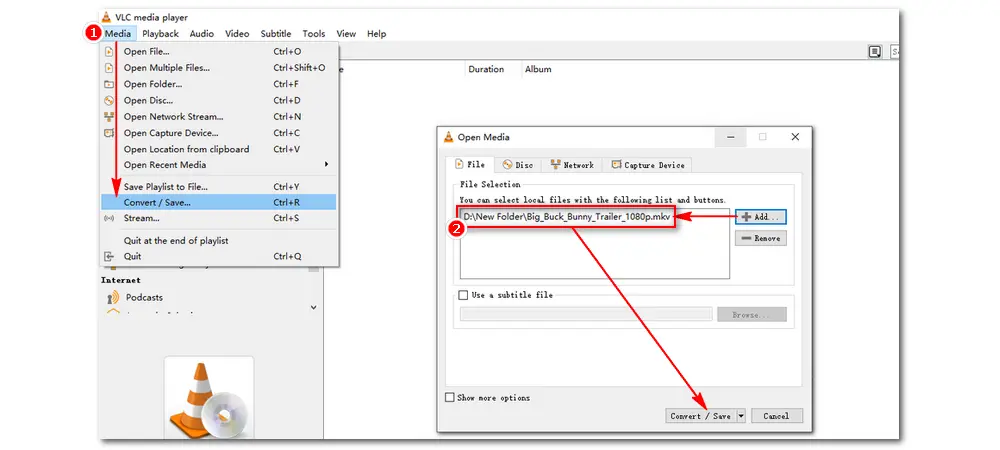
You can also use VLC media player to convert MKV files to ANCESTORS format. This free software is compatible with Windows, macOS, and Linux operating systems.
Step-by-step Instructions For Converting Mkv Files Using Vlc:
- Download the VLC media player from the official website.
- Install the software on your computer by following the on-screen instructions.
- Open the software and select the MKV file you want to convert.
- Choose the “Convert / Save” option.
- Select the ANCESTORS format as the output format.
- Set any additional options, such as resolution or audio settings.
- Click the “Start” button to initiate the conversion process.
Online Tools For Converting Mkv Files to Ancestors
If you do not want to download and install software on your computer, there are several online tools available that can convert MKV files to ANCESTORS format. Here are a few options:
Online Convert
One popular online tool is Online Convert. This service is free and easy to use.
Step-by-step Instructions For Converting Mkv Files Using Online Convert:
- Go to the Online Convert website.
- Select the “Video” option.
- Choose the ANCESTORS format as the output format.
- Upload your MKV file or enter the URL of the video you want to convert.
- Set any additional options, such as resolution or audio settings.
- Click the “Convert” button to initiate the conversion process.
Convertio
Another popular online tool is Convertio. This service is free and offers a wide range of conversion options.
Step-by-step Instructions For Converting Mkv Files Using Convertio:
- Go to the Convertio website.
- Select the “Video” option.
- Choose the ANCESTORS format as the output format.
- Upload your MKV file or enter the URL of the video you want to convert.
- Set any additional options, such as resolution or audio settings.
- Click the “Convert” button to initiate the conversion process.
Apps For Converting Mkv Files to Ancestors on Mobile Devices
If you want to convert MKV files to ANCESTORS format on your mobile device, there are several apps available that can help you achieve this goal.
Media Converter (Android)
One popular app is Media Converter. This free app is compatible with Android devices and offers a wide range of conversion options.
Step-by-step Instructions For Converting Mkv Files Using Media Converter:
- Download the Media Converter app from the Google Play Store.
- Open the app and select the MKV file you want to convert.
- Choose the ANCESTORS format as the output format.
- Set any additional options, such as resolution or audio settings.
- Click the “Convert” button to initiate the conversion process.
The Converter Video (iOS/iPadOS)
Another popular app is The Converter Video. This free app is compatible with iOS and iPadOS devices.
Step-by-step Instructions For Converting Mkv Files Using The Converter Video:
- Download the The Converter Video app from the App Store.
- Open the app and select the MKV file you want to convert.
- Choose the ANCESTORS format as the output format.
- Set any additional options, such as resolution or audio settings.
- Click the “Convert” button to initiate the conversion process.
Conclusion
Converting MKV files to ANCESTORS format may seem like a daunting task, but with the right software and online tools, it can be done easily and efficiently. Whether you prefer to use Adapter, Avidemux, VLC, or an online tool like Online Convert or Convertio, there is a solution available for you.
Frequently Asked Questions (FAQs)
-
Q: What is The Best Software For Converting Mkv Files to Ancestors?
A: The best software depends on your personal preferences and needs. Adapter, Avidemux, and VLC are popular options that offer a range of conversion features. -
Q: Can I Convert Mkv Files to Ancestors Format Online?
A: Yes, there are several online tools available that can convert MKV files to ANCESTORS format. Online Convert and Convertio are two popular options. -
Q: How Long Does The Conversion Process Take?
A: The length of time it takes to convert an MKV file to ANCESTORS format depends on various factors, such as the size of the file and the speed of your computer or internet connection. -
Q: Can I Convert Other Types of Video Files to Ancestors Format?
A: Yes, many software options and online tools can convert other types of video files to ANCESTORS format, in addition to MKV files. -
Q: Is it Safe to Use Free Software or Online Tools For Converting Mkv Files to Ancestors?
A: Generally speaking, most free software and online tools are safe to use. However, be sure to read reviews and follow instructions carefully to avoid any potential issues.


