
The Ultimate Guide to Dual Sim Phones: A Comprehensive Review
Table of Contents
- What is a Dual Sim Phone?
- How Do Dual Sim Phones Work?
- Types of Dual Sim Phones
- Dual Sim Phone Characteristics
- Using Multiple Sim Cards on a Single Phone
- Managing Multiple Lines And Contacts on a Dual Sim Phone
- Tips For Choosing The Right Dual Sim Phone
- How to Insert And Remove Sim Cards From a Dual Sim Phone
- Configuring Dual Sim Phones: A Step-by-step Guide
- Apps That Support Dual Sim Phones
- Saily: A Revolutionary Esim Service For Travelers
- Airalo: The Ultimate Platform For Esim Solutions
What is a Dual Sim Phone?
A dual SIM phone, also known as a dual standby phone, is a mobile device that allows users to have two separate phone numbers and lines on a single device. This feature is particularly useful for individuals who need to maintain multiple phone numbers for personal or professional reasons.
How Do Dual Sim Phones Work?
Dual SIM phones work by using two separate SIM cards, each with its own unique identifier and phone number. The device can then use one or both SIM cards to make calls, send texts, and access the internet. Some dual SIM phones also support VoLTE (Voice over LTE), which allows for high-quality voice calls over 4G networks.
Types of Dual Sim Phones
There are several types of dual SIM phones available on the market:
- Dual Sim Full Active (DSFA): These devices use both SIM cards simultaneously, allowing users to receive calls and texts on both numbers.
- Dual Sim Standby (DSDS): These phones have two active SIM cards, but only one can be used at a time. When a call is received on the other line, it will go to voicemail.
- Dual Sim Vault: These devices support 4G connectivity on both SIM slots and allow for simultaneous use of both lines.
Dual Sim Phone Characteristics
Dual SIM phones have several characteristics that set them apart from single SIM phones:
- Dimension And Technology: Dual SIM phones are often slightly larger than single SIM phones, due to the additional hardware required to support two SIM cards.
- Display Resolution And Camera Count: While some dual SIM phones may have lower display resolution or camera count compared to single SIM phones, many modern devices offer high-quality displays and cameras regardless of their SIM capabilities.
- Processor And Ram: Dual SIM phones often use similar processors and RAM as single SIM phones, ensuring smooth performance and multitasking.
Using Multiple Sim Cards on a Single Phone
Inserting multiple SIM cards into a dual SIM phone is relatively straightforward:
- Remove The Back Cover: Take out the back cover of your phone to access the SIM card slot.
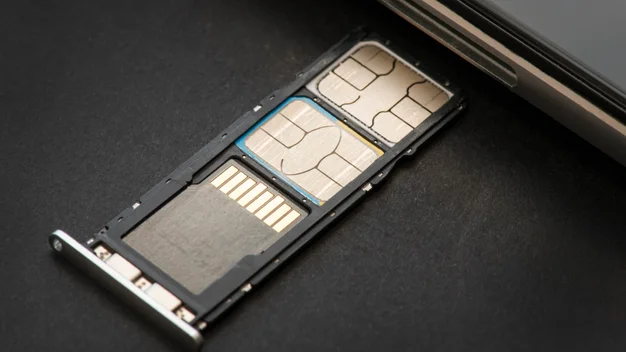
- Pull Out The Sim Card Tray: Gently pull out the SIM card tray, which usually has two separate slots for each SIM card.
- Insert Both Sim Cards: Insert both SIM cards into their respective slots, making sure they are aligned properly and fully seated.
- Replace The Back Cover: Put back the phone’s back cover, ensuring it is securely locked in place.
Managing Multiple Lines And Contacts on a Dual Sim Phone
Managing multiple lines and contacts on a dual SIM phone can be done through the device’s settings:
- Open Settings: Go to your phone’s settings app.
- Select “SIM Cards” or “Dual Sim”: Look for an option that says “SIM Cards” or “Dual SIM.”
- Configure Each Line: Configure each line separately, including setting up call forwarding and voicemail.
Tips For Choosing The Right Dual Sim Phone
When choosing a dual SIM phone, consider the following factors:
- Compatibility: Ensure the device is compatible with your carrier’s frequencies.
- Operating System: Choose a phone that runs on an operating system you’re familiar with.
- Storage And Ram: Consider the storage capacity and RAM required for your needs.
How to Insert And Remove Sim Cards From a Dual Sim Phone
Inserting and removing SIM cards from a dual SIM phone is similar to other phones:
- Remove The Back Cover: Take out the back cover of your phone.
- Pull Out The Sim Card Tray: Gently pull out the SIM card tray.
- Insert or Remove Sim Cards: Insert or remove SIM cards as needed.
Configuring Dual Sim Phones: A Step-by-step Guide
Configuring a dual SIM phone is relatively straightforward:
- Open Settings: Go to your phone’s settings app.
- Select “SIM Cards” or “Dual Sim”: Look for an option that says “SIM Cards” or “Dual SIM.”
- Configure Each Line: Configure each line separately, including setting up call forwarding and voicemail.
Apps That Support Dual Sim Phones
Some popular apps that support dual SIM phones include:
- Whatsapp Business: Allows you to manage two separate WhatsApp accounts on a single device.
- Facebook Messenger: Supports simultaneous use of multiple phone numbers for messaging and calling.
Saily: A Revolutionary Esim Service For Travelers
Saily is an eSIM service designed specifically for travelers. It offers a range of data plans that can be used across 150 countries, making it easy to stay connected while abroad.
Airalo: The Ultimate Platform For Esim Solutions
Airalo is a platform that provides eSIM solutions for travelers and individuals who need access to the internet without incurring roaming charges. Their service supports local, regional, and global eSIMs, offering flexibility and convenience.
In conclusion, dual SIM phones offer a range of benefits for users who need to maintain multiple phone numbers or lines on a single device. By understanding how these devices work, what types are available, and how to configure them, you can make informed decisions when choosing the right dual SIM phone for your needs.


