
Programs For Tickets of Recognition Free: A Comprehensive Guide
Are you looking for ways to create tickets of recognition without spending a dime? Look no further! In this article, we’ll explore the best programs for creating free tickets of recognition, including Microsoft Word, Pages, Cardworks Business Card, Canva, and VistaPrint.
The Benefits of Using Free Programs
Using free programs to create tickets of recognition can be a great way to save money and time. Not only are these programs often free or low-cost, but they also offer a range of features and templates that can help you create professional-looking tickets quickly and easily.
Programs For Tickets of Recognition Free
Microsoft Word (Windows/MacOS)
Microsoft Word is one of the most popular word processing software programs on the market. And it’s not just for creating documents – it’s also great for creating tickets of recognition!
To get started, open Microsoft Word and click on “Search online” in the top menu bar. Type in “tickets of recognition” and press enter. You’ll see a list of available templates to choose from.
Step-by-step Guide:
- Open Microsoft Word
- Click on “Search online”
- Type in “tickets of recognition” and press enter
- Choose a template that suits your needs
- Customize the template with your personal and professional information
- Save the ticket as a PDF or print it out
Pages (MacOS)
Pages is another popular word processing software program that’s perfect for creating tickets of recognition.
To get started, open Pages and click on the “+” button in the top left corner of the screen. Choose the “Ticket of Recognition” template from the list of available templates.
Step-by-step Guide:
- Open Pages
- Click on the “+” button
- Choose the “Ticket of Recognition” template
- Customize the template with your personal and professional information
- Save the ticket as a PDF or print it out
Cardworks Business Card (Windows/MacOS)
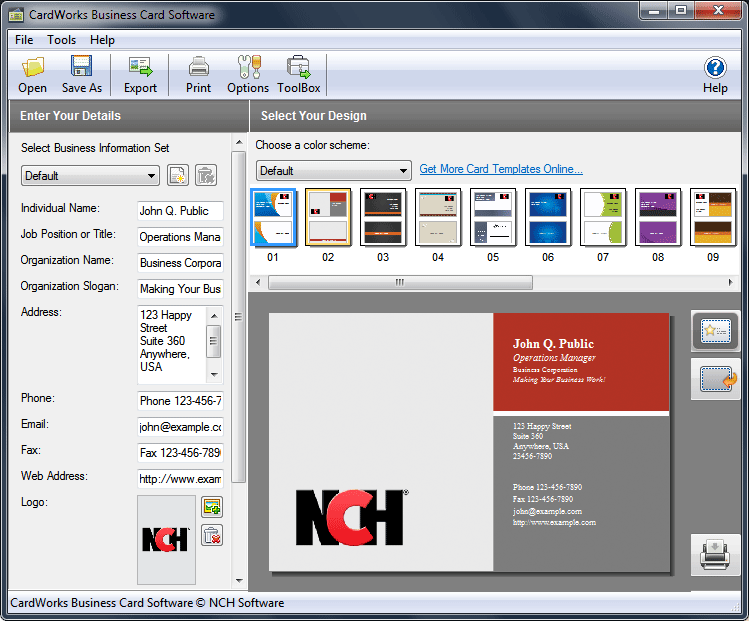
Cardworks Business Card is a great program for creating business cards, but it’s also perfect for creating tickets of recognition.
To get started, download and install the program from the official website. Once installed, open the program and choose the “Ticket of Recognition” template from the list of available templates.
Step-by-step Guide:
- Download and install Cardworks Business Card
- Open the program and choose the “Ticket of Recognition” template
- Customize the template with your personal and professional information
- Save the ticket as a PDF or print it out
Canva (Web)
Canva is a popular online graphic design platform that’s perfect for creating tickets of recognition.
To get started, sign up for a free account on the Canva website. Once signed in, click on the “Create a design” button and choose the “Ticket of Recognition” template from the list of available templates.
Step-by-step Guide:
- Sign up for a free Canva account
- Click on the “Create a design” button
- Choose the “Ticket of Recognition” template
- Customize the template with your personal and professional information
- Save the ticket as a PDF or print it out
Vistaprint (Web)
VistaPrint is another popular online graphic design platform that’s perfect for creating tickets of recognition.
To get started, sign up for a free account on the VistaPrint website. Once signed in, click on the “Create a design” button and choose the “Ticket of Recognition” template from the list of available templates.
Step-by-step Guide:
- Sign up for a free VistaPrint account
- Click on the “Create a design” button
- Choose the “Ticket of Recognition” template
- Customize the template with your personal and professional information
- Save the ticket as a PDF or print it out
Conclusion
Creating tickets of recognition doesn’t have to break the bank! With these free programs, you can create professional-looking tickets quickly and easily.
Whether you’re looking for a simple template or advanced features, there’s a program on this list that’s perfect for your needs. So why wait? Get started today and see what amazing things you can create!
Faqs
- What is The Best Program For Creating Tickets of Recognition?
- The best program for creating tickets of recognition depends on your personal preferences and needs. If you’re looking for a simple template, Microsoft Word or Pages might be the way to go. If you’re looking for more advanced features, Canva or VistaPrint might be a better choice.
- Can I Use These Programs For Free?
- Yes! All of the programs mentioned in this article offer free versions that you can use to create tickets of recognition.
- How do I Customize The Templates?
- To customize the templates, simply click on the elements you want to change and type in your own information.
- Can I Save my Tickets as Pdfs or Print Them Out?
- Yes! All of the programs mentioned in this article allow you to save your tickets as PDFs or print them out directly from the program.
- Are These Programs Available For Mobile Devices?
- Some of the programs, like Canva and Pages, have mobile versions that you can download on your phone or tablet.
The Final Word
Creating tickets of recognition doesn’t have to be a hassle! With these free programs, you can create professional-looking tickets quickly and easily. Whether you’re looking for a simple template or advanced features, there’s a program on this list that’s perfect for your needs. So why wait? Get started today and see what amazing things you can create!


