
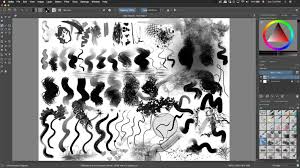
Unlocking Your Creativity: Top Free Graphic Tablet Programs
Are you excited about unleashing your artistic side? Got a new graphic tablet, but unsure which software to use? Look no further! In this article, we’ll explore the best free graphic tablet programs available for Windows, macOS, and Linux. From digital painting to comic strip creation, we’ve got you covered.
What You Need to Get Started
Before diving into the world of graphic design, make sure you have:
- A compatible operating system (Windows, macOS, or Linux)
- A graphic tablet (Wacom or other brands)
- A computer with a stable internet connection
Top Free Graphic Tablet Programs
1. Krita: The Ultimate Digital Painting Experience
Krita is an open-source digital painting and illustration software that’s optimized for creative work. Available on Windows, macOS, and Linux, Krita offers:
- A vast array of brushes and tools
- Support for layers and masks
- Compatibility with various file formats
Getting Started With Krita
- Visit the official Krita website to download the latest version.
- Follow the installation instructions specific to your operating system.
- Launch Krita and explore its intuitive interface.
2. Gravit Designer: A Powerful Vector Graphics Editor
Gravit Designer is a user-friendly vector graphics editor that rivals Adobe Illustrator. Available on Windows, macOS, and Linux, Gravit offers:
- A vast library of shapes and tools
- Support for layers and groups
- Compatibility with various file formats
Getting Started With Gravit Designer
- Visit the official Gravit website to download the latest version.
- Follow the installation instructions specific to your operating system.
- Launch Gravit and explore its intuitive interface.
3. Mypaint: A Simple Yet Powerful Painting Experience
MyPaint is a lightweight painting software that’s perfect for beginners. Available on Windows and Linux, MyPaint offers:
- A simple and intuitive interface
- Support for various brush styles and tools
- Compatibility with various file formats
Getting Started With Mypaint
- Visit the official MyPaint website to download the latest version.
- Follow the installation instructions specific to your operating system.
- Launch MyPaint and explore its user-friendly interface.
4. Gimp: A Free Alternative to Adobe Photoshop
GIMP is a free and open-source raster graphics editor that’s available on Windows, macOS, and Linux. While not specifically designed for graphic tablets, GIMP offers:
- A vast array of tools and filters
- Support for layers and masks
- Compatibility with various file formats
Getting Started With Gimp
- Visit the official GIMP website to download the latest version.
- Follow the installation instructions specific to your operating system.
- Launch GIMP and explore its user-friendly interface.
5. Inkscape: A Free Vector Graphics Editor
Inkscape is a free and open-source vector graphics editor that’s available on Windows, macOS, and Linux. While not specifically designed for graphic tablets, Inkscape offers:
- A vast library of shapes and tools
- Support for layers and groups
- Compatibility with various file formats
Getting Started With Inkscape
- Visit the official Inkscape website to download the latest version.
- Follow the installation instructions specific to your operating system.
- Launch Inkscape and explore its user-friendly interface.
6. Paint.net: A Windows-specific Painting Software
Paint.NET is a free painting software specifically designed for Windows. While not compatible with graphic tablets, Paint.NET offers:
- A simple and intuitive interface
- Support for various brush styles and tools
- Compatibility with various file formats
Getting Started With Paint.Net
- Visit the official Paint.NET website to download the latest version.
- Follow the installation instructions specific to your operating system.
- Launch Paint.NET and explore its user-friendly interface.
Conclusion
Unleash your creativity with these top free graphic tablet programs! From digital painting to comic strip creation, there’s a software out there for you. Remember to follow the installation instructions specific to your operating system and explore each program’s unique features.
Frequently Asked Questions (FAQs)
- What is The Best Free Graphic Tablet Program?
The best free graphic tablet program depends on your personal preferences and needs. Krita, Gravit Designer, and MyPaint are excellent choices for digital painting and illustration, while GIMP and Inkscape offer a wide range of features for raster and vector graphics.
- Can I Use These Programs With my Wacom Graphic Tablet?
Yes, all the mentioned programs are compatible with Wacom graphic tablets. Make sure to follow the installation instructions specific to your operating system and device.
- Do I Need to be a Skilled Artist to Use These Programs?
No, you don’t need to be an experienced artist to use these programs. Each software has a user-friendly interface that’s perfect for beginners.
- Can I Export my Creations in Various Formats?
Yes, all the mentioned programs allow exporting your creations in various file formats, such as PNG, JPEG, SVG, and PDF.
- Are These Programs Available on Linux?
Yes, most of the mentioned programs are available on Linux, with the exception of Paint.NET, which is Windows-specific.
- Can I Use These Programs For Commercial Purposes?
Please check the terms and conditions of each software to ensure you’re allowed to use them for commercial purposes.
- Do These Programs Have a User Manual or Tutorial?
Yes, all the mentioned programs come with user manuals or tutorials that guide you through their features and functionality.
- Can I Customize The Interface And Settings of These Programs?
Yes, most of the mentioned programs allow customizing the interface and settings to suit your needs and preferences.


