
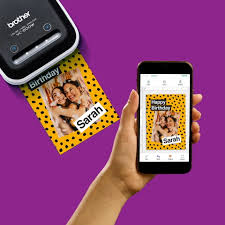
The Ultimate Guide to Creating Custom Labels With Mobile Apps
As a small business owner or entrepreneur, creating custom labels for your products can be a daunting task, especially if you don’t have any design experience. However, with the rise of mobile apps, it’s now easier than ever to create professional-looking labels right from your smartphone.
In this article, we’ll explore some of the best mobile apps available for creating custom labels, and show you how to use them to create stunning labels that will help you stand out in the market.
What Are Custom Labels?
Custom labels are personalized stickers or tags that can be attached to products, packaging, or even promotional materials. They’re a great way to add a personal touch to your branding, and can be used for various purposes such as product labeling, gift wrapping, or even advertising.
Benefits of Using Mobile Apps For Label Creation
Using mobile apps for label creation offers several benefits, including:
- Convenience: With mobile apps, you can create labels anywhere, anytime, as long as you have your smartphone with you.
- Time-saving: Mobile apps save you time and effort compared to traditional methods of creating labels.
- Cost-effective: Using mobile apps is a cost-effective way to create custom labels without breaking the bank.
Top Mobile Apps For Creating Custom Labels
Here are some of the top mobile apps available for creating custom labels:
1. Labels Personalizzate App (Android)
The Labels Personalizzate app is one of the most popular and user-friendly label creation apps available for Android devices. It offers a wide range of customization options, including font styles, colors, and shapes.
To use this app, simply download it from the Play Store, select the type of label you want to create, and customize it using the various tools provided. You can then save your design in PNG or JPG format and print it out.
2. Labels Personalizzate: Logotype (Android)
This app is another popular option for creating custom labels on Android devices. It offers a range of features, including text editing, shape creation, and image importation.
To use this app, simply select the type of label you want to create, add your design elements using the various tools provided, and customize it as desired. You can then save your design in PDF format and print it out.
3. Creator #Label And Printer (Android)
The Creator #Label and Printer app is a user-friendly and feature-rich option for creating custom labels on Android devices. It offers a range of features, including text editing, shape creation, and image importation.
To use this app, simply select the type of label you want to create, add your design elements using the various tools provided, and customize it as desired. You can then save your design in PDF format and print it out.
4. #Create Label: *etichettatrice (iOS)
This app is a popular option for creating custom labels on iOS devices. It offers a range of features, including text editing, shape creation, and image importation.
To use this app, simply select the type of label you want to create, add your design elements using the various tools provided, and customize it as desired. You can then save your design in PDF format and print it out.
5. Canva (Android And Ios)
Canva is a popular graphic design app that offers a range of features for creating custom labels, including text editing, shape creation, and image importation.
To use this app, simply select the type of label you want to create, add your design elements using the various tools provided, and customize it as desired. You can then save your design in PDF format and print it out.
6. Microsoft Word (Android And Ios)
Microsoft Word is a popular word processing app that offers a range of features for creating custom labels, including text editing and image importation.
To use this app, simply select the type of label you want to create, add your design elements using the various tools provided, and customize it as desired. You can then save your design in PDF format and print it out.
Conclusion
In conclusion, creating custom labels with mobile apps is a convenient, time-saving, and cost-effective way to enhance your branding and marketing efforts. By exploring some of the top mobile apps available for label creation, you can create stunning labels that will help you stand out in the market.
Frequently Asked Questions (FAQs)
Here are some frequently asked questions about using mobile apps for label creation:
Q: What Are The Benefits of Using Mobile Apps For Label Creation?
A: The benefits of using mobile apps for label creation include convenience, time-saving, and cost-effectiveness.
Q: Which Mobile App is Best For Creating Custom Labels?
A: The best mobile app for creating custom labels depends on your personal preferences and needs. Some popular options include Labels Personalizzate App, Labels Personalizzate: Logotype, Creator #Label and Printer, and Canva.
Q: How do I Create a Custom Label Using a Mobile App?
A: To create a custom label using a mobile app, simply select the type of label you want to create, add your design elements using the various tools provided, and customize it as desired. You can then save your design in PDF format and print it out.
Q: Can I Use Mobile Apps For Creating Labels on Both Android And Ios Devices?
A: Yes, many mobile apps available for creating custom labels are compatible with both Android and iOS devices.
Q: How Much Does it Cost to Create Custom Labels Using a Mobile App?
A: The cost of creating custom labels using a mobile app varies depending on the specific app you choose. Some apps offer free versions or trials, while others may require a subscription or one-time payment.
Q: Can I Import Images And Shapes Into my Label Design Using a Mobile App?
A: Yes, many mobile apps for creating custom labels allow you to import images and shapes into your design.
Q: How do I Save And Print my Custom Label Design?
A: To save and print your custom label design, simply select the “Save” option within the app, choose the desired format (e.G., PDF), and then print out the design using a printer.


