
The Ultimate Guide to Free Mp3 Converters: How to Easily Convert Music Files on Your Device
Are you tired of struggling to convert music files on your device? Do you want to listen to your favorite songs in the format that suits you best? Look no further! In this article, we will explore the world of free MP3 converters and show you how to easily convert music files on your Windows, macOS, Linux, Android, or iOS device.
The Problem With Music File Formats
When you download music from the internet, it’s often in a format that doesn’t work well with your media player. This can be frustrating, especially if you want to listen to your favorite songs on the go. The good news is that there are free MP3 converters available that can solve this problem.
What is an Mp3 Converter?
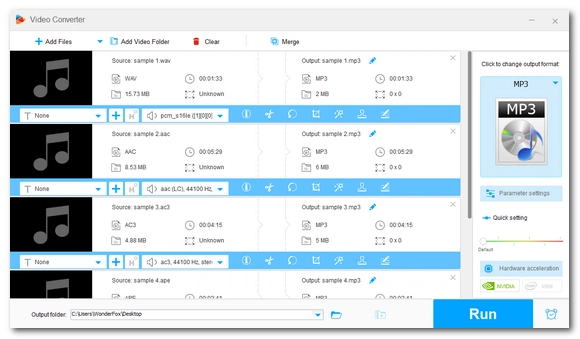
An MP3 converter is a software or app that allows you to convert music files from one format to another. This means you can take a file in a format like WAV, FLAC, or OGG and convert it to MP3, which is a more widely supported format. With an MP3 converter, you can enjoy your favorite songs on any device with an MP3 player.
Free Mp3 Converters For Windows
If you’re using a Windows computer, there are several free MP3 converters available that you can use. Here are some of the best ones:
- Fre:Ac: This is a popular and reliable free MP3 converter that supports multiple formats, including MP3, WMA, OGG, FLAC, AAC, WAV, and Bonk. It’s easy to use and has a user-friendly interface.
- Mediahuman Free Audio Converter: This is another great option for Windows users. It allows you to convert audio files from one format to another, and it supports multiple formats, including MP3, WMA, AAC, WAV, FLAC, OGG, AIFF, and Apple Lossless.
Free Mp3 Converters For Macos
If you’re using a Mac, there are also several free MP3 converters available that you can use. Here are some of the best ones:
- Fre:Ac: This is the same converter we mentioned earlier, which supports multiple formats, including MP3, WMA, OGG, FLAC, AAC, WAV, and Bonk.
- Mediahuman Free Audio Converter: This is another great option for Mac users. It allows you to convert audio files from one format to another, and it supports multiple formats, including MP3, WMA, AAC, WAV, FLAC, OGG, AIFF, and Apple Lossless.
Free Mp3 Converters For Linux
If you’re using a Linux computer, there are also several free MP3 converters available that you can use. Here are some of the best ones:
- Fre:Ac: This is the same converter we mentioned earlier, which supports multiple formats, including MP3, WMA, OGG, FLAC, AAC, WAV, and Bonk.
- Mediahuman Free Audio Converter: This is another great option for Linux users. It allows you to convert audio files from one format to another, and it supports multiple formats, including MP3, WMA, AAC, WAV, FLAC, OGG, AIFF, and Apple Lossless.
Free Mp3 Converters For Android
If you’re using an Android device, there are also several free MP3 converters available that you can use. Here are some of the best ones:
- Media Converter: This is a popular app that allows you to convert audio files from one format to another. It supports multiple formats, including MP3, WAV, FLAC, and OGG.
- Audio Converter: This is another great option for Android users. It allows you to convert audio files from one format to another, and it supports multiple formats, including MP3, WMA, AAC, WAV, FLAC, OGG, AIFF, and Apple Lossless.
Free Mp3 Converters For Ios
If you’re using an iOS device, there are also several free MP3 converters available that you can use. Here are some of the best ones:
- The Audio Converter: This is a popular app that allows you to convert audio files from one format to another. It supports multiple formats, including MP3, WAV, FLAC, and OGG.
- Audio Converter: This is another great option for iOS users. It allows you to convert audio files from one format to another, and it supports multiple formats, including MP3, WMA, AAC, WAV, FLAC, OGG, AIFF, and Apple Lossless.
How to Use a Free Mp3 Converter
Using a free MP3 converter is easy. Here are the general steps you can follow:
- Download And Install The Converter: Download the converter from the official website or app store.
- Choose The Input Format: Select the format of the file you want to convert, such as WAV, FLAC, or OGG.
- Choose The Output Format: Select the format you want to convert the file to, such as MP3.
- Set The Bitrate And Other Options: Set the bitrate and other options for the conversion process.
- Convert The File: Click on the “Convert” button to start the conversion process.
Tips And Tricks
Here are some tips and tricks you can use when converting music files:
- Use a High Bitrate: Use a high bitrate, such as 256 kbps or higher, to ensure good quality audio.
- Choose The Right Output Format: Choose the output format that is most compatible with your device and media player.
- Check The File Size: Check the file size before converting to ensure it’s not too large.
Conclusion
In conclusion, free MP3 converters are a great way to convert music files on your Windows, macOS, Linux, Android, or iOS device. With so many options available, you’re sure to find one that suits your needs. Whether you’re looking for a simple and easy-to-use converter or something more advanced, there’s an option out there for you.
Faqs
Here are some frequently asked questions about free MP3 converters:
- What is The Best Free Mp3 Converter?
The best free MP3 converter depends on your specific needs and preferences. - Can I Convert Music Files From One Format to Another Using a Free Mp3 Converter?
Yes, you can convert music files from one format to another using a free MP3 converter. - Is it Safe to Use a Free Mp3 Converter?
Yes, most free MP3 converters are safe to use and won’t harm your device or data. - Can I Convert Multiple Audio Files at Once Using a Free Mp3 Converter?
Yes, many free MP3 converters allow you to convert multiple audio files at once. - What Formats do Free Mp3 Converters Support?
Most free MP3 converters support multiple formats, including MP3, WMA, AAC, WAV, FLAC, OGG, AIFF, and Apple Lossless.
We hope this article has been helpful in answering your questions about free MP3 converters! If you have any other questions or need further assistance, feel free to ask.


