
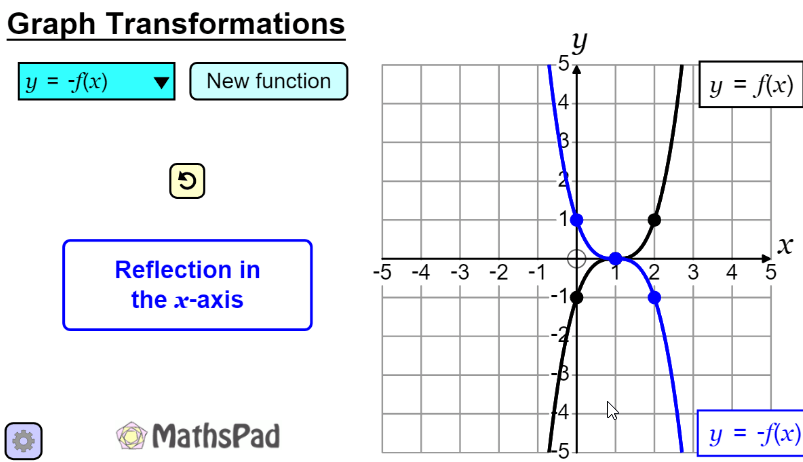
Unlocking The Power of Function Charts: A Guide to Software And Apps
As we delve into the world of mathematics, one fundamental tool emerges that helps us visualize and understand complex functions: The function chart. In this article, we’ll explore various software programs and apps designed to create function charts, catering to different operating systems and user preferences.
The Importance of Function Charts
Function charts are graphical representations of mathematical functions, providing a visual aid for understanding relationships between variables. These charts are essential in mathematics, physics, engineering, and other fields where complex functions need to be analyzed and visualized.
Software Programs For Creating Function Charts
In this section, we’ll explore free software programs that enable you to create function charts on your computer.
Wxmaxima (Windows/macOS/Linux)
The first program we recommend is wxMaxima. This open-source software is designed specifically for mathematics and function chart creation. It’s available for Windows, macOS, and Linux operating systems.
Features of Wxmaxima:
- Simple and intuitive interface
- Supports a wide range of mathematical functions
- Can create two-dimensional and three-dimensional charts
- Includes features like algebraic manipulation and equation solving
To download wxMaxima on your computer, follow these steps:
- Visit the official website for wxMaxima.
- Click on the “Download” button and select the appropriate installer (Windows or macOS).
- Run the installer and follow the prompts to complete the installation process.
Using Wxmaxima:
Once installed, launch wxMaxima by searching for it in your start menu (Windows) or spotlight search (macOS). The program’s interface is divided into three main sections:
- Function Input: Enter your function using mathematical symbols and Greek letters.
- Graphical Representation: Use the buttons below to create a chart of your function.
- Tools And Features: Access additional tools like algebraic manipulation, equation solving, and more.
Effedix (Windows)
Another free software program for creating function charts is EffeDix. This Italian-developed tool offers a wide range of features and functions.
Features of Effedix:
- Supports two-dimensional and three-dimensional chart creation
- Includes tools for algebraic manipulation, equation solving, and more
- Offers real-time zooming and panning capabilities
To download EffeDix on your computer:
- Visit the official website.
- Click on the “Download” button and select the appropriate installer (Windows).
- Run the installer and follow the prompts to complete the installation process.
Using Effedix:
Once installed, launch EffeDix by searching for it in your start menu. The program’s interface is divided into several sections:
- Function Input: Enter your function using mathematical symbols and Greek letters.
- Graphical Representation: Use the buttons below to create a chart of your function.
- Tools And Features: Access additional tools like algebraic manipulation, equation solving, and more.
Other Software Programs For Function Charts
If you’re not satisfied with wxMaxima or EffeDix, there are other free software programs available that can help you create function charts:
- Gnuplot (Windows/macOS/Linux): A portable and command-line driven program that creates two-dimensional and three-dimensional charts.
- Graph (Windows): A user-friendly program that allows you to create customized graphs of mathematical functions.
- Mathgv (Windows): An open-source software program that enables you to create two-dimensional, three-dimensional, polar coordinate, and parametric chart.
Online Tools For Function Charts
If you don’t have access to a computer or prefer using online tools, there are several options available:
Graphsketch
GraphSketch is an online tool that allows you to create charts of mathematical functions without requiring any software installation. This web-based application is free and accessible from anywhere.
Using Graphsketch:
To use GraphSketch, follow these steps:
- Visit the official website.
- Choose the type of chart you want to create (e.G., Two-dimensional or three-dimensional).
- Enter your function using mathematical symbols and Greek letters.
- Use the “Plot” button to generate the chart.
Wolframalpha
WolframAlpha is an online tool that can help you solve mathematical equations, including those related to function charts. This platform offers a wide range of features and functions.
Using Wolframalpha:
To use WolframAlpha, follow these steps:
- Visit the official website.
- Enter your function using mathematical symbols and Greek letters.
- Use the “Plot” button to generate the chart.
Graphing Functions Calculator
The Graphing Functions Calculator is another online tool that allows you to create charts of mathematical functions without requiring any software installation. This web-based application is free and accessible from anywhere.
Using Graphing Functions Calculator:
To use Graphing Functions Calculator, follow these steps:
- Visit the official website.
- Choose the type of chart you want to create (e.G., Two-dimensional or three-dimensional).
- Enter your function using mathematical symbols and Greek letters.
- Use the “Plot” button to generate the chart.
Symbolab
Symbolab is an online tool that allows you to create charts of mathematical functions. This platform offers a wide range of features and functions, including algebraic manipulation, equation solving, and more.
Using Symbolab:
To use Symbolab, follow these steps:
- Visit the official website.
- Choose the type of chart you want to create (e.G., Two-dimensional or three-dimensional).
- Enter your function using mathematical symbols and Greek letters.
- Use the “Plot” button to generate the chart.
Apps For Function Charts on Mobile Devices
If you prefer using mobile apps, there are several options available:
Calculator Graphic Geogebra (Android/iOS/iPadOS)
GeoGebra is a popular app that allows you to create charts of mathematical functions on your Android or iOS device. This app offers a range of features and functions, including algebraic manipulation, equation solving, and more.
Using Geogebra:
To use GeoGebra, follow these steps:
- Download the app from the App Store (iOS) or Google Play Store (Android).
- Choose the type of chart you want to create (e.G., Two-dimensional or three-dimensional).
- Enter your function using mathematical symbols and Greek letters.
- Use the “Plot” button to generate the chart.
Elaboratore Graphic Desmos (Android/iOS/iPadOS)
Desmos is another popular app that allows you to create charts of mathematical functions on your Android or iOS device. This app offers a range of features and functions, including algebraic manipulation, equation solving, and more.
Using Desmos:
To use Desmos, follow these steps:
- Download the app from the App Store (iOS) or Google Play Store (Android).
- Choose the type of chart you want to create (e.G., Two-dimensional or three-dimensional).
- Enter your function using mathematical symbols and Greek letters.
- Use the “Plot” button to generate the chart.
Quick Graph (iOS/iPadOS)
Quick Graph is a user-friendly app that allows you to create charts of mathematical functions on your iOS device. This app offers a range of features and functions, including algebraic manipulation, equation solving, and more.
Using Quick Graph:
To use Quick Graph, follow these steps:
- Download the app from the App Store.
- Choose the type of chart you want to create (e.G., Two-dimensional or three-dimensional).
- Enter your function using mathematical symbols and Greek letters.
- Use the “Plot” button to generate the chart.
Conclusion
In this article, we’ve explored various software programs and apps designed for creating function charts on different operating systems and devices. Whether you’re a student, researcher, or professional, these tools can help you visualize and understand complex mathematical functions.


