
Hdmi Arc: What You Need To Know
As we continue to upgrade our home entertainment systems, integrating a new soundbar or home theater system with our Smart TV has become increasingly popular. However, during your research, you may have come across the term “HDMI ARC” (Audio Return Channel), which can be confusing if you’re not familiar with it.
In this article, we’ll delve into the world of HDMI ARC and eARC (enhanced Audio Return Channel) to help you understand their functions, characteristics, and how they work together. We’ll also explore the best practices for choosing a compatible cable and setting up your devices for optimal audio performance.
What is Hdmi Arc?
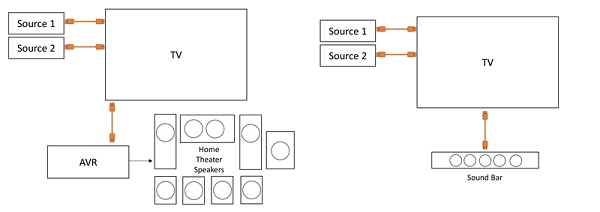
HDMI ARC is a protocol integrated into the HDMI 1.4 Interface that enables the transmission of audio signals from a TV to an external soundbar or receiver, eliminating the need for a separate optical or analog cable.
The ARC feature supports stereo PCM and up to 5.1 Channels of surround sound, making it compatible with various audio technologies like Dolby Digital and DTS. This protocol has improved the bandwidth capacity, allowing for higher-quality audio transmission.
What is Earc?
The introduction of more complex audio technologies, such as DTS:X and Dolby Atmos, required an upgrade to the HDMI ARC standard. The new version, eARC (enhanced Audio Return Channel), offers a significant improvement in bandwidth capacity (up to 37 MB/s) and supports up to 32 channels of audio and data streams.
How Does Hdmi Arc Work?
To establish a connection between your TV and soundbar or receiver using HDMI ARC, you’ll need:
- A compatible cable that supports the latest HDMI 2.1 Standard.
- Ensure both devices are equipped with the ARC/eARC feature (most modern TVs produced after 2009 have it).
- Connect the cable to the corresponding HDMI ports on your TV and soundbar/receiver.
Choosing The Right Cable
When selecting a compatible cable, consider the following:
- Look for cables that support the latest HDMI 2.1 Standard.
- Opt for cables with speeds up to 48 Gbps for future-proofing.
- Choose cables within the recommended length (max 2 meters) to prevent signal loss and degradation.
Setting Up Your Devices
To activate HDMI ARC on your devices:
- Check your TV’s manual or manufacturer’s website to ensure it supports ARC/eARC.
- Select the correct HDMI input on your soundbar/receiver that corresponds with the ARC/eARC feature.
- Follow the specific setup instructions for your device, as they may vary (e.G., Sony Smart TVs require accessing Settings > Setup).
Troubleshooting Tips
If you encounter issues with audio signal transmission:
- Refer to your devices’ manuals or online resources for troubleshooting guides.
- Ensure both devices are powered on and properly connected.
- Adjust the HDMI ARC settings on your soundbar/receiver if necessary.
Conclusion
In conclusion, understanding HDMI ARC and eARC is essential for achieving optimal audio performance when integrating a new soundbar or home theater system with your Smart TV. By choosing the right cable and following proper setup procedures, you’ll be able to enjoy enhanced audio quality and take full advantage of the latest technologies available.
Frequently Asked Questions (FAQs)
- Q: What is The Difference Between Hdmi Arc And Earc?
A: HDMI ARC supports up to 5.1 Channels, while eARC offers improved bandwidth capacity and supports up to 32 channels. - Q: Do All Modern Tvs Support Hdmi Arc/earc?
A: Most TVs produced after 2009 have the ARC feature; however, it’s essential to check your device’s specifications. - Q: Can I Use a Separate Optical or Analog Cable For Audio Transmission?
A: No, using a compatible HDMI cable is recommended for optimal performance and future-proofing. - Q: How do I Ensure Proper Setup of my Devices?
A: Refer to the manufacturer’s manuals or online resources for specific instructions. - Q: What Are The Benefits of Choosing an Hdmi 2.1-Compatible Cable?
A: These cables support higher speeds, enabling future-proofing and improved performance. - Q: Can I Use a Different Type of Cable For Audio Transmission (e.G., Usb or Wi-fi)?
A: No, HDMI is the recommended interface for audio transmission in this context. - Q: Are There Any Specific Settings on my TV or Soundbar/receiver That Need to be Adjusted?
A: Yes, follow the manufacturer’s instructions to ensure correct setup and configuration. - Q: What Should I do if I Encounter Issues With Audio Signal Transmission?
A: Refer to troubleshooting guides provided by your device manufacturers or online resources for assistance.


