
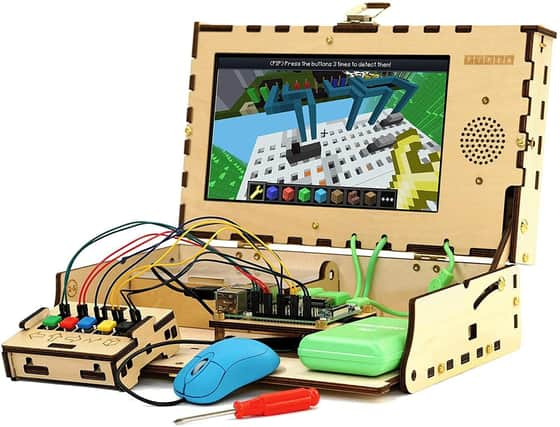
In today’s digital age, computers have become an integral part of our lives. From work to school, shopping, and entertainment, they play a vital role in making our daily tasks more efficient and enjoyable. But have you ever wondered what’s inside that computer box? What are the components that make it tick? In this article, we’ll take you on a journey to explore the inner workings of computers.
The Power Supply (Alimentatore)
The power supply is the component that provides electricity to all other parts of the computer. It’s connected directly to the motherboard and supplies power to various components like the CPU, hard drives, and optical readers. There are two types of power supplies: Modular and non-modular. Modular power supplies have cables that can be easily removed or added as needed.
The Motherboard (La Scheda Madre)
The motherboard is the most crucial component of a computer, housing all other parts and facilitating communication among them. It’s installed directly on the case and secured with screws. The motherboard has numerous integrated circuits, connectors, expansion slots, and communication buses to connect various components.
The Central Processing Unit (CPU or Il Processore)
The CPU is the heart of a computer, responsible for executing instructions and performing calculations. Modern CPUs have multiple cores, allowing them to handle multiple tasks simultaneously. The CPU’s speed is measured in Gigahertz (GHz), with higher values indicating greater performance.
The Graphics Processing Unit (GPU or La Scheda Video)
The GPU is responsible for rendering images on the screen. It communicates directly with the CPU and conveys data to the monitor through output video peripherals. Not all computers have a dedicated GPU; some integrate it into the CPU or motherboard.
Cooling System (Il Sistema di Raffreddamento)
To prevent overheating, computers employ various cooling systems, such as fans (ventole) and liquid cooling. These systems help maintain optimal temperatures for components like the processor, power supply, and graphics card.
Random Access Memory (RAM or La Memoria Ram)
RAM is a type of computer storage that temporarily holds data from the hard drive to facilitate faster processing. It’s installed in the motherboard and communicates directly with the CPU.
Hard Disk Drive (Il Disco Fisso)
The hard disk is a non-volatile storage device that stores persistent data like operating systems, programs, and files. There are two types of hard disks: Mechanical and solid-state drives (SSD). SSDs use flash memory to store data, offering faster access times.
Network Card (La Scheda di Rete)
The network card is responsible for connecting the computer to a network or the internet. It’s connected to the motherboard via PCI or PCIe slots.
Case (Il Case)
The case houses all components and provides a protective enclosure. Cases are usually made of steel or aluminum, with various features like LED indicators, USB ports, and fans.
Input/output Peripherals
Peripherals include devices that allow users to interact with the computer, such as keyboards, mice, monitors, and webcams. These components enable input/output operations between the user and the computer.
Monitor (Il Monitor)
The monitor is a display device that shows images and videos produced by the GPU. It’s connected to the motherboard via HDMI or DVI ports.
Mouse
The mouse is an input device used for controlling the cursor on the screen and interacting with the operating system. Modern mice often have precision pointers and additional buttons.
Keyboard (La Tastiera)
The keyboard is a peripheral that allows users to input data into the computer. It’s connected to the motherboard via USB or PS/2 ports.
Webcam
A webcam uses a camera to capture images or video, which can be saved, shared, or streamed online.
Software And Operating Systems (Software e Sistemi Operativi)
Software and operating systems coordinate interactions between hardware and software, executing tasks and managing data storage. They are the “brain” of the computer, allowing users to interact with it and perform various tasks.
Faqs
Q: What is the purpose of the power supply?
A: The power supply provides electricity to all other components of the computer.
Q: What role does the motherboard play in a computer?
A: The motherboard houses all other components and facilitates communication among them.
Q: How does the CPU perform calculations?
A: The CPU executes instructions and performs calculations by communicating with other components and executing tasks.
Q: What is the difference between mechanical and solid-state drives (SSD)?
A: Mechanical hard disks use spinning disks and read/write heads, while SSDs use flash memory to store data.
Q: How does a webcam work?
A: A webcam uses a camera to capture images or video, which can be saved, shared, or streamed online.
Q: What is the purpose of software and operating systems in a computer?
A: Software and operating systems coordinate interactions between hardware and software, executing tasks and managing data storage.
Q: How do speakers produce audio output?
A: Speakers convert electrical signals into sound waves, producing audio that enhances the overall user experience.
Q: Can I upgrade my computer’s components individually?
A: Yes, most computers allow users to upgrade individual components, such as RAM or hard drives, without replacing the entire system.


