
Understanding How Hard Drives Function
Are you curious about how your computer stores all its data, from your favorite games to important documents? The answer lies within the inner workings of a hard drive or solid-state drive (SSD). In this article, we’ll delve into the fascinating world of hard drives and explore their characteristics, organization logic, and how they function.
What is a Hard Drive?
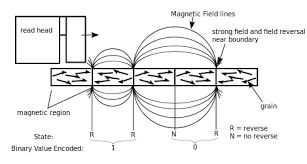
A hard drive, also known as a hard disk drive (HDD), is a non-volatile storage device that stores data on a magnetic medium. It consists of one or more platters coated with a thin layer of magnetizable material, which are rotated at high speed to access the stored information.
Characteristics of Hard Drives
Hard drives have several characteristics that make them an essential component of computers:
- Access Time: The time it takes for the drive to locate and read data from the disk. This is measured in milliseconds.
- Capacity: The amount of data a hard drive can store, typically measured in gigabytes (GB) or terabytes (TB).
- Speed of Cession: The rate at which data can be written or read from the drive.
Organization Logic of Hard Drives
To understand how hard drives organize data, let’s look at the logical structure of a disk:
- Strokes: A set of concentric rings on the platter that represent a sector.
- Sectors: The smallest unit of storage on a hard drive, typically 512 bytes in size.
- Clusters: A group of adjacent sectors that are used to store data.
- Cylinders: The set of all strokes with the same distance from the center of the platter.
How Hard Drives Function
When you save a file or run an application, your computer requests the hard drive to read or write data. Here’s what happens:
- The operating system sends a request to the hard drive to access a specific sector.
- The hard drive rotates the platters to bring the requested sector into position.
- The hard drive uses magnetic heads to read or write data to the sector.
- The data is transferred between the hard drive and the computer’s RAM.
External Hard Drives
External hard drives are almost identical to internal ones, but with some key differences:
- Usb Interface: External hard drives use USB interfaces instead of SATA cables.
- Power Requirements: Some external hard drives require a separate power source.
Solid-state Drives (SSDs)
SSDs are a type of non-volatile storage that uses flash memory to store data. They offer faster access times, higher capacities, and lower power consumption than traditional hard drives. SSDs use a controller to manage the flow of data between the flash memory and the computer’s RAM.
Hybrid Drives
Hybrid drives, also known as SSHD (Solid-State Hybrid Drive), combine the benefits of both HDDs and SSDs. They offer faster access times and higher capacities than traditional hard drives, but with lower costs than SSDs.
Network-attached Storage (NAS)
A NAS is a type of network storage that allows multiple devices to access shared files over a network. It uses one or more hard drives to store data and can be configured as a RAID (Redundant Array of Independent Disks) system for added reliability.
In conclusion, hard drives play a vital role in storing and accessing data on computers. Understanding how they function, including their characteristics, organization logic, and operation, is essential for anyone interested in computer science. Whether you’re using an internal hard drive, external hard drive, SSD, or NAS, the principles of data storage remain the same.
Frequently Asked Questions (FAQs)
- Q: What is a Hard Drive?
A: A hard drive is a non-volatile storage device that stores data on a magnetic medium. - Q: How Does a Hard Drive Store Data?
A: Data is stored on the platters of a hard drive using magnetic heads to read or write information. - Q: What is an Ssd?
A: An SSD (Solid-State Drive) uses flash memory to store data, offering faster access times and higher capacities than traditional hard drives. - Q: How Does a Nas Work?
A: A NAS (Network-Attached Storage) allows multiple devices to access shared files over a network using one or more hard drives configured as a RAID system. - Q: What is The Difference Between an External And Internal Hard Drive?
A: External hard drives use USB interfaces instead of SATA cables and may require a separate power source, while internal hard drives are connected directly to the motherboard. - Q: How do Hybrid Drives Work?
A: Hybrid drives (SSHD) combine the benefits of both HDDs and SSDs, offering faster access times and higher capacities at lower costs than SSDs. - Q: What is Raid?
A: RAID (Redundant Array of Independent Disks) is a configuration method for multiple hard drives that provides added reliability by mirroring data across all disks. - Q: Can I Use a Hard Drive as a Nas?
A: Yes, you can configure a hard drive as a NAS using software and hardware components specifically designed for this purpose.


