
Understanding Anydesk: A Comprehensive Guide
Are you struggling with remote computer access issues? Do you need a reliable solution to control your PC or mobile device from afar? Look no further than AnyDesk, the popular remote desktop application that has revolutionized the way we interact with our digital devices.
In this article, we will delve into the world of AnyDesk, exploring its features, benefits, and how it can be used on both PC and mobile devices. Whether you’re a tech-savvy individual or just someone who needs help troubleshooting computer problems, this guide is designed to provide you with a comprehensive understanding of AnyDesk and how it can be utilized to meet your remote access needs.
What is Anydesk?
AnyDesk is a remote desktop application that allows users to control and interact with their PC or mobile device remotely. This means that you can access and control your computer from any other device, anywhere in the world, as long as an internet connection is available.
With AnyDesk, you can:
- Access your files and folders
- Run applications and programs
- Control your computer’s mouse and keyboard
- Share your screen with others
How Does Anydesk Work?
AnyDesk uses a peer-to-peer connection to establish remote access. This means that there are no middlemen or servers involved in the process, making it faster and more secure.
Here’s how it works:
- You download and install AnyDesk on both devices (the one you want to control and the one you’ll be using to control from).
- You generate a unique ID for your device.
- You share this ID with the person who will be controlling your device remotely.
- The controller enters the ID into their AnyDesk application, establishing a connection between the two devices.
How to Use Anydesk on PC
Using AnyDesk on PC is relatively straightforward:
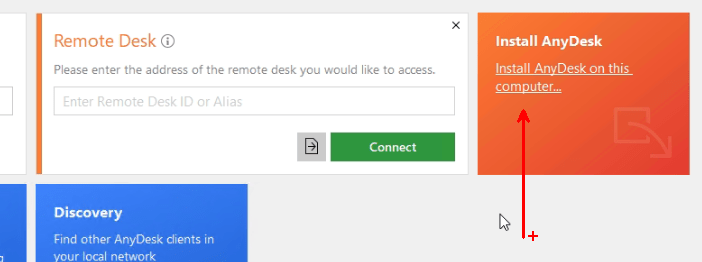
- Download and install AnyDesk from the official website.
- Run the application and generate a unique ID for your device.
- Share this ID with the person who will be controlling your device remotely.
- The controller enters the ID into their AnyDesk application, establishing a connection between the two devices.
How to Use Anydesk on Smartphone And Tablet
Using AnyDesk on smartphone and tablet is just as easy:
- Download and install the AnyDesk app from the App Store or Google Play Store.
- Run the application and generate a unique ID for your device.
- Share this ID with the person who will be controlling your device remotely.
- The controller enters the ID into their AnyDesk application, establishing a connection between the two devices.
Benefits of Using Anydesk
AnyDesk offers numerous benefits, including:
- Remote access to your computer from anywhere in the world
- Ability to control and interact with your PC or mobile device from afar
- Secure and fast peer-to-peer connection
- Easy setup and installation process
How Much Does Anydesk Cost?
AnyDesk is free for personal use. However, if you plan on using it for commercial purposes, you’ll need to subscribe to their paid plans, which start at €14.90 Per month.
Conclusion
In conclusion, AnyDesk is a powerful remote desktop application that offers numerous benefits and features. Whether you’re looking to control your PC or mobile device from afar or simply need help troubleshooting computer problems, AnyDesk is the perfect solution for you. With its easy setup process and secure peer-to-peer connection, you can rest assured that your devices are safe and secure.
Frequently Asked Questions (FAQs)
- Q: What is Anydesk?
A: AnyDesk is a remote desktop application that allows users to control and interact with their PC or mobile device remotely. - Q: How Does Anydesk Work?
A: AnyDesk uses a peer-to-peer connection to establish remote access, eliminating the need for middlemen or servers. - Q: Is Anydesk Secure?
A: Yes, AnyDesk offers a secure and fast peer-to-peer connection, ensuring that your devices are safe and protected. - Q: How Much Does Anydesk Cost?
A: AnyDesk is free for personal use. Commercial plans start at €14.90 Per month. - Q: Can I Control my PC From a Smartphone or Tablet Using Anydesk?
A: Yes, you can control your PC from a smartphone or tablet using AnyDesk. - Q: Is Anydesk Compatible With All Operating Systems?
A: Yes, AnyDesk is compatible with Windows, macOS, iOS, and Android operating systems. - Q: Can I Share my Screen With Others Using Anydesk?
A: Yes, you can share your screen with others using AnyDesk. - Q: Is Anydesk Easy to Set Up?
A: Yes, setting up AnyDesk is a straightforward process that requires minimal technical expertise.
Key Takeaways
- AnyDesk is a powerful remote desktop application that offers numerous benefits and features.
- Using AnyDesk on PC or mobile device is relatively straightforward.
- AnyDesk offers secure and fast peer-to-peer connections, ensuring that your devices are safe and protected.
- Commercial plans start at €14.90 Per month.
By understanding the ins and outs of AnyDesk, you can take advantage of its numerous benefits and features, making it easier to control and interact with your PC or mobile device from afar.


