
Unlocking The Power of Apple Maps: A Comprehensive Guide
Are you tired of getting lost or struggling to find your way? Do you want to explore new places with ease? Look no further than Apple Maps! As a powerful mapping and navigation app, Apple Maps has revolutionized the way we navigate our surroundings. In this article, we’ll delve into the world of Apple Maps and explore its features, benefits, and uses.
What is Apple Maps?
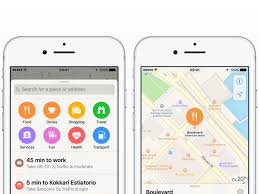
Apple Maps is a free mapping and navigation app developed by Apple Inc. It’s available on various Apple devices, including iPhones, iPads, Macs, and Apple Watches. The app provides detailed maps, turn-by-turn directions, and real-time traffic updates to help users navigate their surroundings.
How Does Apple Maps Work?
Using Apple Maps is surprisingly simple. Here’s a step-by-step guide:
- Open The App: Find the Apple Maps icon on your device and tap it to open.
- Search For a Location: Use the search bar to find a specific location, address, or point of interest.
- View The Map: Browse through the map to get an overview of your surroundings.
- Get Directions: Select a destination and choose your preferred mode of transportation (e.G., Walking, driving, public transport).
- Follow The Navigation: Apple Maps will provide turn-by-turn directions, real-time traffic updates, and estimated arrival times.
Features of Apple Maps
Apple Maps offers a range of features to make navigation easier:
- Real-time Traffic Updates: Get accurate and up-to-date traffic information to avoid congested areas.
- Turn-by-turn Directions: Receive clear and concise directions to your destination.
- Street View: Explore streets, buildings, and landmarks in 3D.
- Indoor Maps: Navigate shopping malls, airports, and other large complexes with ease.
- Share Your Location: Share your location with friends or family members.
Using Apple Maps on Iphone And Ipad
To use Apple Maps on your iPhone or iPad:
- Launch The App: Find the Apple Maps icon and tap it to open.
- Search For a Location: Use the search bar to find a specific location or point of interest.
- View The Map: Browse through the map to get an overview of your surroundings.
- Get Directions: Select a destination and choose your preferred mode of transportation.
Using Apple Maps on Mac
To use Apple Maps on your Mac:
- Launch The App: Find the Apple Maps icon in the Dock or Launchpad.
- Search For a Location: Use the search bar to find a specific location or point of interest.
- View The Map: Browse through the map to get an overview of your surroundings.
- Get Directions: Select a destination and choose your preferred mode of transportation.
Using Apple Maps on Apple Watch
To use Apple Maps on your Apple Watch:
- Launch The App: Find the Apple Maps icon in the watchOS app list.
- Search For a Location: Use the search bar to find a specific location or point of interest.
- View The Map: Browse through the map to get an overview of your surroundings.
- Get Directions: Select a destination and choose your preferred mode of transportation.
Tips And Tricks
Here are some additional tips and tricks for using Apple Maps:
- Customize Your Settings: Adjust your settings to suit your preferences, such as choosing your favorite navigation view or turning off distractions.
- Use Siri: Use Siri to find locations, get directions, or share your location with others.
- Share Your Favorite Places: Save your favorite places and share them with friends or family members.
Conclusion
Apple Maps is an incredibly powerful app that has revolutionized the way we navigate our surroundings. With its user-friendly interface, real-time traffic updates, and turn-by-turn directions, Apple Maps makes exploring new places a breeze. Whether you’re using it on your iPhone, iPad, Mac, or Apple Watch, Apple Maps has got you covered.
Frequently Asked Questions
Here are some additional questions and answers to help you get the most out of Apple Maps:
- Q: Is Apple Maps Free?
A: Yes, Apple Maps is a free app available on various Apple devices. - Q: Can I Use Apple Maps Offline?
A: Yes, you can download maps for offline use in areas with poor internet connectivity. - Q: How Accurate Are Apple Maps’ Directions?
A: Apple Maps provides highly accurate directions, but it’s always a good idea to double-check your route. - Q: Can I Share my Location With Others Using Apple Maps?
A: Yes, you can share your location with friends or family members in real-time. - Q: Is Apple Maps Compatible With Other Devices?
A: Yes, Apple Maps is compatible with various Apple devices, including iPhones, iPads, Macs, and Apple Watches. - Q: Can I Use Apple Maps to Find Places Near Me?
A: Yes, you can search for places in your vicinity using the “Nearby” feature. - Q: How do I Report Issues With Apple Maps?
A: You can report issues or provide feedback by contacting Apple Support. - Q: Can I Use Apple Maps to Track my Fitness Activities?
A: Yes, you can use Apple Maps to track your fitness activities and view your routes in the Health app.
By following these tips and using Apple Maps on various devices, you’ll be able to navigate with confidence and explore new places with ease!


