
The Ultimate Guide to Avira Free Security: Protecting Your Computer From Threats
Are you tired of using antivirus software that not only fails to protect your computer but also slows it down? Look no further than Avira Free Security, a comprehensive security suite that offers real-time protection against viruses, malware, and other online threats.
In this article, we will delve into the features and benefits of Avira Free Security, exploring its various components and how they can help safeguard your digital world. We will also discuss the importance of choosing a reliable antivirus software and why Avira stands out from the rest.
What is Avira Free Security?
Avira Free Security is a free security suite that combines antivirus, anti-malware, VPN (Virtual Private Network), password manager, and other useful tools to protect your computer from various threats. This all-in-one solution provides real-time protection against viruses, malware, ransomware, and other online dangers.
Key Features of Avira Free Security
- Antivirus: The antivirus component scans your system for any potential threats, providing real-time protection against viruses, malware, and other malicious programs.
- Anti-malware: This feature detects and removes malware from your computer, including adware, spyware, and other types of unwanted software.
- Vpn (Virtual Private Network): The VPN component encrypts your internet traffic, protecting your online identity and keeping your sensitive information secure.
- Password Manager: Avira’s password manager helps you generate and store strong passwords for all your online accounts, ensuring that your digital identity remains safe.
- System Optimization Tools: These tools help optimize your computer’s performance by erasing temporary files, cleaning up disk space, and updating outdated drivers.
How to Use Avira Free Security on Your PC
Installing Avira Free Security is a straightforward process:
- Download the software from the official website.
- Run the installer and follow the prompts to complete the installation.
- Launch the program and initiate a scan to detect any potential threats.
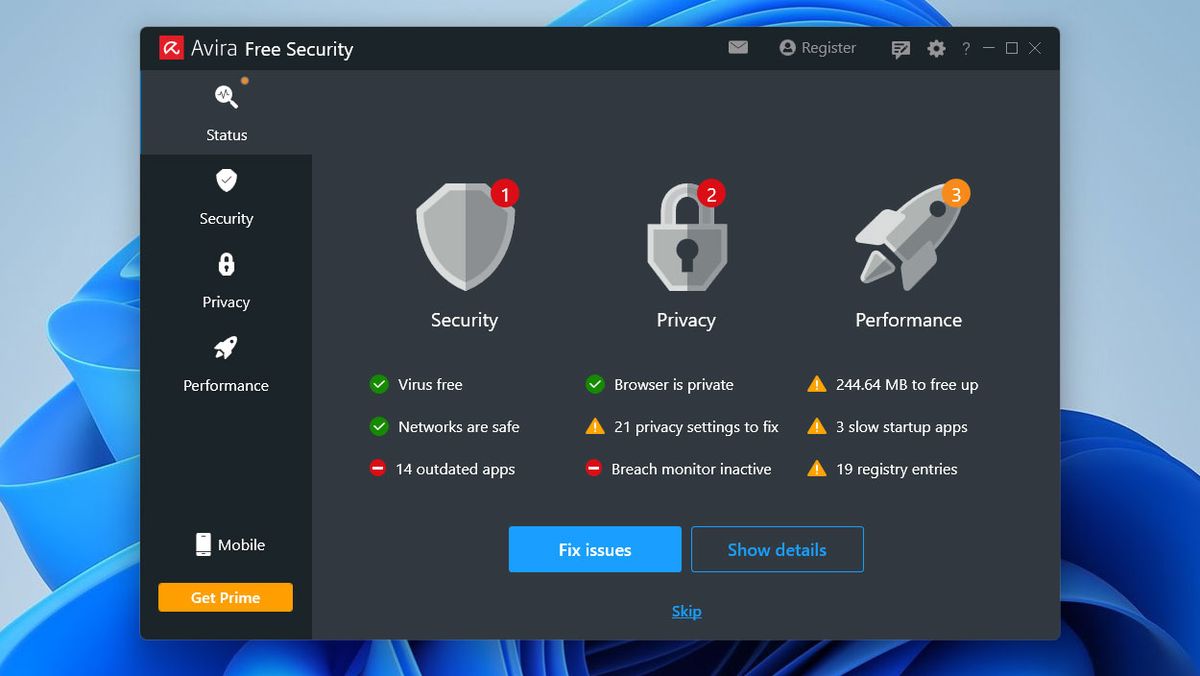
Once installed, you can access various features through the dashboard or by clicking on specific icons:
- State: Provides an overview of your system’s status, including security, performance, and updates.
- Safety: Allows you to run virus scans, regulate protection settings, and manage quarantined files.
- Privacy: Offers tools for web protection, password management, and VPN access.
- Performance: Includes system optimization features, such as disk cleanup, driver updates, and process management.
Using Avira Free Security on Mac
Avira also offers a version of its security suite specifically designed for Mac users. While the interface may differ slightly from the Windows version, the core features remain the same:
- Antivirus: Protects your Mac against viruses, malware, and other online threats.
- Vpn (Virtual Private Network): Encrypts your internet traffic, keeping your digital identity safe.
To use Avira Free Security on Mac:
- Download the software from the official website.
- Run the installer and follow the prompts to complete the installation.
- Launch the program and initiate a scan to detect any potential threats.
Using Avira Free Security on Smartphone And Tablet
Avira offers mobile apps for Android and iOS devices, providing protection against malware, viruses, and other online threats:
- Avira Security: Offers antivirus and VPN features to safeguard your mobile device.
- Avira Password Manager: Helps you generate and store strong passwords for all your online accounts.
Why Choose Avira Free Security?
- Comprehensive Protection: Avira offers real-time protection against viruses, malware, ransomware, and other online threats.
- All-in-one Solution: Combines antivirus, anti-malware, VPN, password manager, and system optimization tools in a single package.
- User-friendly Interface: Easy to navigate and understand, making it accessible to users of all skill levels.
Conclusion
Avira Free Security is an excellent choice for anyone looking to protect their computer from various online threats. Its comprehensive feature set, user-friendly interface, and real-time protection make it a standout solution in the antivirus market.
Whether you’re using Avira on your PC, Mac, smartphone, or tablet, rest assured that your digital world is being safeguarded by this reliable security suite.
Frequently Asked Questions (FAQs)
- Is Avira Free Security Free?
Yes, Avira offers a free version of its security suite that provides comprehensive protection against various online threats. - What Are The System Requirements For Avira Free Security?
The minimum system requirements for Avira Free Security on Windows include 1 GB RAM, 500 MB disk space, and an Intel Pentium processor. For Mac, you’ll need macOS High Sierra or later, with a 64-bit processor and at least 2 GB RAM. - Can I Use Avira Free Security on Multiple Devices?
Yes, Avira allows you to install its security suite on multiple devices using a single license. - Does Avira Offer Customer Support?
Avira provides comprehensive customer support through its website, including FAQs, documentation, and live chat assistance. - Can I Upgrade to The Premium Version of Avira Free Security?
Yes, users can easily upgrade to the paid version of Avira for additional features and enhanced protection. - Is Avira Free Security Compatible With All Browsers?
Avira’s web protection feature is compatible with popular browsers like Chrome, Firefox, and Edge. - Can I Use Avira Free Security on Public Wi-fi Networks?
Yes, Avira’s VPN component encrypts your internet traffic, making it safe to use on public Wi-Fi networks.
I hope you have enjoyed this comprehensive guide to Avira Free Security!


