
How to Recover Your Facebook Profile: A Step-by-step Guide
Are you struggling to access your Facebook profile? Don’t worry, we’ve got you covered! In this article, we’ll walk you through the step-by-step process of recovering your Facebook account in various situations.
Why Can’t I Access My Facebook Account?
Before we dive into the recovery process, let’s identify why you might not be able to access your account. It could be due to:
- Forgotten password
- Temporarily disabled account
- Blocked profile by Facebook
- Hacked or stolen account
- Deleted account
Recovering Your Account: A Step-by-step Guide
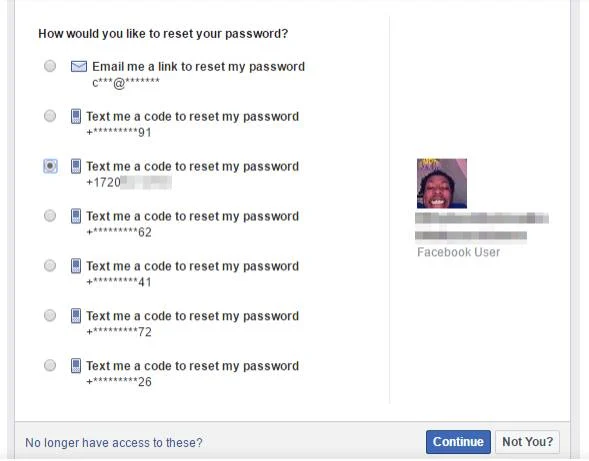
Scenario 1: Forgotten Password
If you’ve forgotten your password, follow these steps:
- Open the official Facebook app on your Android or iOS device.
- Tap on the “Forgot Password” link.
- Enter your email address or phone number associated with your account.
- Follow the prompts to reset your password.
Scenario 2: Temporarily Disabled Account
If your account has been temporarily disabled, you can reactivate it by:
- Logging in to Facebook using your credentials.
- Confirming your account through email or SMS.
Scenario 3: Blocked Profile by Facebook
If your profile has been blocked by Facebook due to a breach of their terms of service, follow these steps:
- Open the Facebook website on your computer or mobile device.
- Click on the “Learn More” link next to your account status.
- Fill out the form with the required information.
- Submit the request to Facebook.
Scenario 4: Hacked or Stolen Account
If you suspect that your account has been hacked or stolen, follow these steps:
- Try accessing your account using your credentials.
- If you can’t log in, report the incident to Facebook.
- Follow their guidelines for recovering a compromised account.
Scenario 5: Deleted Account
Unfortunately, if your account has been deleted for more than 30 days, it’s not possible to recover it. In this case, you’ll need to create a new profile.
Troubleshooting Tips
If you’re experiencing issues recovering your account, try:
- Checking the Facebook help center for troubleshooting tips.
- Contacting Facebook support for assistance.
- Reviewing their terms of service and community guidelines.
Conclusion
Recovering your Facebook account can be a straightforward process if you know what to do. By following these step-by-step guides, you should be able to regain access to your profile. Remember to always keep your login credentials secure and monitor your account for any suspicious activity.
Frequently Asked Questions (FAQs)
-
Q: What Happens When I Forget my Facebook Password?
A: You can reset your password by following the prompts on the Facebook website or mobile app.
2. Q: Can I Recover a Temporarily Disabled Account?A: Yes, you can reactivate your account by logging in using your credentials and confirming your account through email or SMS.
3. Q: How do I Report a Hacked or Stolen Account to Facebook?A: You can report the incident by filling out the form on the Facebook website and following their guidelines for recovering a compromised account.
4. Q: What Happens if my Account Has Been Deleted For More Than 30 Days?A: Unfortunately, it’s not possible to recover your account in this case. You’ll need to create a new profile.
5. Q: Where Can I Find Troubleshooting Tips For Recovering my Facebook Account?A: You can check the Facebook help center or contact their support team for assistance.
We hope this article has helped you regain access to your Facebook profile!


