
The Ultimate Guide to Creating Collections on Instagram
Are you tired of scrolling through your Instagram feed, searching for a specific post or collection? Do you wish there was an easier way to organize your favorite content and share it with friends? Look no further! In this article, we’ll explore the new functionality that allows you to create collections on Instagram, both on mobile and PC.
What Are Collections on Instagram?
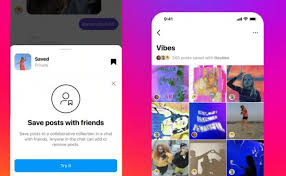
Collections on Instagram are a new feature that enables you to save posts and images in a dedicated section, making them easily accessible and shareable with friends. This feature is designed to help you curate your favorite content and collaborate with others in real-time.
How to Create Collections on Mobile
To create collections on mobile, follow these steps:
- Open Instagram: Launch the Instagram app on your mobile device.
- Access Direct Messages: Tap on the chat icon located at the top right corner of the screen to access Instagram Direct.
- Select a Conversation: Choose the conversation with the friend you want to create a collection with.
- Find a Post: Select a post that you want to save in your collection.
- Tap The Save Button: Tap on the “Save” button, represented by a small bookmark icon, next to the post.
- Create a Collection: A new screen will appear, asking you to create a collection. Choose the name of your collection and add your friend to collaborate with.
- Save The Collection: Tap on the “Save” button to save the collection.
Creating Collections in a Chat
You can also create collections directly within a chat conversation. Follow these steps:
- Open Instagram Direct: Access the chat conversation with the friend you want to create a collection with.
- Select a Post: Find the post that you want to save in your collection.
- Tap on The Save Button: Tap on the “Save” button, represented by a small bookmark icon, next to the post.
- Create a Collection: A new screen will appear, asking you to create a collection. Choose the name of your collection and add your friend to collaborate with.
- Save The Collection: Tap on the “Save” button to save the collection.
Creating Collections From The Feed
You can also create collections directly from the Instagram feed. Follow these steps:
- Open Instagram: Launch the Instagram app on your mobile device.
- Find a Post: Select a post that you want to save in your collection.
- Tap on The Create Collection Button: Tap on the “Create a collection” button, represented by a small bookmark icon, next to the post.
- Choose Friends to Collaborate With: Choose the friends with whom you want to collaborate and share the collection.
- Save The Collection: Tap on the “Save” button to save the collection.
How to Create Collections on PC
Unfortunately, creating collections on PC is not currently possible using Instagram’s web version or desktop application. However, you can still view your existing collections and saved posts from within the app.
Benefits of Creating Collections on Instagram
Creating collections on Instagram offers several benefits, including:
- Easy Access: Save your favorite posts and images in a dedicated section for easy access.
- Collaboration: Share and collaborate with friends in real-time.
- Organization: Organize your content into categories or themes.
Frequently Asked Questions (FAQs)
- Q: What is the purpose of creating collections on Instagram?
A: Collections allow you to save posts and images in a dedicated section for easy access and collaboration with friends. - Q: How do I create collections on mobile?
A: Follow the steps outlined above to create collections on mobile. - Q: Can I create collections directly from the feed?
A: Yes, you can create collections directly from the Instagram feed using the “Create a collection” button. - Q: Is it possible to create collections on PC?
A: Unfortunately, creating collections on PC is not currently possible using Instagram’s web version or desktop application.
Conclusion
Creating collections on Instagram is a game-changer for anyone looking to save and share their favorite content with friends. With this feature, you can easily organize your posts and images into dedicated sections, making it easier to find what you’re looking for. While creating collections on PC is not currently possible, the benefits of using this feature on mobile far outweigh any limitations.
Recommended Reading
- Tutorial: How to Use Instagram Direct: A comprehensive guide to getting started with Instagram Direct.
- The Ultimate Guide to Instagram Stories: Everything you need to know about Instagram stories and how to use them effectively.


