
Unlocking The Power of Amazon Fba: A Comprehensive Guide
Are you ready to take your e-commerce business to the next level? Do you want to sell products on Amazon without worrying about logistics, storage, and customer service? Look no further than Amazon FBA (Fulfillment by Amazon). In this article, we’ll delve into the world of Amazon FBA, exploring its benefits, rules of use, costs, and everything in between.
What is Amazon Fba?
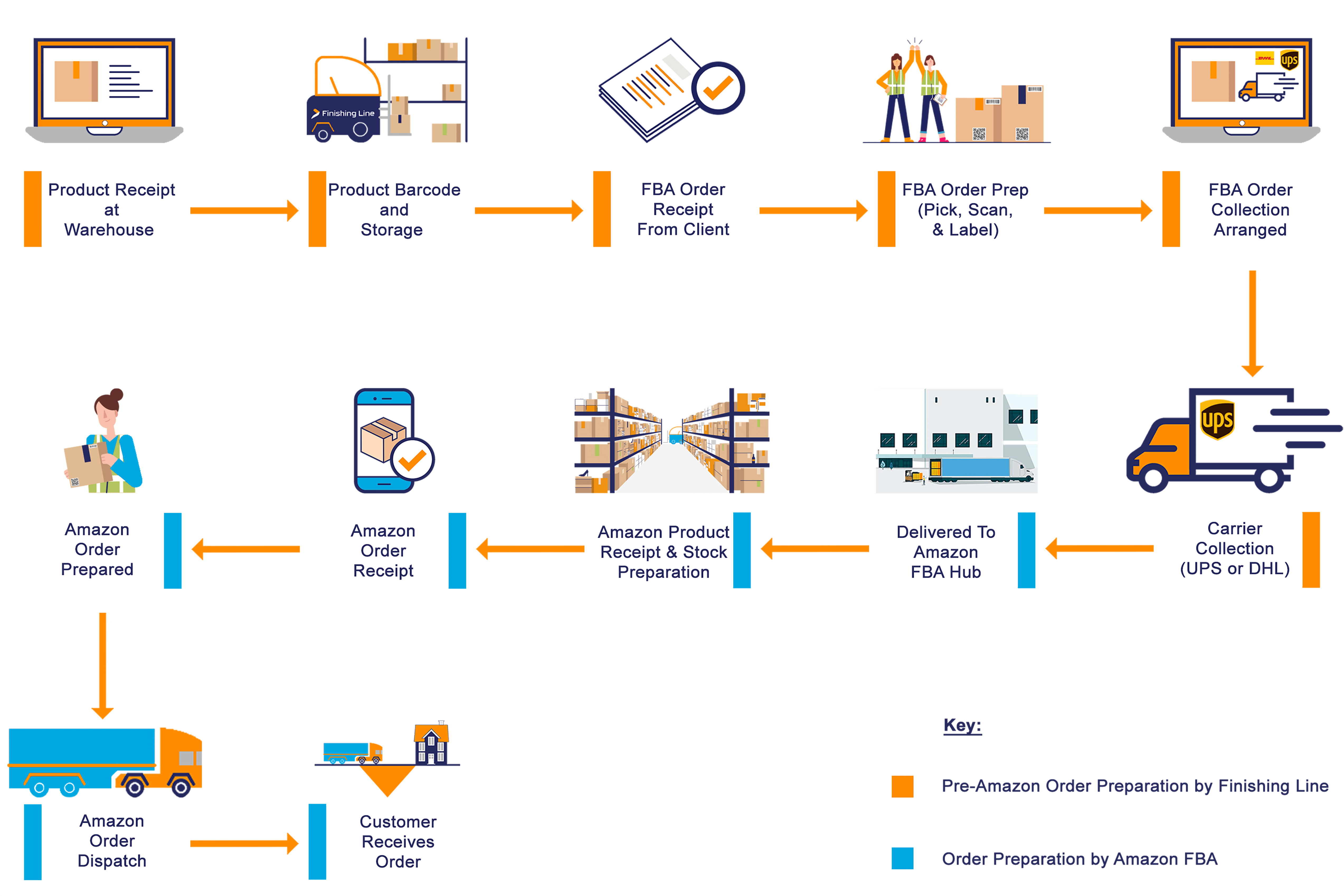
Amazon FBA is a service offered by Amazon that allows sellers to store their products in Amazon’s warehouses, handle customer service, and provide fast and reliable shipping. By enrolling in the program, you’ll be able to focus on what matters most – growing your business and selling more products.
Benefits of Amazon Fba
So, why should you consider using Amazon FBA for your e-commerce business? Here are just a few benefits:
- Convenience: With Amazon FBA, you don’t have to worry about storing inventory, handling customer service, or shipping products. Amazon takes care of all that for you.
- Increased Sales: By being part of the Amazon platform, you’ll be able to tap into millions of potential customers, increasing your sales and revenue.
- Improved Customer Service: Amazon’s customer service team will handle all customer inquiries and issues, freeing up your time to focus on growing your business.
Rules of Use And Costs of Amazon Fba
Before enrolling in the program, it’s essential to understand the rules of use and costs associated with Amazon FBA. Here are some key things to keep in mind:
- Eligibility: To be eligible for Amazon FBA, you must have a professional seller account and meet certain requirements, such as having a valid business license.
- Inventory Storage: You’ll need to store your products in Amazon’s warehouses, which will incur storage costs.
- Shipping Costs: You’ll also be responsible for paying shipping costs to get your products to Amazon’s warehouses.
How to Enroll in Amazon Fba
Enrolling in Amazon FBA is a straightforward process. Here are the steps you need to follow:
- Create an Account: Create a professional seller account on Amazon.
- Meet Eligibility Requirements: Ensure you meet the eligibility requirements for Amazon FBA, such as having a valid business license.
- Store Your Products: Store your products in Amazon’s warehouses.
- Configure Your Settings: Configure your settings to enable Amazon FBA.
Pro And Con of Amazon Fba
While Amazon FBA offers many benefits, there are also some drawbacks to consider:
- Discounts: You’ll need to give up a percentage of each sale to Amazon as a discount.
- Shipping Costs: You’ll be responsible for paying shipping costs to get your products to Amazon’s warehouses.
- Inventory Management: You’ll still need to manage your inventory levels and ensure you have enough stock on hand.
Conclusion
Amazon FBA is an excellent way to take your e-commerce business to the next level. With its convenience, increased sales potential, and improved customer service, it’s no wonder why many businesses are turning to Amazon FBA for their logistics needs. However, it’s essential to understand the rules of use and costs associated with the program before enrolling.
Frequently Asked Questions (FAQs)
Here are some frequently asked questions about Amazon FBA:
- What is Amazon Fba?
Amazon FBA is a service offered by Amazon that allows sellers to store their products in Amazon’s warehouses, handle customer service, and provide fast and reliable shipping. - How Much Does it Cost to Enroll in Amazon Fba?
There are no setup fees or costs associated with enrolling in Amazon FBA. However, you’ll need to pay storage and shipping costs for your products. - What Are The Benefits of Using Amazon Fba?
The benefits of using Amazon FBA include convenience, increased sales potential, and improved customer service. - How do I Enroll in Amazon Fba?
To enroll in Amazon FBA, create a professional seller account on Amazon, meet eligibility requirements, store your products in Amazon’s warehouses, and configure your settings to enable Amazon FBA. - What Are The Drawbacks of Using Amazon Fba?
The drawbacks of using Amazon FBA include discounts paid to Amazon, shipping costs, and inventory management responsibilities.
Additional Resources
If you’re interested in learning more about Amazon FBA or want to get started with enrolling in the program, here are some additional resources:
- Amazon Seller Central: This is a great resource for learning more about selling on Amazon and enrolling in Amazon FBA.
- Amazon Fba Blog: This blog provides tips and best practices for using Amazon FBA successfully.
Conclusion
In conclusion, Amazon FBA is an excellent way to take your e-commerce business to the next level. With its convenience, increased sales potential, and improved customer service, it’s no wonder why many businesses are turning to Amazon FBA for their logistics needs. By understanding the rules of use and costs associated with the program, you’ll be able to make informed decisions about whether or not to enroll in Amazon FBA.
Additional Tips
Here are some additional tips for using Amazon FBA successfully:
- Monitor Your Inventory Levels: Ensure you have enough stock on hand to meet customer demand.
- Keep Your Products Organized: Use product labels and inventory management tools to keep your products organized and easy to find.
- Respond Quickly to Customer Issues: Respond quickly to customer issues and concerns to ensure high levels of satisfaction.
Conclusion
In conclusion, Amazon FBA is a powerful tool for e-commerce businesses looking to take their sales and revenue to the next level. By understanding the rules of use and costs associated with the program, you’ll be able to make informed decisions about whether or not to enroll in Amazon FBA.


