
How to Master The Function “Switch” in Fantacalcio: A Comprehensive Guide
Are you ready to take your Fantacalcio game to the next level? Do you want to know the secrets of the “Switch” function, which has been making waves in the Italian fantasy football scene? Look no further! In this article, we will delve into the world of Fantacalcio and explore the ins and outs of the “Switch” function, providing you with a comprehensive guide on how to master it.
What is Fantacalcio?
Before we dive into the specifics of the “Switch” function, let’s take a step back and understand what Fantacalcio is all about. Fantacalcio is an Italian fantasy football game that allows users to create their own teams and compete against each other. The game is known for its complexity and depth, with various modes and features that make it a favorite among football enthusiasts.
What is The “Switch” Function?
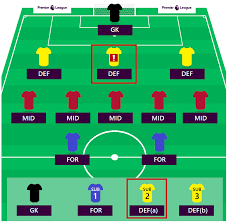
The “Switch” function is a feature in Fantacalcio that allows users to swap two players of the same role without affecting the overall score or position of their team. This function can be particularly useful during matches when there are doubts about the starting lineup or when players are injured.
How Does The “Switch” Function Work?
To use the “Switch” function, you need to have a player in your starting lineup and a reserve player who shares the same role. You can then swap the two players by selecting the “Switch” option from the training menu. The system will automatically swap the two players, ensuring that the new starting lineup is reflected in the live score.
Practical Example: When to Use The “Switch” Function
Let’s say you have a player like Dimarco who is usually your starting midfielder but has some doubts about his physical condition. You can use the “Switch” function to swap him with another midfielder, Carlos Augusto, who shares the same role. This way, you can still take advantage of Dimarco’s skills while ensuring that your team’s overall score and position are not affected.
When Can You Use The “Switch” Function?
The “Switch” function can be used during matches when there are doubts about the starting lineup or when players are injured. However, it is essential to note that the function can only be activated if certain conditions are met, such as the starting player not being involved in the match from the beginning.
How to Insert The “Switch” Function in Your Training
To insert the “Switch” function in your training, you need to go to the Options menu and select the Regulation option. From there, you can choose the Switch option and follow the on-screen instructions to add it to your team’s training schedule.
Common Questions About The “Switch” Function
Q: Can I use the “Switch” function during matches?
A: Yes, but only if certain conditions are met.
Q: How do I insert the “Switch” function in my training?
A: Go to the Options menu and select the Regulation option. From there, choose the Switch option and follow the on-screen instructions.
Q: Can I use the “Switch” function with any player?
A: No, you can only swap players of the same role.
Conclusion
The “Switch” function is a powerful tool in Fantacalcio that allows users to adapt their team’s strategy during matches. By understanding how to master this feature, you can take your game to new heights and stay ahead of the competition. Remember to always follow the rules and conditions for using the “Switch” function, and don’t hesitate to consult our other guides if you need further clarification.
Frequently Asked Questions (FAQs)
Q: What is Fantacalcio?
A: Fantacalcio is an Italian fantasy football game that allows users to create their own teams and compete against each other.
Q: What is the “Switch” function?
A: The “Switch” function is a feature in Fantacalcio that allows users to swap two players of the same role without affecting the overall score or position of their team.
Q: How does the “Switch” function work?
A: To use the “Switch” function, you need to have a player in your starting lineup and a reserve player who shares the same role. You can then swap the two players by selecting the “Switch” option from the training menu.
Q: Can I use the “Switch” function during matches?
A: Yes, but only if certain conditions are met.
Q: How do I insert the “Switch” function in my training?
A: Go to the Options menu and select the Regulation option. From there, choose the Switch option and follow the on-screen instructions.
Q: Can I use the “Switch” function with any player?
A: No, you can only swap players of the same role.
Key Takeaways
- The “Switch” function is a powerful tool in Fantacalcio that allows users to adapt their team’s strategy during matches.
- To use the “Switch” function, you need to have a player in your starting lineup and a reserve player who shares the same role.
- Certain conditions must be met for the “Switch” function to be activated during matches.
- The “Switch” function can only be inserted in training by going to the Options menu and selecting the Regulation option.
By mastering the “Switch” function, you can take your Fantacalcio game to new heights and stay ahead of the competition. Remember to always follow the rules and conditions for using this feature, and don’t hesitate to consult our other guides if you need further clarification. Good luck!


