
How To Do Gifts On Tiktok: A Comprehensive Guide
As a social media platform, TikTok has become increasingly popular among users of all ages. With its vast array of creative content, it’s no wonder that many users are curious about the features and functions available on the app. One such feature is the ability to give gifts to other users during live streams or videos. In this article, we’ll delve into the world of gifts on TikTok and explore how you can use them.
What Are Gifts On Tiktok?
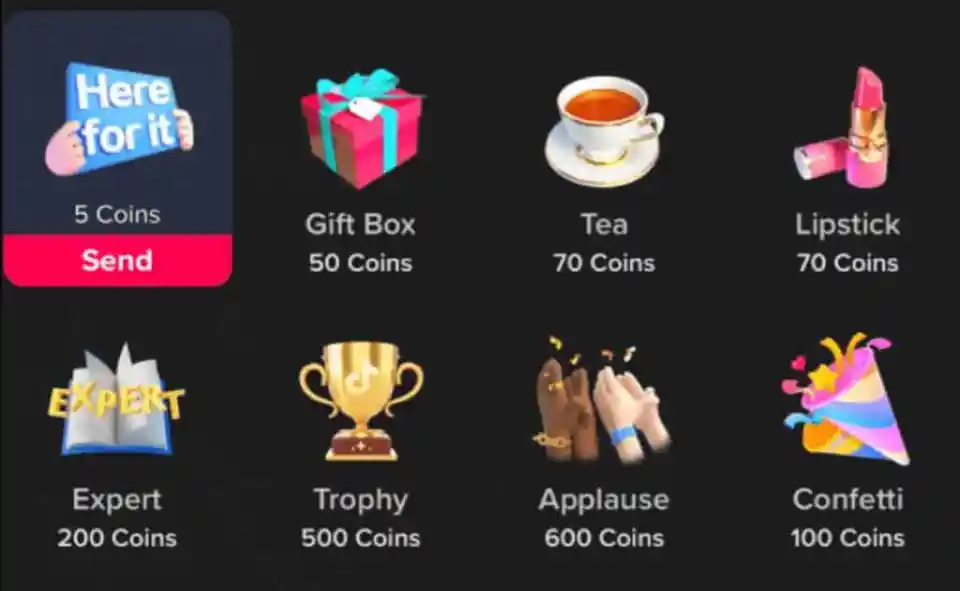
Gifts on TikTok are a unique feature that allows users to show their appreciation for content creators by sending virtual gifts during live streams or video playback. These gifts come in various forms, including coins, stickers, and other digital tokens. The main idea behind gifts is to provide a way for users to support and engage with their favorite content creators.
How Do Gifts Work On Tiktok?
To give gifts on TikTok, you’ll need to access the app’s live streaming feature. This can be done by tapping on the “Live” icon in the bottom navigation bar or by searching for specific hashtags related to your interests. Once you’re in a live stream, you’ll see an option to send gifts to the content creator.
Types Of Gifts On Tiktok
There are several types of gifts available on TikTok, including:
- Coins: These are the primary form of virtual currency used on TikTok for gifting. They can be purchased using real money or earned through microtransactions.
- Stickers: These are digital stickers that users can send to content creators as a gesture of appreciation.
- Other Gifts: There are various other types of gifts available, including special emotes and animations.
How To Give Gifts On Tiktok
Giving gifts on TikTok is relatively straightforward. Here’s a step-by-step guide:
- Access the TikTok app and navigate to the live streaming feature.
- Select a live stream or video you’d like to gift.
- Tap on the gift icon (represented by a heart) to access the gifting menu.
- Choose your desired gift from the available options.
- Click on the “Forward” button to send the gift.
Can I Give Gifts On Tiktok Using My Pc?
Yes, you can give gifts on TikTok using your computer or laptop. To do so, follow these steps:
- Log in to your TikTok account on a web browser (e.G., Google Chrome).
- Navigate to the live streaming feature.
- Select a live stream or video you’d like to gift.
- Click on the “Gift” icon to access the gifting menu.
- Choose your desired gift and click on the “Forward” button.
Requirements For Gifting On Tiktok
To use gifts on TikTok, you must meet certain requirements:
- Age: You must be at least 13 years old (or the minimum age required in your country/region) to use TikTok.
- Followers: You need at least 10,000 followers to access the live streaming feature and gift content creators.
What Happens When I Give Gifts On Tiktok?
When you give gifts on TikTok, they are converted into coins, which can be used by the content creator for various purposes. The exact uses of these coins may vary depending on the platform’s policies and the content creator’s preferences.
Tips For Giving Gifts On Tiktok
To make the most out of gifting on TikTok:
- Choose Gifts Thoughtfully: Select gifts that are relevant to the content creator’s style or theme.
- Be Consistent: Regularly gifting content creators can help build a strong relationship and increase their engagement with your content.
Conclusion
Gifts on TikTok are a unique feature that allows users to engage and support their favorite content creators. By understanding how gifts work, what types of gifts are available, and the requirements for using them, you can enhance your overall experience on the platform.


