
Unlocking The Power of Google Ads: A Comprehensive Guide
Are you ready to take your online presence to the next level? Look no further than Google Ads, a powerful platform that can help you reach millions of potential customers. In this article, we’ll dive into the world of Google Ads and explore its features, benefits, and best practices.
What is Google Ads?
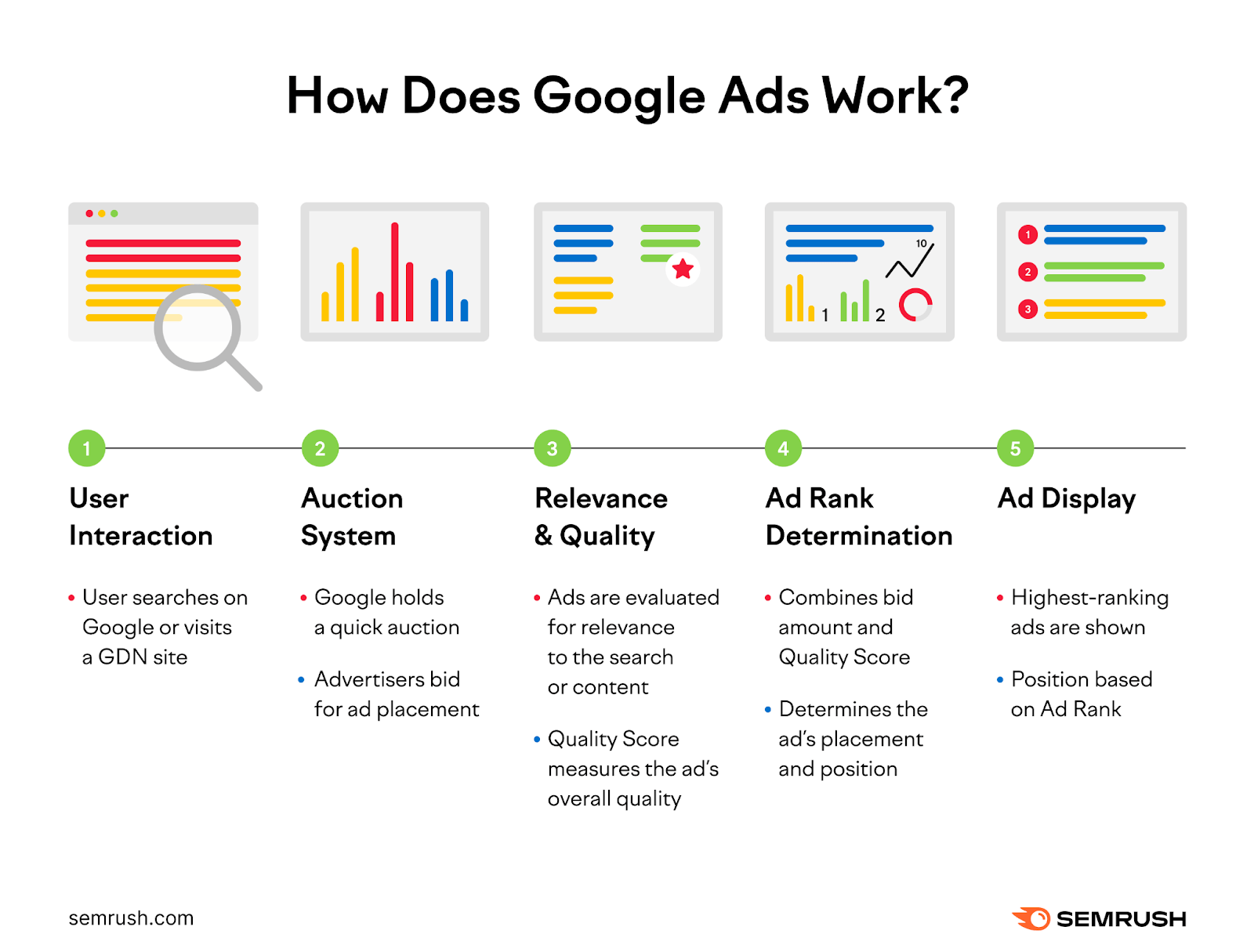
Google Ads, formerly known as Google AdWords, is a cost-per-click (CPC) advertising model that allows businesses to create and display ads on Google’s search engine results page (SERP). The platform uses a bidding system, where advertisers compete for ad space based on their bid amount and ad relevance.
Benefits of Using Google Ads
Google Ads offers numerous benefits to businesses, including:
- Increased Online Visibility: With Google Ads, your business can appear at the top of search engine results pages, increasing its online visibility.
- Targeted Advertising: You can target specific audiences based on their search queries, demographics, and behaviors.
- Measurable Roi: Google Ads provides a range of metrics to measure the effectiveness of your campaigns and track your return on investment (ROI).
- Cost-effective: With Google Ads, you only pay for ads that are clicked by users, making it a cost-effective way to reach potential customers.
How to Use Google Ads
Using Google Ads is relatively straightforward. Here’s a step-by-step guide:
- Create an Account: Sign up for a Google Ads account and complete the registration process.
- Set up Your Campaign: Choose your target audience, set a budget, and create ad groups based on relevant keywords.
- Write Compelling Ads: Craft attention-grabbing headlines and descriptions that encourage users to click on your ads.
- Target Specific Locations: Use Google Ads’ geographic targeting feature to reach potential customers in specific areas.
- Monitor And Optimize: Track your campaign’s performance, adjust bids and ad copy as needed, and make data-driven decisions.
Best Practices For Using Google Ads
To get the most out of Google Ads, follow these best practices:
- Conduct Thorough Keyword Research: Use tools like Google Keyword Planner to find relevant keywords and phrases.
- Create High-quality ad Copy: Craft compelling headlines and descriptions that resonate with your target audience.
- Set a Realistic Budget: Determine how much you’re willing to spend on Google Ads and adjust your bid strategy accordingly.
- Monitor And Optimize Regularly: Track your campaign’s performance, make adjustments as needed, and refine your targeting strategies.
Google Ads on Smartphone And Tablet
With the rise of mobile devices, it’s essential to have a presence on Google Ads for smartphones and tablets. Here’s how:
- Download The Official App: Get the Google Ads app for Android or iOS/iPadOS.
- Sign in With Your Account: Use your existing Google Ads account to access the app.
- Create a Campaign: Set up a new campaign or modify an existing one using the app’s intuitive interface.
Additional Resources For Using Google Ads
For more information on using Google Ads, check out these resources:
- Official Guide: Consult Google Ads’ official guide for detailed instructions and tips.
- Google Ads Support: Reach out to Google Ads support for assistance with setting up and managing your campaigns.
- Online Communities: Join online forums and communities to connect with other advertisers and share best practices.
Conclusion
Google Ads is a powerful platform that can help businesses reach millions of potential customers. By following the steps outlined in this article, you’ll be well on your way to creating effective Google Ads campaigns that drive real results. Remember to monitor and optimize regularly, and don’t hesitate to seek help from Google Ads support or online communities.
Frequently Asked Questions
- Q: What is Google Ads?
A: Google Ads is a cost-per-click (CPC) advertising model that allows businesses to create and display ads on Google’s search engine results page (SERP). - Q: How Much Does it Cost to Use Google Ads?
A: You only pay for ads that are clicked by users, making it a cost-effective way to reach potential customers. - Q: What is The Minimum Budget I Can Set For my Campaign?
A: The minimum budget you can set for your campaign is $10 per day. - Q: How do I Target Specific Locations Using Google Ads?
A: Use Google Ads’ geographic targeting feature to reach potential customers in specific areas. - Q: Can I Use Google Ads on my Smartphone or Tablet?
A: Yes, you can download the official Google Ads app for Android or iOS/iPadOS to access and manage your campaigns on-the-go.
Key Takeaways
- Google Ads is a powerful platform that can help businesses reach millions of potential customers.
- The platform uses a bidding system, where advertisers compete for ad space based on their bid amount and ad relevance.
- To get the most out of Google Ads, follow best practices such as conducting thorough keyword research, creating high-quality ad copy, setting a realistic budget, and monitoring and optimizing regularly.
Recommended Actions
- Sign up for a Google Ads account and complete the registration process.
- Set up a new campaign or modify an existing one using the platform’s intuitive interface.
- Monitor and optimize your campaigns regularly to ensure maximum ROI.


